


Running payroll isn't just about paying employees on time. You also need to calculate taxes, stay compliant with government regulations, manage employee benefits, and keep accurate records. Doing all of this manually can take hours every pay period and increase the risk of costly mistakes.
That's where payroll software like Gusto comes in.
Gusto is one of the most popular payroll and HR platforms for small and medium-sized businesses. It helps employers automate payroll, file payroll taxes, onboard new employees, manage benefits, and handle many everyday HR tasks from one dashboard.
But with so many payroll solutions available today, you may be wondering:
Is Gusto really worth it?
Or perhaps you're asking:
Is Gusto the right payroll software for your business?
In this detailed Gusto review, we'll answer those questions and much more.
We'll look at Gusto's features, pricing, pros and cons, customer reviews, ease of use, customer support, and compare it with some of its biggest competitors. By the end of this review, you'll know whether Gusto is the right choice for your business.
Quick Verdict
If you're looking for an easy-to-use payroll platform that combines payroll, HR, employee benefits, and hiring tools in one place, Gusto is one of the best options for small businesses.
Its biggest strength is simplicity.
You don't need to be a payroll expert to run payroll or file taxes. Gusto automates many repetitive tasks, helping business owners save time while reducing payroll errors.
It's especially suitable for:
- Small businesses
- Startups
- Agencies
- Restaurants
- Retail stores
- Professional service businesses
- Companies hiring remote employees across multiple U.S. states
However, Gusto isn't perfect.
Larger businesses with complex HR requirements or companies that need advanced enterprise-level customization may find platforms like ADP or Rippling better suited to their needs.
Gusto Review
- Full-Service Payroll Automation
- Automatic Payroll Tax Filing
- HR, Hiring & Employee Onboarding
- Employee Benefits Administration
- Unlimited Payroll Runs
- Earn a $100 Visa Gift Card After Your First Payroll
Run your first payroll with Gusto through our exclusive partner link and earn a $100 Visa Gift Card. It's the perfect time to simplify payroll while claiming an exclusive bonus.
Gusto at a Glance
| Feature | Details |
|---|---|
| Best For | Small and medium-sized businesses |
| Starting Price | $49/month + $6 per employee (Simple plan) |
| Free Trial | No free trial, but product demos and guided onboarding are available |
| Payroll Automation | Yes |
| Payroll Tax Filing | Yes |
| Direct Deposit | Yes |
| Employee Benefits | Yes |
| Hiring & Onboarding | Yes |
| Mobile Access | Employee self-service mobile experience available |
Our Verdict: Gusto is an excellent payroll solution for businesses that want to automate payroll while managing HR and employee benefits from a single platform. Its intuitive interface and comprehensive feature set make it one of the strongest payroll software options for growing businesses.
What Is Gusto?
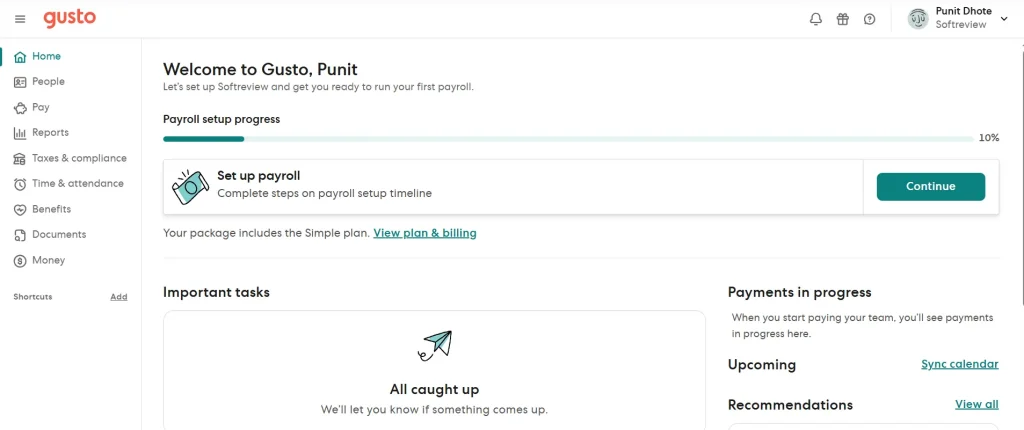
Gusto is a cloud-based payroll and human resources (HR) platform designed to help businesses manage employees more efficiently.
Instead of using separate software for payroll, onboarding, benefits, and employee records, Gusto brings everything together in one easy-to-use platform.
The company was founded in 2011 with the goal of making payroll simpler for small businesses. Since then, Gusto has grown into one of the leading payroll providers in the United States, serving hundreds of thousands of businesses.
In simple terms, Gusto helps employers:
- Run payroll automatically
- File federal, state, and local payroll taxes
- Pay employees and contractors
- Manage employee benefits
- Store employee documents securely
- Track paid time off (PTO)
- Hire and onboard new employees
- Generate payroll reports
Everything is managed through an online dashboard, so you don't need to install any software.
Because Gusto is cloud-based, you can access your account from anywhere with an internet connection.
Why Do Businesses Need Payroll Software Like Gusto?
Many small business owners start by managing payroll manually or using spreadsheets.
This may work when you only have one or two employees.
However, as your business grows, payroll becomes more complicated.
You need to calculate wages accurately, deduct taxes, issue tax forms, manage paid leave, and make sure employees are paid on time.
Even a small payroll mistake can lead to penalties or unhappy employees.
That's why many businesses choose payroll software.
A platform like Gusto helps automate many of these tasks, reducing manual work and improving accuracy.
Some of the biggest benefits include:
- Paying employees on time
- Automatically calculating payroll taxes
- Filing payroll tax forms
- Managing employee records
- Reducing paperwork
- Saving time every payroll cycle
- Helping businesses stay compliant with payroll regulations
Instead of spending hours processing payroll, business owners can focus on growing their business.
How Does Gusto Work?
One of Gusto's biggest strengths is its simple setup process.
After creating your account, you'll be guided through a step-by-step setup wizard.
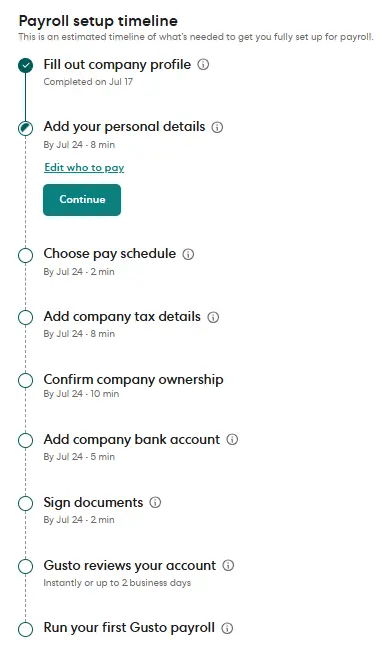
During setup, you'll add information such as:
- Company details
- Employee information
- Pay schedules
- Bank account details
- Tax information
Once your account is ready, Gusto helps automate many payroll tasks.
Here's how a typical payroll process works:
Add Employees
Start by entering employee details, including salary or hourly pay, tax information, and payment preferences.
You can also add independent contractors if you work with freelancers.
Run Payroll
When payday arrives, Gusto calculates employee wages, tax deductions, and employer payroll taxes automatically.
You simply review the payroll information before approving it.
For many businesses, this process takes only a few minutes.
Pay Employees
After payroll is approved, Gusto sends payments through direct deposit or other supported payment methods.
Employees can also access their pay information through their own accounts.
File Payroll Taxes
One of Gusto's most valuable features is automatic payroll tax filing on supported plans.
The platform calculates payroll taxes, prepares required tax forms, and files them with the appropriate government agencies, helping reduce manual work and the risk of filing errors.
Manage Employee Information
Beyond payroll, Gusto acts as a central place to store employee records.
You can manage tax forms, onboarding documents, benefits, paid time off, and payroll history from the same dashboard.
Who Should Use Gusto?
Gusto is designed primarily for small and growing businesses.
If you want payroll software that's easy to learn and doesn't require a dedicated HR team, Gusto is an excellent choice.
It's particularly well suited for:
Small Businesses
Small business owners often wear many hats.
Gusto helps simplify payroll, taxes, employee management, and benefits so owners can spend less time on administrative work.
Startups
Startups need software that's easy to set up and can grow with the business.
Gusto offers payroll and HR tools that support growing teams without requiring enterprise-level complexity.
Agencies
Marketing agencies, web development companies, and creative businesses often manage full-time employees alongside contractors.
Gusto supports both, making payroll management more convenient.
Restaurants and Retail Stores
Businesses with hourly workers can use Gusto to manage payroll while tracking employee hours through supported integrations.
Professional Service Businesses
Law firms, accounting firms, consultants, and healthcare practices can use Gusto to automate payroll while maintaining organized employee records.
Who Should Avoid Gusto?
Although Gusto is an excellent payroll platform, it isn't the perfect solution for every business.
You may want to consider other payroll providers if:
You Need Advanced Enterprise HR Tools
Large organizations with complex HR workflows may require more advanced customization than Gusto currently offers.
You Operate International Payroll
Gusto primarily focuses on U.S. payroll. Businesses with large international workforces may need a platform that specializes in global payroll and compliance.
You Require Extensive Customization
If your company needs highly customized workflows or enterprise-grade reporting, another solution may better match your requirements.
That said, for most small and medium-sized businesses operating in the United States, Gusto offers an excellent balance of ease of use, payroll automation, HR tools, and employee management features.
Gusto Pricing: How Much Does Gusto Cost?
Pricing is one of the first things most business owners look at before choosing payroll software.
After all, you don't just want software that works you also want good value for your money.
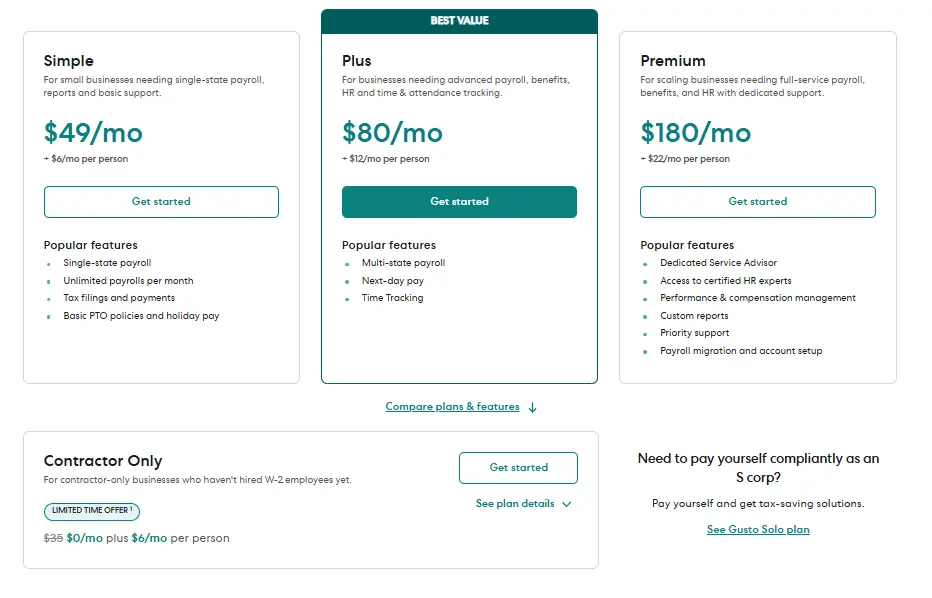
The good news is that Gusto keeps its pricing simple. Instead of charging hidden setup fees or long-term contracts, it uses a monthly subscription with an additional per-person fee.
This makes it easy to estimate your payroll costs as your business grows.
At the time of writing, Gusto offers four pricing options designed for different business needs.
Gusto Pricing Plans
| Plan | Monthly Price | Per Person | Best For |
|---|---|---|---|
| Simple | $49/month | $6/person | Small businesses running payroll |
| Plus | $80/month | $12/person | Growing businesses needing more HR tools |
| Premium | $180/month | $22/person | Businesses looking for advanced HR support |
| Contractor Only | Promotional pricing available | $6 per contractor | Businesses that only pay contractors |
Note: Gusto occasionally runs promotional offers and may update its pricing. Always check the official pricing page before purchasing.
Let's look at what each plan includes.
Gusto Simple Plan
The Simple plan is the entry-level option and is suitable for many small businesses.
If your main goal is to automate payroll without paying for advanced HR features, this plan will likely cover everything you need.
With the Simple plan, you get:
- Full-service payroll
- Unlimited payroll runs
- Automatic payroll tax calculations and filing
- Direct deposit
- Employee self-service accounts
- Hiring and onboarding tools
- Basic reporting
- Payroll document storage
For many businesses with fewer than 20 employees, this plan provides an excellent balance between features and price.
Gusto Plus Plan
As your business grows, you may need more than payroll.
That's where the Plus plan comes in.
It includes everything in the Simple plan while adding more HR and workforce management tools.
Some of the additional features include:
- Time tracking
- Paid time off (PTO) management
- Holiday pay management
- Workforce costing reports
- Team management tools
- Multi-state payroll support
If you're managing a growing team, these extra features can save a lot of time.
Instead of using multiple HR tools, you can manage everything from one dashboard.
Gusto Premium Plan
The Premium plan is designed for larger businesses that need additional HR guidance and support.
In addition to payroll and HR features, businesses may receive access to enhanced support and advanced HR resources.
This plan is generally best suited for businesses that:
- Have larger teams
- Need dedicated HR assistance
- Require advanced people management support
- Want additional compliance resources
Because pricing is significantly higher than the other plans, smaller businesses should carefully consider whether they'll use these extra services.
Contractor Only Plan
Not every business has traditional employees.
Some businesses only work with freelancers or independent contractors.
For those businesses, Gusto offers a Contractor Only option.
Instead of paying for employee payroll features you don't need, you only pay for contractor payments.
This can be a cost-effective solution for:
- Freelancers
- Agencies
- Consultants
- Creative businesses
- Companies hiring remote contractors
Which Gusto Plan Should You Choose?
Choosing the right plan depends on your business size and the features you need.
Here's a quick recommendation.
| Business Type | Recommended Plan |
|---|---|
| Freelancer hiring contractors | Contractor Only |
| Small business with employees | Simple |
| Growing business | Plus |
| Large team needing HR support | Premium |
If you're just getting started, the Simple plan will be enough for many businesses.
As your team grows, you can upgrade to a higher plan when you need additional HR tools.
How Much Does Gusto Cost for Different Business Sizes?
One thing many reviews don't explain is how Gusto's pricing changes as your team grows.
Since every plan includes a monthly base fee plus a per-person charge, your total monthly cost increases as you add employees.
Here are some estimated examples based on Gusto's published pricing.
| Employees | Suggested Plan | Estimated Monthly Cost* |
|---|---|---|
| 5 | Simple | $79/month |
| 10 | Simple | $109/month |
| 25 | Plus | $380/month |
| 50 | Premium | $1,280/month |
*These examples are estimates using Gusto's published base price and per-person pricing. Your actual monthly cost may differ depending on the plan you choose, optional services, and future pricing updates.
These examples can help you compare Gusto with other payroll providers before making a decision.
Are There Any Hidden Costs?
One reason Gusto is popular is that its pricing is generally straightforward.
However, it's still important to understand that your total cost may increase depending on the services you choose.
For example, costs can change if you:
- Upgrade to a higher plan
- Add more employees
- Purchase optional employee benefits
- Use additional HR services available through Gusto
This isn't unusual.
Most payroll providers use similar pricing models where your monthly cost grows with your business.
The important thing is to choose a plan that fits your current needs instead of paying for features you won't use.
Is Gusto Expensive?
Compared with many payroll providers, Gusto sits in the middle of the market.
It's not the cheapest option available.
It's also not the most expensive.
What you're really paying for is convenience.
Instead of buying separate software for payroll, onboarding, employee records, benefits administration, and HR management, Gusto combines these tools into one platform.
For many small businesses, that can provide better overall value than paying for several different services.
If your only requirement is basic payroll, there are lower-cost alternatives.
But if you want payroll plus HR tools in one place, Gusto offers a strong balance between features and price.
Is Gusto Worth the Price?
For most small and growing businesses, the answer is yes.
The platform helps automate payroll, reduces manual work, and brings payroll and HR tasks together in one dashboard.
That can save business owners hours each month.
The real value isn't just in running payroll.
It's in reducing paperwork, improving organization, and making everyday HR tasks easier to manage.
Of course, the best plan depends on your business size and how many HR features you actually need.
If you're only paying contractors, the Contractor Only option may be the best fit.
If you're building a growing team, the Plus plan often offers the best mix of payroll and HR features.
And for businesses that need advanced HR support, the Premium plan provides additional services that may justify its higher monthly price.
Gusto Features: What Can You Do With Gusto?
Now that you know how much Gusto costs, let's look at what you actually get for your money.
Gusto is much more than payroll software.
It combines payroll, HR, employee benefits, hiring, onboarding, and reporting into one platform. This means you don't have to switch between multiple tools to manage your employees.
Whether you're paying five employees or managing a growing team, Gusto is designed to make everyday HR tasks faster and easier.
Let's explore its main features.
Run Payroll in Minutes
Payroll is the core feature of Gusto.
Instead of calculating wages, taxes, and deductions manually, Gusto automates most of the process.
After your employees are added to the system, running payroll only takes a few steps.
You simply review the payroll details, approve them, and Gusto handles the rest.
Some payroll features include:
- Unlimited payroll runs
- Direct deposit
- Automatic payroll calculations
- Employee and contractor payments
- Multi-state payroll support
- Payroll history
- Payroll reports
Because payroll is cloud-based, you can run payroll from anywhere without installing any software.
This makes payroll much less stressful for busy business owners.
Automatic Payroll Tax Filing
Payroll taxes can be confusing, especially for small businesses.
Missing a tax deadline or filing incorrect information can lead to penalties.
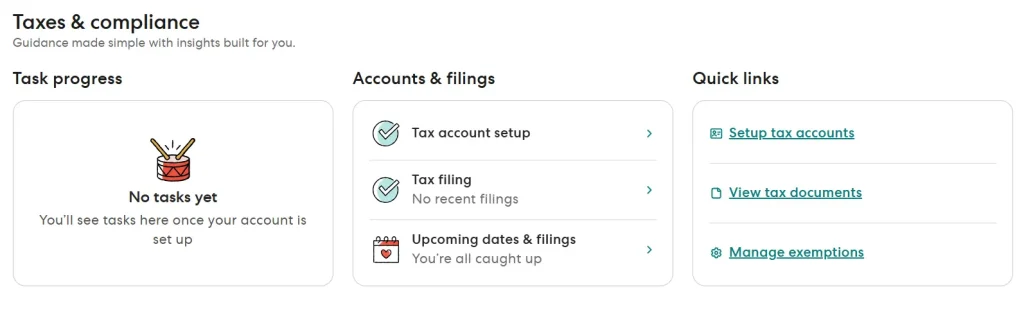
One of Gusto's biggest advantages is that it automates payroll tax calculations and filing on supported plans.
The platform helps calculate payroll taxes, prepares the required forms, and files them with the appropriate tax agencies.
This reduces paperwork and helps businesses stay compliant with payroll regulations.
Instead of worrying about tax deadlines, you can focus on running your business.
Pay Employees and Contractors
Many businesses work with both full-time employees and independent contractors.
Gusto supports both.
You can add employees with their payment details and tax information, then manage everything from one dashboard.
If you hire freelancers or contractors, Gusto also helps you send payments and manage contractor records.
Keeping everyone in one system makes payroll much easier to organize.
Hire and Onboard New Employees
Hiring new employees often involves a lot of paperwork.
Employment forms, tax documents, company policies, and personal information all need to be collected before someone starts work.
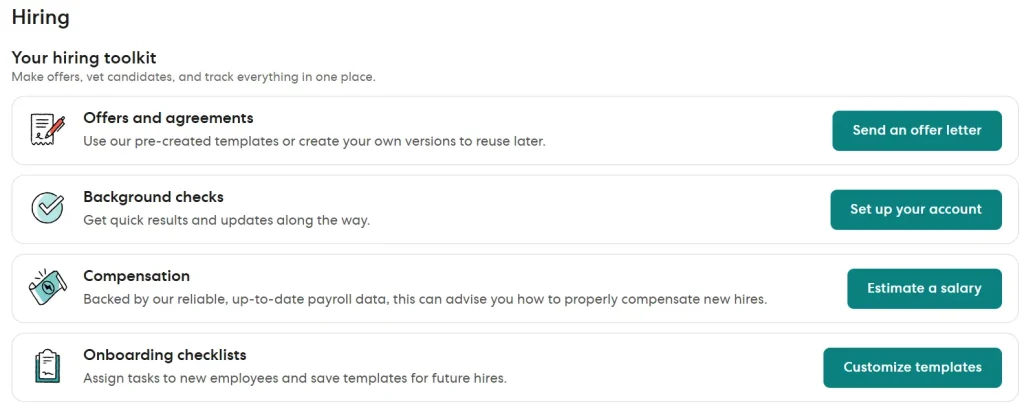
Gusto simplifies this process with digital onboarding tools.
Instead of printing documents or sending multiple emails, new employees can complete many onboarding tasks online.
This creates a smoother experience for both employers and employees.
Some onboarding features include:
- Digital offer letters
- Employee information collection
- Tax forms
- Document storage
- Electronic signatures
For growing businesses, this can save hours of administrative work every month.
Manage Employee Information
Employee records are one of the most important parts of running a business.
Gusto provides a central place to store employee information securely.
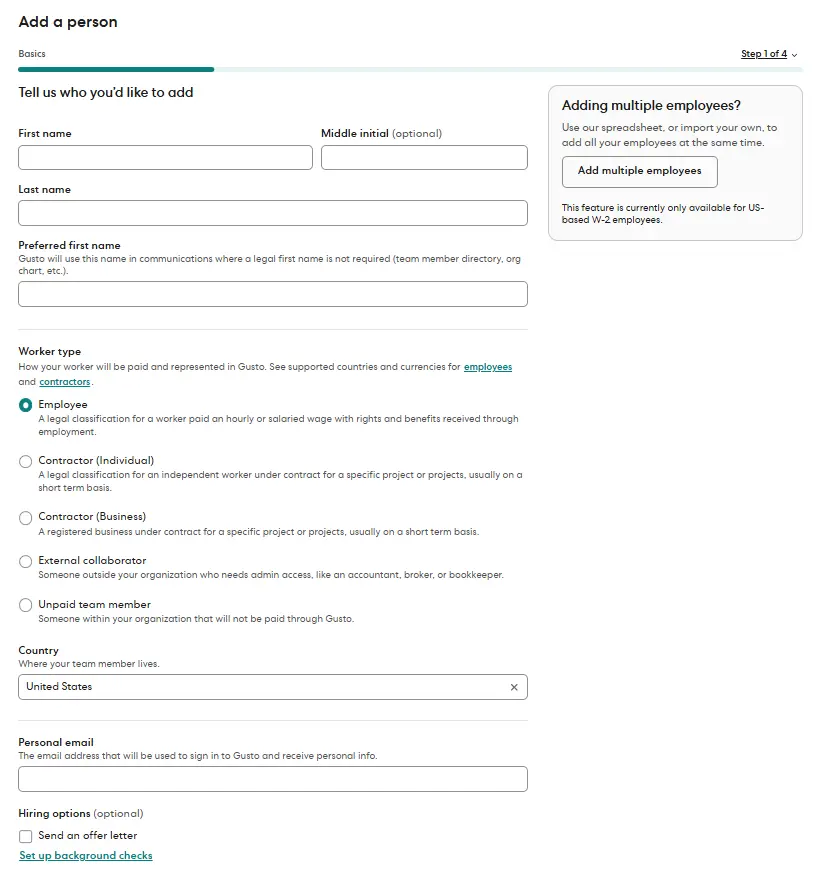
Instead of keeping paper files in different locations, you can organize everything inside your account.
This includes:
- Employee profiles
- Contact information
- Payroll history
- Tax documents
- Employment agreements
- Important company documents
Having everything in one place makes it easier to find information whenever you need it.
Employee Self-Service Portal
Employees often have questions about their payslips, tax forms, or personal information.
Without self-service tools, these requests usually go through HR or the business owner.
Gusto gives employees access to their own accounts.
From their dashboard, employees can:
- View payslips
- Download tax forms
- Update personal information
- Access important documents
- Review payment history
This reduces repetitive administrative work for employers while giving employees more control over their own information.
Time Off and PTO Management
Managing paid time off manually can quickly become confusing.
Employees may have different vacation balances, sick leave, or holiday allowances.
Gusto includes tools to help businesses manage paid time off more efficiently.
Depending on your plan, you can:
- Track vacation time
- Manage sick leave
- Approve time-off requests
- Monitor PTO balances
- View employee leave history
Everything is connected to payroll, making it easier to process employee payments accurately.
Time Tracking
For businesses with hourly employees, tracking work hours is essential.
Instead of entering hours manually, Gusto supports time tracking through built-in tools and supported integrations.
This helps employers:
- Track employee hours
- Reduce payroll mistakes
- Improve payroll accuracy
- Save time during payroll processing
Once employee hours are recorded, they can flow directly into payroll, reducing manual data entry.
Employee Benefits Administration
Offering employee benefits can help businesses attract and retain talented employees.
Managing those benefits manually, however, can become complicated as your team grows.
Gusto helps simplify benefits administration by allowing eligible businesses to manage benefits alongside payroll.
Depending on your business and location, available options may include:
- Health insurance
- Dental insurance
- Vision insurance
- Workers' compensation
- Retirement plans
- Health savings accounts (HSAs)
- Flexible spending accounts (FSAs)
Having payroll and benefits connected in one platform can reduce duplicate work and make employee management more efficient.
Payroll Reports and Analytics
Good reports help business owners make better decisions.
Gusto provides several payroll reports that give you a better understanding of your payroll expenses.
Reports may include:
- Payroll summaries
- Employee earnings
- Tax reports
- Payroll history
- Labor cost reports
Instead of creating reports manually in spreadsheets, you can generate them directly from your dashboard.
This saves time while improving accuracy.
Gusto Integrations
Most businesses already use accounting, communication, or productivity software.
That's why integrations are important.
Gusto connects with many popular business tools, allowing information to move between platforms without constant manual updates.
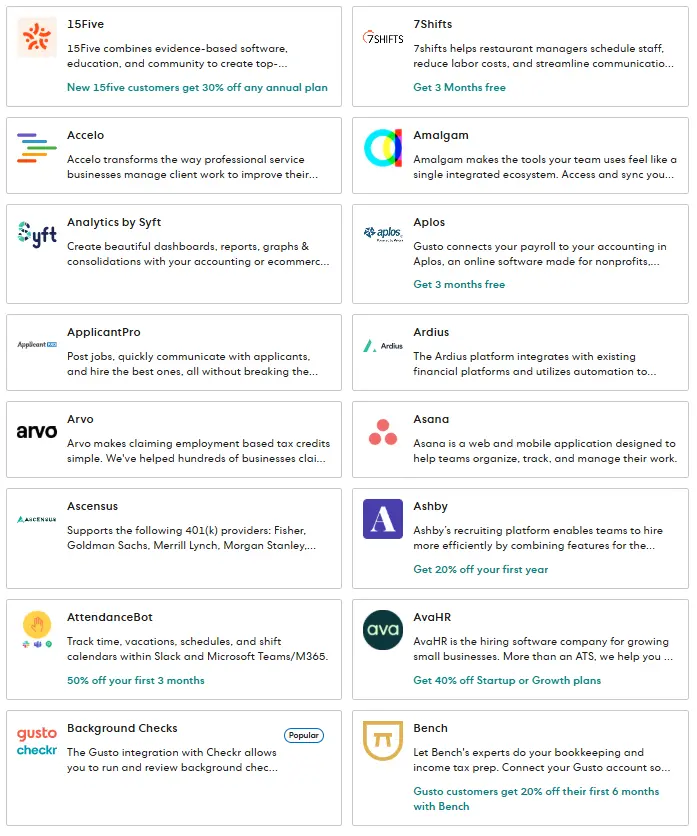
Some popular integrations include:
Accounting Software
- QuickBooks
- Xero
- FreshBooks
Time Tracking
- Homebase
- Deputy
- When I Work
Productivity Tools
- Google Workspace
- Slack
- Microsoft 365
Automation Platforms
- Zapier
These integrations help businesses streamline their workflows and reduce duplicate data entry.
Is Gusto Easy to Use?
One reason Gusto receives positive feedback from many small business owners is its clean and beginner-friendly interface.
The dashboard is well organized, making it easy to find payroll, employee records, tax documents, and reports.
Most tasks are completed through simple step-by-step workflows.
Even if you've never used payroll software before, the learning curve is relatively small.
Instead of overwhelming users with complex menus, Gusto focuses on making common payroll and HR tasks straightforward.
For many businesses, this ease of use is one of the platform's biggest advantages.
What We Like Most About Gusto's Features
After reviewing Gusto's features, a few strengths stand out.
The platform doesn't just process payroll.
It helps businesses manage employees from hiring to payday using one centralized dashboard.
Some of our favorite features include:
- Easy payroll automation
- Automatic payroll tax filing
- Digital employee onboarding
- Employee self-service portal
- Built-in HR tools
- Benefits administration
- Useful payroll reports
- Wide range of integrations
Instead of buying separate software for payroll, HR, onboarding, and employee management, many businesses can handle everything through Gusto.
That's one of the biggest reasons why it continues to be a popular choice among small and growing businesses.
Setting Up Gusto
Getting started with Gusto is fairly straightforward.
After signing up, you'll be asked to provide information about your business, including:
- Business details
- Federal tax information
- State tax information (if applicable)
- Employee information
- Bank account details
- Payroll schedule
Depending on your business and the information you already have available, the initial setup may take some time.
The good news is that once everything is configured, running future payrolls becomes much faster because most information is already stored in your account.
Gusto Customer Support
Even easy-to-use software can raise questions from time to time.
Whether you're setting up payroll for the first time or trying to solve a tax-related issue, having access to reliable customer support is important.
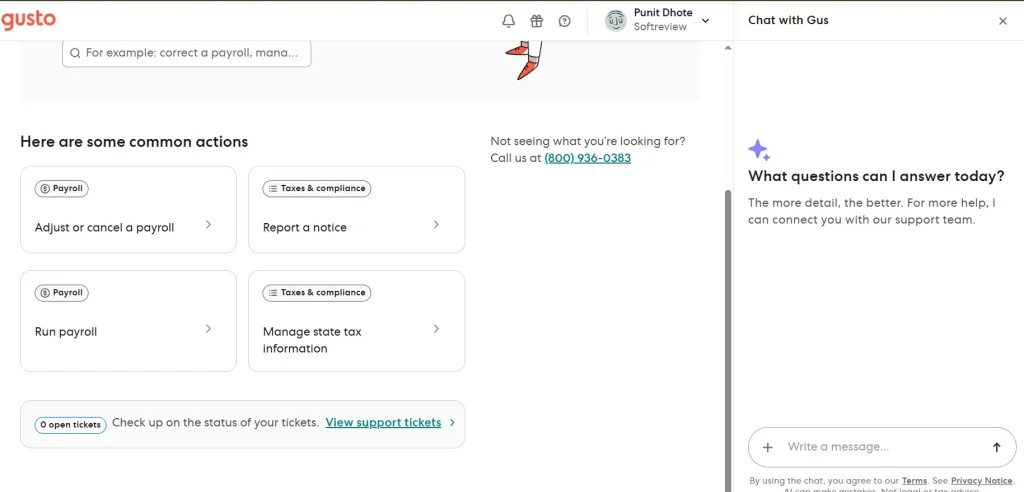
Gusto offers several support resources to help customers find answers.
These include:
- Help Center
- Email support
- Phone support (availability depends on your plan and support hours)
- Online guides
- Payroll and HR articles
The Help Center contains hundreds of articles covering common topics such as payroll, taxes, employee management, benefits, onboarding, and troubleshooting.
Many users can solve simple questions without needing to contact the support team.
What Do Customers Say About Gusto Support?
Customer feedback about support is generally mixed.
Many users praise the support team for being friendly, knowledgeable, and helpful when resolving payroll questions.
However, some customers report longer response times during busy periods or when dealing with more complex issues.
This isn't unusual for cloud software, especially platforms serving a large number of businesses.
Overall, Gusto's customer support receives positive feedback from many users, but there are also reviews that suggest response times could be improved in certain situations.
That's why it's always a good idea to explore the Help Center first, as many common questions are already answered there.
Gusto Security
Payroll software stores some of your business's most sensitive information.
This includes:
- Employee personal details
- Payroll records
- Tax information
- Banking information
Because of this, security should always be a top priority.
Gusto states that it uses industry-standard security practices to help protect customer information. The company also provides security-related documentation explaining how it safeguards customer data and manages access controls.
As with any online platform, businesses should also follow good security practices themselves, such as:
- Using strong passwords
- Enabling multi-factor authentication when available
- Limiting account access to authorized employees
- Regularly reviewing user permissions
Good security is a shared responsibility between the software provider and the business using it.
Real Gusto Customer Reviews
One of the best ways to understand any software is by looking at feedback from real customers.
Instead of relying on one review website, we looked at comments and ratings from multiple trusted platforms, including G2, Capterra, and Trustpilot.
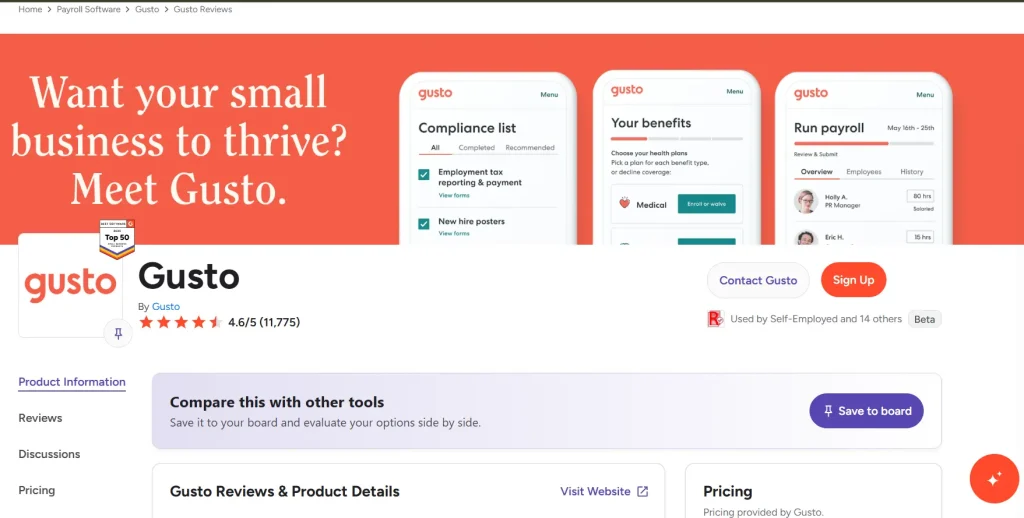
While every business has different needs, several common patterns appear across these review sites.
What Customers Like About Gusto
Many business owners choose Gusto because it helps simplify payroll and everyday HR tasks.
Some of the most frequently mentioned positives include:
Easy to Use
Many reviewers say the dashboard is simple and easy to understand.
Even first-time payroll users often mention that they were able to learn the software without much difficulty.
Payroll Automation
Automatic payroll processing and tax filing are among the features users appreciate the most.
Businesses report spending less time on payroll after switching to Gusto.
Employee Onboarding
Digital onboarding tools make it easier to collect employee information and complete paperwork online.
This creates a smoother experience for new hires.
Employee Self-Service
Employees like being able to access payslips, tax forms, and personal information without contacting HR.
Time Savings
Many reviewers mention that Gusto reduces repetitive administrative work, allowing business owners to focus on running their businesses.
Common Customer Complaints
No software is perfect.
While Gusto receives many positive reviews, there are also recurring complaints that potential buyers should know about.
Customer Support Delays
Some customers report waiting longer than expected when contacting support for complex issues.
Pricing Can Increase
Since Gusto charges a monthly base fee plus a per-person fee, costs naturally increase as your team grows.
Businesses planning to hire many employees should factor this into their budget.
Advanced Features on Higher Plans
Some HR features are only available on higher-tier plans.
Businesses looking for advanced workforce management tools may need to upgrade as they grow.
These concerns don't necessarily make Gusto a poor choice, but they're worth considering before making a decision.
Our Take on Gusto Reviews
After comparing editorial reviews, official product information, and verified customer feedback, a clear picture begins to emerge.
Gusto consistently receives praise for making payroll easier.
Its clean interface, payroll automation, onboarding tools, and HR features make it a strong option for small and growing businesses.
At the same time, it's important to understand its limitations.
Some businesses would like faster customer support, while others may eventually outgrow the platform as their HR requirements become more complex.
Overall, the positive feedback significantly outweighs the negative feedback across major review platforms.
That's one reason Gusto continues to be recommended by many business owners, accountants, and payroll professionals.
Gusto Pros and Cons
Every payroll platform has strengths and weaknesses.
Here's a quick summary of what we like most and where Gusto could improve.
PROS
- Easy-to-use interface
- Automated payroll processing
- Automatic payroll tax filing
- Employee self-service portal
- Digital hiring and onboarding
- Helpful HR features
- Large integration library
CONS
- Monthly costs increase as your team grows
- Some advanced HR tools require higher plans
- May not suit very large enterprises
- Support experiences vary between users
- Primarily focused on U.S. payroll
Looking at both sides helps you decide whether Gusto fits your business instead of relying only on marketing claims.
For most small businesses, the advantages are likely to outweigh the drawbacks.
Gusto vs ADP vs Rippling vs QuickBooks Payroll vs OnPay
If you're still deciding which payroll software is right for your business, here's a side-by-side comparison of Gusto and some of its biggest competitors.
| Feature | Gusto | ADP | Rippling | QuickBooks Payroll | OnPay |
|---|---|---|---|---|---|
| Best For | Small & growing businesses | Medium & large businesses | Growing companies needing HR + IT | QuickBooks users | Budget-conscious small businesses |
| Starting Price | $49/month + $6 per employee | Custom quote | Starts around $8/user + platform fee | Starts around $50/month + $6 per employee | $49/month + $6 per employee |
| Full-Service Payroll | ✅ | ✅ | ✅ | ✅ | ✅ |
| Automatic Payroll Tax Filing | ✅ | ✅ | ✅ | ✅ | ✅ |
| Unlimited Payroll Runs | ✅ | ✅ | ✅ | ✅ | ✅ |
| Direct Deposit | ✅ | ✅ | ✅ | ✅ | ✅ |
| Employee Self-Service Portal | ✅ | ✅ | ✅ | ✅ | ✅ |
| Hiring & Onboarding | ✅ | ✅ | ✅ Advanced | Basic | ✅ |
| HR Management | ✅ | ✅ Advanced | ✅ Advanced | Limited | ✅ |
| Employee Benefits Administration | ✅ | ✅ | ✅ | Limited | ✅ |
| Time Tracking | ✅ (Plus Plan) | Optional | ✅ | Premium Plans | Limited |
| Performance Management | Limited | ✅ | ✅ | ❌ | ❌ |
| IT Device Management | ❌ | ❌ | ✅ | ❌ | ❌ |
| International Payroll | ❌ (U.S. focused) | Limited Global Solutions | ✅ | ❌ | ❌ |
| Accounting Integrations | Excellent | Good | Excellent | Best with QuickBooks | Good |
| Ease of Use | ⭐⭐⭐⭐⭐ | ⭐⭐⭐⭐☆ | ⭐⭐⭐⭐☆ | ⭐⭐⭐⭐☆ | ⭐⭐⭐⭐⭐ |
| Customer Support | ⭐⭐⭐⭐☆ | ⭐⭐⭐⭐☆ | ⭐⭐⭐⭐☆ | ⭐⭐⭐⭐☆ | ⭐⭐⭐⭐☆ |
| Overall Value | ⭐⭐⭐⭐⭐ | ⭐⭐⭐⭐☆ | ⭐⭐⭐⭐☆ | ⭐⭐⭐⭐☆ | ⭐⭐⭐⭐⭐ |
Which Payroll Software Should You Choose?
Every business has different payroll needs, so there's no single “best” option for everyone.
Choose Gusto if you:
- Want an easy-to-use payroll and HR platform.
- Run a small or growing business.
- Need employee onboarding and benefits in one place.
- Want excellent value for the features included.
- Prefer simple payroll automation without a steep learning curve.
Choose ADP if you:
- Manage a medium or large business.
- Need advanced HR and compliance tools.
- Require enterprise-level reporting.
- Want highly customizable payroll solutions.
Choose Rippling if you:
- Want payroll, HR, and IT management in one platform.
- Manage remote or distributed teams.
- Need employee device and app management.
- Plan to scale rapidly.
Choose QuickBooks Payroll if you:
- Already use QuickBooks Online.
- Want payroll integrated directly with your accounting.
- Need basic HR features alongside bookkeeping.
Choose OnPay if you:
- Want affordable payroll software.
- Run a small business with straightforward payroll needs.
- Need strong payroll features without paying for advanced HR tools.
- Are looking for a simple alternative to Gusto.
Who Should Choose Gusto?
After reviewing Gusto's pricing, features, ease of use, customer feedback, and competitors, it's clear that the platform is built with small and growing businesses in mind.
Gusto is an excellent choice if you:
- Own a small business
- Run a startup
- Manage a growing team
- Need payroll and HR in one platform
- Want automated payroll tax filing
- Hire employees and contractors
- Prefer easy-to-use software
The platform saves time by reducing manual payroll work while bringing employee management together in one dashboard.
Who Should Look at Other Payroll Software?
Gusto won't be the perfect solution for every business.
You may want to compare other providers if you:
- Need enterprise-level HR customization
- Operate large international payroll teams
- Require advanced workforce management tools
- Need specialized global payroll solutions
Fortunately, there are several excellent payroll providers available, so it's worth comparing features before making your final decision.
Final Verdict: Is Gusto Worth It?
Yes—for most small businesses, Gusto is absolutely worth considering.
It combines payroll, HR, employee onboarding, benefits administration, and reporting into one platform that's easy to learn and manage.
One of Gusto's biggest strengths is that it removes much of the complexity from payroll.
Instead of calculating taxes manually, managing paperwork, and switching between different HR tools, you can handle many day-to-day employee management tasks from one dashboard.
That said, no payroll software is perfect.
As your business grows, your payroll costs will increase because Gusto charges a monthly base fee plus a per-person fee.
Some advanced HR features are also available only on higher-tier plans.
Even with those limitations, Gusto continues to offer excellent value for many small businesses looking for reliable payroll software.
If your goal is to simplify payroll while keeping HR organized, Gusto is one of the strongest options currently available.
Frequently Asked Questions
Is Gusto good for small businesses?
Yes. Gusto is designed primarily for small and growing businesses. Its easy-to-use interface, automated payroll, and built-in HR tools make it a popular choice for businesses that want to simplify employee management.
How much does Gusto cost?
Gusto offers multiple pricing plans. Pricing starts with a monthly base fee plus a per-person charge, and the total cost depends on the plan you choose and the size of your team. Because pricing may change over time, it's always a good idea to check Gusto's official pricing page before purchasing.
Does Gusto file payroll taxes automatically?
Yes. Gusto automates payroll tax calculations and, on supported plans, helps prepare and file payroll taxes with the appropriate government agencies.
Can Gusto pay independent contractors?
Yes. Gusto supports contractor payments and offers a plan designed specifically for businesses that work only with independent contractors.
Is Gusto easy to learn?
Yes. One of Gusto's biggest strengths is its beginner-friendly interface. Most users can learn the basics without previous payroll experience.
Does Gusto offer employee benefits?
Yes. Depending on your business and location, Gusto can help eligible businesses manage employee benefits such as health insurance, retirement plans, workers' compensation, and other benefits alongside payroll.
Is Gusto better than QuickBooks Payroll?
It depends on your business.
If you already use QuickBooks for accounting, QuickBooks Payroll may fit naturally into your workflow.
If you want payroll, HR, hiring, onboarding, and employee management in one easy-to-use platform, Gusto is often the better choice.
Does Gusto work for large businesses?
Gusto can support growing businesses, but organizations with highly complex HR requirements or large international workforces may also want to evaluate enterprise payroll platforms before making a decision.
Final Thoughts
Choosing payroll software is an important decision because it affects your employees, your business finances, and your day-to-day operations.
Gusto stands out because it keeps payroll simple without sacrificing the tools many businesses need to grow.
Whether you're hiring your first employee or managing a team that's expanding every month, Gusto provides an easy way to automate payroll, organize HR tasks, and reduce administrative work.
While it may not be the perfect fit for every business, it delivers an excellent combination of usability, payroll automation, and HR features for most small businesses.
If you're looking for a payroll platform that can save time and simplify employee management, Gusto is well worth considering.
