


I have been looking at AdGuard from three different angles in this review: its ad blocker, VPN, and DNS service.
Most AdGuard reviews focus mainly on the ad blocker. But that doesn't give you the full picture because AdGuard now has separate products for different privacy and internet protection needs.
So, in this AdGuard review, I will cover all three.
I will look at the features, pricing, supported devices, limitations, and which product makes sense depending on what you actually need.
I will also share the current AdGuard offers available through my partner links, so you can check the discount before purchasing.
AdGuard Review
- AdGuard VPN: 80% off 2-year subscription
- Ad blocking & tracker protection
- AdGuard Ad Blocker: 30% off any license
- VPN for private internet connections
- AdGuard DNS: 20% off any plan
- DNS-level filtering
AdGuard offers separate tools for ad blocking, VPN, and DNS filtering. Use our exclusive partner offers to save on the AdGuard product that fits your needs.
What Is AdGuard?
AdGuard is a company that develops internet privacy and filtering products.
Its product lineup includes AdGuard Ad Blocker, AdGuard VPN, AdGuard DNS, and AdGuard Home. Each product works at a different level.
AdGuard Ad Blocker works directly on supported devices to filter ads and trackers.
AdGuard VPN is a separate VPN service that routes your internet connection through VPN servers.
AdGuard DNS works at the DNS level and can filter domains used for ads, trackers, and other unwanted content.
AdGuard Home is aimed more at advanced users who want to run DNS-based filtering on their own network.
That difference is important because you don't necessarily need all of these products.
AdGuard Ad Blocker Review

Let's start with the product most people associate with AdGuard.
AdGuard Ad Blocker is available for Windows, macOS, Android, iOS, Linux, and Android TV. AdGuard also provides browser extensions for popular browsers.
The main advantage of the standalone application is that it can do more than simply block advertisements inside your browser.
What Can AdGuard Ad Blocker Block?
AdGuard uses filtering lists to identify advertising, tracking, and other unwanted requests.
Depending on the platform and configuration, you can use it to block:
- Website advertisements
- Popups
- Trackers
- Tracking scripts
- Unwanted web content
- Known phishing and malicious domains
You can also add your own filters and create custom rules if the default configuration isn't enough.
For most people, the default filters should be enough.
The custom filtering options become more useful when you already know what you want to block.
AdGuard Browser Extension
If your only problem is advertisements while browsing, you don't necessarily need the full AdGuard application.

The AdGuard browser extension can handle browser-level ad and tracker blocking.
This makes it a good starting point if you don't want system-wide filtering.
The standalone application is more useful when you want filtering outside the browser as well.
System-Wide Ad Blocking
This is where the full AdGuard application becomes more interesting.
On supported platforms, AdGuard can filter traffic generated by applications as well as websites.
For example, a desktop application may connect to advertising or tracking domains even when you are not browsing the web.
A browser extension can't control traffic from every application on your computer.
The standalone AdGuard application can handle more of this traffic.
Tracking Protection
AdGuard includes tracking protection filters designed to block known trackers.
You can adjust the protection level and filtering lists depending on how much control you want.
There is a trade-off here.
The more aggressively you filter, the greater the chance that a website or web application may stop working correctly.
When that happens, you can check the filtering log, adjust a rule, or add the website to your allowlist.
Custom Filters and Rules
This is one of the areas where AdGuard is much more flexible than a basic ad-blocking extension.
You can add third-party filter lists, write custom rules, and see individual requests in the filtering log.
For an average user, this may look complicated.
For someone who manages websites or regularly works with browser privacy tools, it gives much more control.
You can see what AdGuard is blocking instead of simply turning an ad blocker on and hoping everything works.
HTTPS Filtering
HTTPS filtering is another advanced feature.
Modern websites use encrypted HTTPS connections. AdGuard can inspect HTTPS traffic locally so that its filtering rules can work on that traffic.
To do this, AdGuard installs a local certificate that allows it to inspect the traffic.
This is useful for advanced filtering, but I wouldn't recommend changing these settings without understanding what they do.
If you experience certificate errors or a website suddenly stops working after changing HTTPS settings, check the exclusions and certificate configuration first.
AdGuard Security Protection
AdGuard also provides protection against known phishing and malicious domains.
The feature can warn users when they attempt to access a domain listed in AdGuard's security database.
But there is an important limitation.
AdGuard isn't an antivirus program.
Its security feature doesn't remove viruses that are already on your device, and it shouldn't be treated as a replacement for dedicated antivirus protection.
AdGuard on Android
AdGuard for Android is different from the browser extension.
The Android application can filter traffic from browsers and other applications by using Android's local VPN interface. The connection stays on the device and is used for filtering rather than sending traffic to an AdGuard VPN server.
There is one limitation Android users should know.
Android normally doesn't allow two VPN applications to use its VPN interface at the same time.
That means another VPN application can interfere with AdGuard's local filtering VPN.
AdGuard provides an integrated setup for using its ad blocker and VPN together.
Is AdGuard Available on Google Play?
AdGuard for Android is not distributed through Google Play.
AdGuard provides its own APK and other supported installation methods.
This is something I would check before buying because the installation process is different from downloading a normal Android application from Google Play.
AdGuard on iPhone
AdGuard also has an iOS application.
However, Apple places restrictions on how applications can filter network traffic, so the iOS version doesn't offer exactly the same functionality as the Windows or Android versions.
Safari protection and DNS filtering are important parts of AdGuard's iOS offering.
If you're buying AdGuard specifically for an iPhone, check the current iOS feature list before purchasing.
AdGuard Ad Blocker Free vs Premium
AdGuard offers a free browser extension, while its full applications provide additional functionality.
The simple way to look at it is:
| Requirement | What to consider |
|---|---|
| Block ads in a browser | Free browser extension |
| Block trackers in a browser | Browser extension |
| Filter traffic from applications | Full AdGuard app |
| System-wide filtering | Full AdGuard app |
| Custom filtering rules | Full app |
| Advanced protection | Full app |
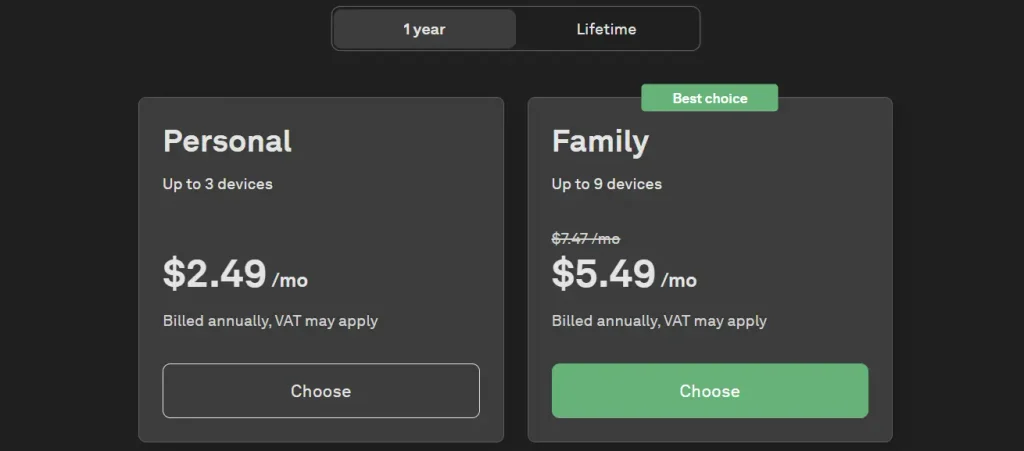
AdGuard's current licenses include Personal and Family options.
The Personal license supports up to 3 devices, while the Family license supports up to 9 devices.
AdGuard Ad Blocker Pricing
AdGuard currently sells 1-year and lifetime licenses for Personal and Family users.
The exact price can change because AdGuard runs promotions and pricing can differ by region.
Purchases made through AdGuard's website are covered by a 30-day money-back guarantee.
My AdGuard Ad Blocker Discount
I have an exclusive partner offer for AdGuard Ad Blocker.
Use code SOFTREVIEW30 to get 30% off any AdGuard Ad Blocker license.
Get 30% Off on Ad Blocker
Use our exclusive link to activate the discount. No code needed at checkout.
Your exclusive deal is ready!
Copy the code below and use it at checkout to save.
Before completing the purchase, check the checkout page to make sure the discount has been applied.
AdGuard VPN Review
AdGuard VPN is a completely different product from the ad blocker.
Instead of filtering advertising requests, the VPN creates a VPN connection and routes your internet traffic through a VPN server.
This can hide your normal public IP address from websites and encrypt traffic between your device and the VPN server.
AdGuard VPN Features
The paid version of AdGuard VPN currently includes:
- Unlimited traffic
- No speed limit
- 70+ locations
- Up to 10 simultaneous devices
- Streaming support
The number of locations is a changing product specification, so check the official page before publishing.
AdGuard also provides VPN applications and browser extensions for multiple platforms.
AdGuard VPN Free Plan
There is a free version of AdGuard VPN.
The current free plan includes:
- 3 GB of traffic per month
- 10 server locations
- Up to 2 simultaneous devices
Once the monthly allowance is used, speed restrictions apply. The free service also has limitations compared with the paid plan.
For occasional VPN use, 3 GB may be enough.
For daily browsing, video streaming, or large downloads, you will likely need the paid plan because of the monthly limit.
AdGuard VPN Privacy
AdGuard says it does not store users' activity or connection logs.
The company also says it collects limited technical information that cannot be linked to users' activity.
These are AdGuard's stated privacy practices.
If VPN privacy is your main concern, I would still read the current privacy policy before subscribing because policies can change over time.
AdGuard VPN Supported Devices
AdGuard VPN supports multiple platforms, including:
- Windows
- macOS
- Android
- iOS
- Linux
- Chrome
- Firefox
- Edge
- Android TV
- Apple TV
- Chromecast
- PlayStation
- Xbox
- Routers
The available features can differ by platform.
AdGuard VPN Discount Code
My exclusive partner offer for AdGuard VPN is:
SOFTREVIEW80 gives 80% off a 2-year AdGuard VPN subscription.
Get 80% Off on VPN
Use our exclusive link to activate the discount. No code needed at checkout.
Your exclusive deal is ready!
Copy the code below and use it at checkout to save.
The offer is for the 2-year subscription. Check the final checkout price after entering the code.
AdGuard DNS Review
AdGuard DNS takes a different approach.
Instead of installing a complete ad blocker, you can configure your device or network to use AdGuard's DNS servers.
When your device asks DNS to resolve a domain, AdGuard DNS can filter the request according to its rules.
This makes it possible to block many advertising and tracking domains without installing an ad-blocking application on every device.
AdGuard DNS Filtering Options
AdGuard provides different public DNS configurations.
- Default DNS:- The default configuration blocks ads and trackers.
- Non-Filtering DNS:- This option provides DNS resolution without AdGuard's advertising and tracker filtering.
- Family Protection DNS:- The Family Protection configuration adds adult-content filtering and enables Safe Search and Safe Mode where supported.
This setup is useful if different people use devices on the same network and you want DNS-level filtering.
Encrypted DNS
AdGuard DNS supports several encrypted DNS protocols, including:
- DNS-over-HTTPS
- DNS-over-TLS
- DNS-over-QUIC
The exact setup depends on the device and configuration.
This is different from a VPN.
Using encrypted DNS does not turn the connection into a VPN or hide your public IP address.
AdGuard DNS Free Plan
AdGuard DNS has separate plans from the AdGuard Ad Blocker licenses.
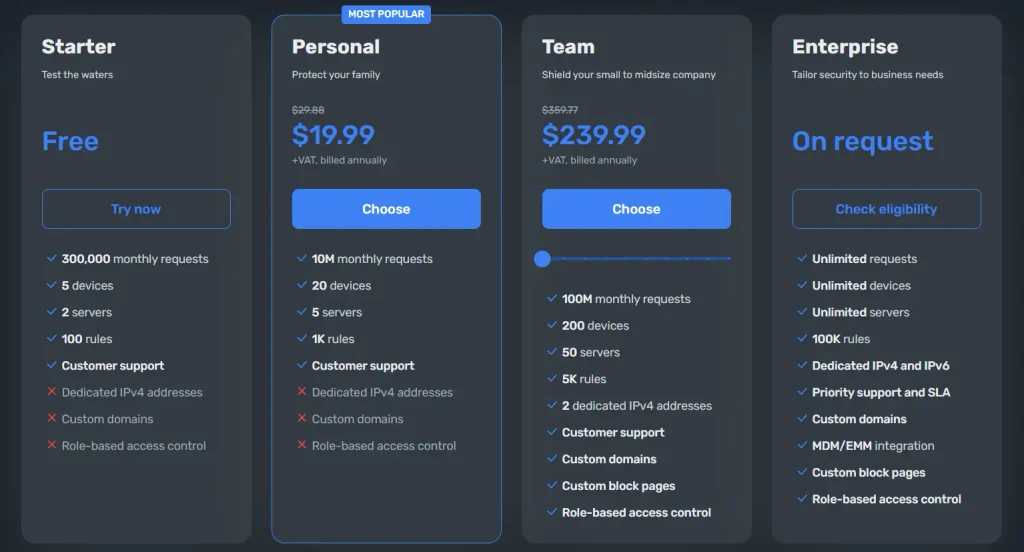
The current plans include:
- Starter
- Personal
- Team
- Enterprise
The Starter plan is free.
The current Starter plan includes:
- 5 devices
- 300,000 monthly requests
- 2 servers
- 100 rules
The Personal plan currently includes:
- 20 devices
- 10 million monthly requests
- 5 servers
- Additional filtering controls
AdGuard DNS Pricing
AdGuard currently lists the Personal DNS plan at $19.99 per month or $29.88 per year before VAT.
Pricing can change, so verify the checkout page before publication.
AdGuard DNS Discount Code
My exclusive partner code for AdGuard DNS is:
SOFTREVIEW20 gives 20% off any AdGuard DNS plan.
Get 20% Off on DNS
Use our exclusive link to activate the discount. No code needed at checkout.
Your exclusive deal is ready!
Copy the code below and use it at checkout to save.
Enter the code during checkout and confirm the discount has been applied.
AdGuard DNS for Router
One of the practical uses of AdGuard DNS is router configuration.
Instead of setting DNS separately on every device, you can configure a compatible router to use AdGuard DNS.
Then devices connected to that network can use the configured DNS service.
This can be useful for homes with multiple phones, laptops, smart TVs, and other connected devices.
There is one limitation, though.
DNS filtering works at the domain/request level. It isn't the same as a full content blocker that can inspect and modify page content.
AdGuard Ad Blocker vs VPN vs DNS
Now that the three products are covered separately, here's the actual difference.
| Work | AdGuard Ad Blocker | AdGuard VPN | AdGuard DNS |
|---|---|---|---|
| Main job | Ad and tracker blocking | VPN connection | DNS filtering |
| Blocks ads | Yes | With DNS integration | Yes |
| Blocks trackers | Yes | With DNS integration | Yes |
| Changes IP | No | Yes | No |
| VPN encryption | No | Yes | No |
| System-level filtering | Yes, supported platforms | VPN traffic | DNS requests |
| Custom filtering | Yes | Limited | Yes |
| Router use | Limited | Supported configurations | Yes |
| Best use | Device-level filtering | VPN protection | Network/DNS filtering |
The biggest mistake is treating these as interchangeable.
A DNS service isn't a VPN.
A VPN isn't automatically a complete ad blocker.
And a browser extension isn't the same as system-wide filtering.
Can You Use AdGuard Ad Blocker, VPN and DNS Together?
Yes, but the exact setup depends on the device.
AdGuard VPN can work with AdGuard DNS, allowing VPN traffic to use DNS filtering.
On Android, AdGuard provides an integrated mode for its Ad Blocker and VPN because Android normally doesn't allow two VPN applications to use the VPN interface simultaneously.
You don't need to activate every AdGuard product just because they are available.
For example, if you already have a good ad blocker and only need a VPN, purchasing the AdGuard ad blocker may not add much value for you.
AdGuard Pricing Comparison
Because AdGuard has several products, comparing the prices separately makes more sense.
| Product | Plan | Regular Price | Your Exclusive Offer | Price After Discount |
|---|---|---|---|---|
| AdGuard Ad Blocker | Personal / Family:- 1Year | $2.49 to $5.49/m | 30% off | $54.42/yr |
| AdGuard Ad Blocker | Personal / Family:- Lifetime | $79.99 to $169.99 | 30% off | $140.41/yr |
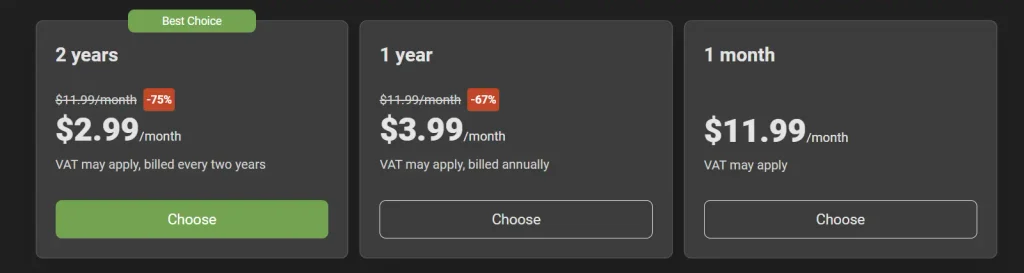
| AdGuard VPN | 2-Year | $2.99/m | 80% off | $67.91/yr |
| AdGuard VPN | 1-Year | $3.99/m | 80% off | $56.50 |
| AdGuard VPN | 1-Month | $11.99 | 80% off | N/A |
| AdGuard DNS | Starter | Free | – | Free |
| AdGuard DNS | Personal | $19.99 | 20% off | $28.20 |
| AdGuard DNS | Team | $239.99 | 20% off | – |
AdGuard Pros and Cons
PROS
- Strong ad and tracker filtering
- System-level filtering on supported platforms
- Custom filtering rules
- DNS filtering
- Separate VPN service
- Router-level DNS configuration
- Multiple device options
- Free options for several products
- 30-day money-back guarantee for eligible AdGuard website purchases
CONS
- iOS has more platform restrictions
- Advanced HTTPS filtering can require technical knowledge
- Android's local VPN can conflict with another VPN
- Aggressive filtering can break some websites
- Free VPN has a monthly traffic limit
- DNS filtering cannot replace all functions of a full content blocker
AdGuard vs uBlock Origin
If you're only looking for a browser ad blocker, uBlock Origin is an obvious alternative to consider.
The important difference is scope.
uBlock Origin is primarily a browser content blocker.
AdGuard has browser extensions, standalone applications, DNS services, and a VPN.
| Feature | AdGuard | uBlock Origin |
|---|---|---|
| Browser ad blocking | Yes | Yes |
| Tracker blocking | Yes | Yes |
| Custom rules | Yes | Yes |
| Standalone application | Yes | No |
| DNS service | Yes | No |
| VPN | Yes | No |
| Paid product | Yes | No |
So the comparison depends on what you want from the tool.
For browser-only filtering, you can compare the browser extensions directly.
If you also want DNS or VPN products, AdGuard has those as part of its wider product lineup.
AdGuard Alternatives
There isn't one alternative that replaces every AdGuard product.
For ad blocking, you can look at browser-based blockers such as uBlock Origin or browsers with built-in ad and tracker blocking.
For VPN use, you can check out Surfshark VPN or compare VPN providers based on their privacy policies, supported platforms, server network, pricing, and independent audits.
For DNS filtering, compare DNS providers based on filtering controls, encrypted DNS support, device limits, and network management features.
The important thing is to compare the same type of product.
A DNS service shouldn't be compared with a VPN simply because both are marketed around privacy.
Is AdGuard Safe?
AdGuard provides several security and privacy-related features, including tracker blocking, DNS filtering, HTTPS filtering, and protection against known malicious domains.
Its VPN privacy documentation says that it doesn't store users' activity or connection logs.
Those are AdGuard's stated policies.
For anyone choosing a VPN mainly because of privacy, I recommend checking the current privacy policy and terms rather than relying only on marketing claims.
For the ad blocker, remember that its security protection is not the same thing as antivirus software.
Does AdGuard Block YouTube Ads?
AdGuard's documentation explains that HTTPS filtering is required for filtering ads on HTTPS websites such as YouTube.
However, YouTube's advertising and anti-ad-blocking systems can change. But answer is yes Adguard ad blocker block youtube ads.
Who Should Use AdGuard?
The answer depends on which part of the AdGuard ecosystem you actually need.
For people who mainly want ad blocking
AdGuard Ad Blocker is the product to investigate.
The full application is more suitable when you want filtering outside the browser.
For people who need a VPN
AdGuard VPN is the relevant product.
The free plan can be useful for occasional use, while the paid plan removes the major traffic restriction.
For people who want network-level filtering
AdGuard DNS is worth considering.
It can be configured at the device or router level, depending on your setup.
AdGuard Promo Codes
Here are the current partner offers I have for the three products:
| Product | Code | Discount |
|---|---|---|
| AdGuard Ad Blocker | SOFTREVIEW30 | 30% off any license |
| AdGuard VPN | SOFTREVIEW80 | 80% off a 2-year subscription |
| AdGuard DNS | SOFTREVIEW20 | 20% off any plan |
These are separate offers, so use the code for the product you are purchasing.
Always check the final checkout price before completing the order.
Is AdGuard Worth It?
After looking at all three products, I wouldn't recommend buying AdGuard as a package without first deciding what you need.
The ad blocker, VPN, and DNS service solve different problems.
If your main issue is advertisements and trackers, start with the ad blocker.
If you need a VPN connection, look at AdGuard VPN.
If you want DNS-level filtering for several devices or a network, look at AdGuard DNS.
The good thing about AdGuard's product lineup is that you can choose the service based on your actual requirement.
You don't need to pay for features you aren't going to use.
Frequently Asked Questions
Q1. Is AdGuard free?
AdGuard has both free and paid products.
Its browser extension is free, AdGuard VPN has a free plan with a monthly data limit, and AdGuard DNS has a free Starter plan.
Q2. Is AdGuard a VPN?
AdGuard itself is not one single VPN product.
AdGuard VPN is the company's dedicated VPN service.
The Android ad blocker can also use Android's local VPN interface for filtering, but that is not the same as connecting to a remote VPN server.
Q3. What is AdGuard DNS?
AdGuard DNS is a DNS filtering service.
It can block advertising and tracking domains and also provides Family Protection and encrypted DNS options.
Q4. Can I use AdGuard with another VPN?
This depends on the device.
On Android, the operating system normally doesn't allow two VPN applications to use the VPN interface at the same time. AdGuard provides an integrated setup for its own VPN and ad blocker.
Q5. Does AdGuard work on Android?
Yes.
AdGuard provides an Android application that can filter traffic from browsers and applications.
Q6. Does AdGuard work on iPhone?
Yes, but iOS restrictions mean the feature set is different from Android and desktop versions.
AdGuard provides iOS protection through supported Safari and DNS features.
Q7. Does AdGuard have a money-back guarantee?
AdGuard currently offers a 30-day money-back guarantee for purchases made through its website.
Final Verdict
AdGuard makes more sense when you look at its products separately.
The AdGuard Ad Blocker is built around blocking ads, trackers, and unwanted content.
The AdGuard VPN is for VPN connections and changing the IP address visible to websites.
The AdGuard DNS service provides DNS-level filtering and can be useful for multiple devices or network-level setups.
I wouldn't buy all three just because they're from the same company.
First decide what problem you are trying to solve, then choose the product that actually handles it.
If you do need multiple products, they can work together in supported configurations.
For the current partner offers:
- SOFTREVIEW30 — 30% off AdGuard Ad Blocker
- SOFTREVIEW80 — 80% off a 2-year AdGuard VPN subscription
- SOFTREVIEW20 — 20% off AdGuard DNS
Check the current product price and make sure the discount appears at checkout before paying.
