


I have been keeping an eye on Magnific because it started with one very specific purpose making low-resolution images look much better with AI but the platform has changed a lot since then.
In April 2026, Freepik officially became Magnific, and the company positioned Magnific as a broader creative platform covering image, video, 3D, audio, AI workflows, stock content, and image enhancement.
So, if you are looking for a Magnific AI review today, simply calling it an AI image upscaler is not enough.
In this review, I will cover what Magnific AI does, its image upscaling features, Creative vs Precision mode, pricing, pros and cons, who should use it, Magnific vs Topaz Gigapixel, and whether Magnific AI is actually worth paying for.
Magnific AI Review
- Starts at €9.60/month with our exclusive 20% discount
- 240K credits/year included with Premium
- Creative & Precision AI upscaling for different image needs
- Commercial AI license included with Premium
- Premium+ starts at €21.60/month with 600K credits/year
- Magnific + Topaz upscalers included with Premium+
Magnific AI is an AI creative platform with powerful image upscaling, editing, video, and other AI tools. Get 20% off Premium and Premium+ through our exclusive claim offer.
What Is Magnific AI?
Magnific is an AI creative platform that combines AI-powered creation and editing tools with a large library of stock assets. Its current documentation lists tools for image generation, video generation, image editing, upscaling, background removal, audio, 3D, workflows, and more.
However, Magnific is still particularly well known for its AI image upscaler.
The important thing about Magnific's approach is that it is not limited to simply stretching an image to a larger resolution. Its Creative upscaling workflow can reconstruct and add visual detail, which is why the results can look very different from traditional image enlargement.
This is also the biggest thing you need to understand before using Magnific.
If you want the AI to creatively improve an image, Magnific can be very interesting.
If you want the enlarged image to remain as faithful as possible to the original, you need to use the right mode.
What Is Magnific AI Used For?
Magnific can be used for several different creative tasks, but its image enhancement tools are particularly useful for:
- Upscaling low-resolution images
- Improving AI-generated artwork
- Enhancing illustrations
- Working with creative and stylized images
- Preparing images for larger formats
- Editing and retouching images
- Relighting images
- Creating variations of visual content
- Working with AI-generated images and videos
The current Magnific platform goes beyond image upscaling. Its documentation describes it as an all-in-one creative platform with AI image and video generation, editing, enhancement, workflows, and access to stock content.
But I would not recommend choosing Magnific simply because it has a long feature list.
The more important question is whether its AI enhancement approach fits your particular workflow.
My Experience With Magnific AI
I have been using Magnific from the time it was called Freepik.
As a content writer, I regularly need creative assets for articles, videos, thumbnails, and other content. So, in the beginning, I mainly used it to download vectors, photos, illustrations, mockups, sound effects, and other stock assets.
After the platform changed from Freepik to Magnific, I started using the AI tools much more.
Now, I mostly use the image generator and voice generator. I also use Audio Isolation for my YouTube videos and occasionally use the video generator and video upscaler.
Here is how I use each of these tools.
AI Image Generator
For me, the Magnific AI image generator is one of the best parts of the platform.
The main reason I like it is the number of models available in one place. Depending on the current Magnific model lineup, you can find popular models such as Google Nano Banana, Seedream, GPT-2, and Flux.
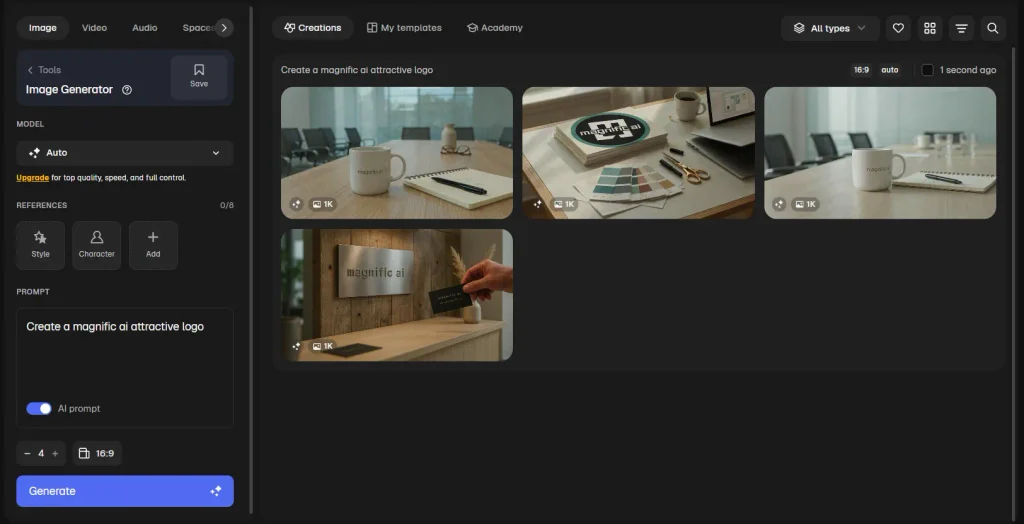
I have used different models depending on the type of image I want to create.
At this price range, I don't think you can easily get access to this many different image-generation models in one place.
Another feature I use a lot is the ability to add reference images when prompting.
For example, if I have a particular design style or visual reference in mind, I can upload the reference and explain what I want in the prompt. This gives me more control over the direction of the generated image.
Of course, the result still depends on the model and how well you write the prompt. But having multiple models and reference options available in the same workflow makes image generation much easier for me.
Voice Generation
I also use Magnific's Voice Generator quite often, especially when I need a voiceover for my content.
Magnific provides access to voice models from ElevenLabs and Google Flash TTS, and I find the generated voices quite good.
What I like about the voices is that they don't sound completely flat. You can hear changes in pitch, some emotion, and natural pauses that make the voice sound closer to a real human voice.
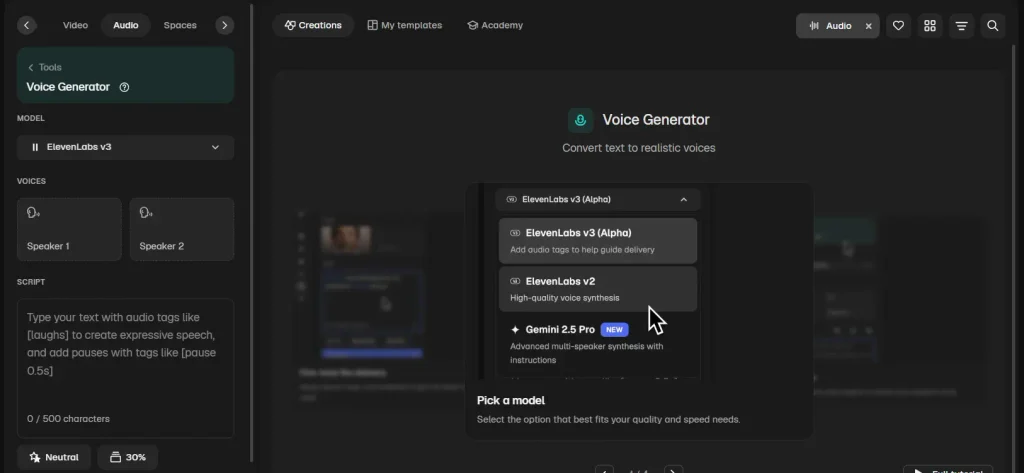
There is also a speaker selection option where you can select two speakers for a conversation-style generation.
However, there is one limitation that I don't like.
The script limit is 500 characters, which makes it difficult to generate a long script in one go.
You can split the script into smaller sections, but there is another problem.
When I generate the first 500 characters and then generate another 500 characters separately, the tone can change. The first section may sound slightly different from the second section.
For short voiceovers, this isn't a major issue. But if you are creating a long YouTube script, you need to keep this limitation in mind.
Audio Generator
I also use the Audio Generator, especially when I need a longer script than the Voice Generator allows.
In my experience, the Audio Generator supports up to 2,048 characters, and you can also add media as a reference for the generation.
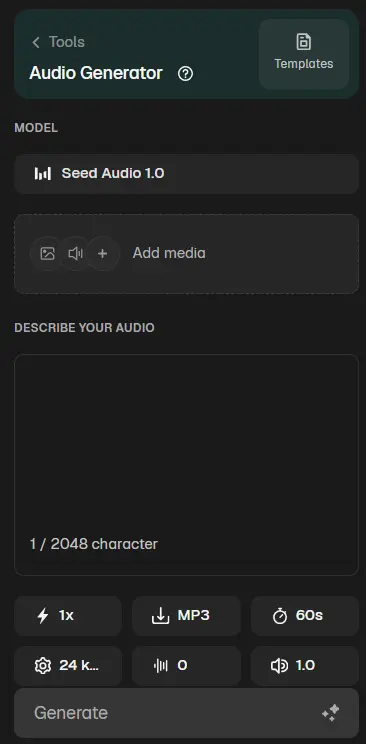
However, it has another limitation.
You can generate audio for up to 2 minutes.
The Audio Generator also uses the Seed Audio model rather than the ElevenLabs or Google Flash TTS models I use with the Voice Generator.
Because of this, I personally prefer the Voice Generator when I want a natural-sounding voiceover.
The Audio Generator isn't bad, but the voice can have more of an AI-generated tone compared with the voices I get from the Voice Generator.
Audio Isolation
The tool I use most for audio editing is probably Audio Isolation.
I mainly use it for my YouTube videos when I need to remove unwanted background noise from the audio.
The workflow is very simple.
I upload the audio, click the button, and let Magnific process it.
I don't need to spend a lot of time adjusting settings, and I find the output quite good for my regular YouTube workflow.
For me, this is one of those simple tools that can save a lot of time when you regularly create videos.
Video Generator
Magnific also has several video tools, but I don't use all of them.
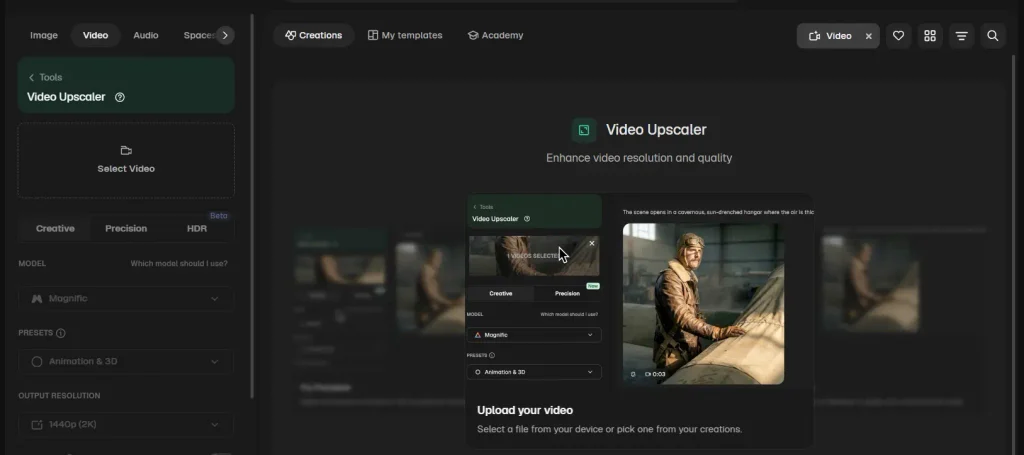
The two I use are the Video Generator and Video Upscaler.
In the Video Generator, you can choose from different video models. Depending on the current model lineup, Magnific provides models such as Google Veo, Kling, Seedance, and MiniMax.
Different models have different options.
For example, some models support reference images, while others support start and end images or audio. The available options depend on the model you select.
I usually use the Auto model because it makes the process easier for me.
One thing I like about the Auto workflow is that I can use a start image and end image when the option is available, and I can also upload media as a reference.
But there are some limitations.
The video clips I have generated are short, generally around 10–12 seconds, and sometimes the output can look blurry.
I also found that the prompt is very important.
If you want a good video, you need to give the AI enough information about the subject, movement, camera, environment, lighting, and other important details.
So, I wouldn't recommend using a very short prompt and expecting a perfect result every time.
Video Upscaler
I have also tried the Video Upscaler, and overall, I like the output.
Magnific uses its own AI technology for video upscaling, and the result can look sharper and higher in resolution.
However, I noticed one thing during my use.
Sometimes the resolution looks increased, but the overall video quality doesn't improve as much as I expected.
When that happens, processing the video again can improve the result.
So, I wouldn't say that every video gets the perfect result in a single attempt.
Overall, though, I find the Video Upscaler useful when I need to improve the resolution of an existing video.
Magnific AI Features
AI Image Upscaler
The Magnific image upscaler is the feature that made the product popular.
Instead of treating upscaling as nothing more than increasing the number of pixels, Magnific can use AI to reconstruct visual information during the process.
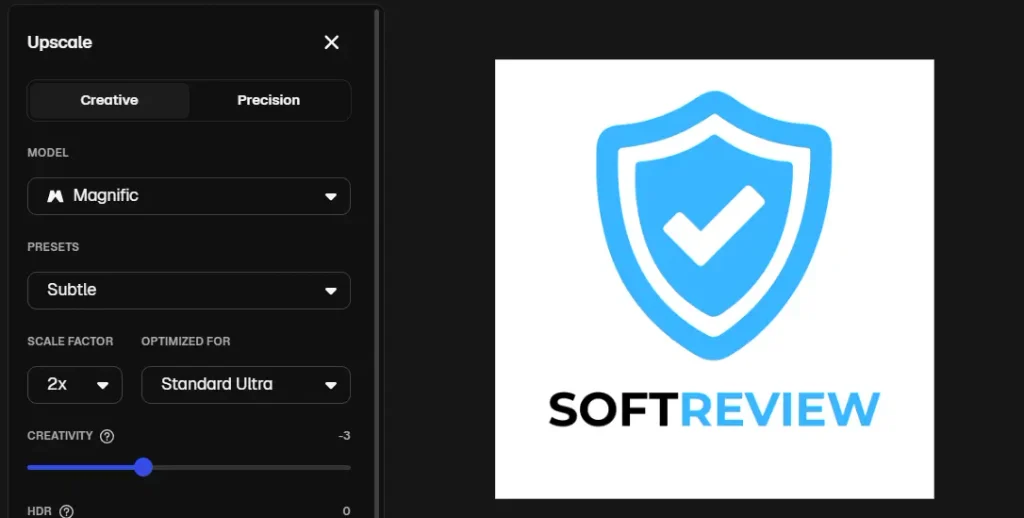
The platform provides both Creative and Precision approaches, which is useful because different images need different treatment.
For example, an AI-generated illustration may benefit from additional creative detail.
A product photo may need something completely different.
That is where the next two modes become important.
Creative Upscaling
Creative upscaling is designed for situations where you are comfortable with AI adding or reinterpreting visual details.
Magnific's documentation positions Creative upscaling for artwork, illustrations, and other creative content.
This makes it particularly interesting for AI-generated images.
You can also use creative controls to influence how much the AI changes the image. Magnific's upscaling workflow includes controls related to creativity, HDR, resemblance and other enhancement parameters.
The main advantage is obvious:
You are not simply asking the software to make the image larger. You are giving the AI room to improve the visual detail.
But there is a trade-off.
If the original image contains an important detail, the AI may not reproduce it exactly when you give it more freedom to reinterpret the image.
So I would not use Creative mode blindly on every image.
Precision Upscaling
Precision mode is the more appropriate option when preserving the source matters more than creatively changing it.
Magnific positions Precision for use cases such as photos, products and print-oriented work.
This distinction is extremely important.
For example, imagine you have a product image for an online store.
You don't want the AI to decide that the product should have a slightly different texture or shape just because that looks more detailed.
In that situation, a fidelity-focused workflow makes much more sense.
The same applies to logos, text-heavy graphics, documentation, or any image where accuracy matters.
Creativity, HDR, Resemblance and Other Controls
Magnific gives users more control than a basic one-click image enhancer.
The controls are designed to influence how the AI interprets the original image and how much visual detail it introduces.
The important thing is not to think of these settings as a simple “higher is better” slider.
More creativity can mean more changes.
More resemblance can mean staying closer to the source.
So the best settings depend on the image you are working with.
Image Editor
Magnific is now much broader than its original upscaling workflow.
Its current documentation describes an Image Editor that can be used to edit, retouch, resize, restyle, remove backgrounds, upscale and enhance images.
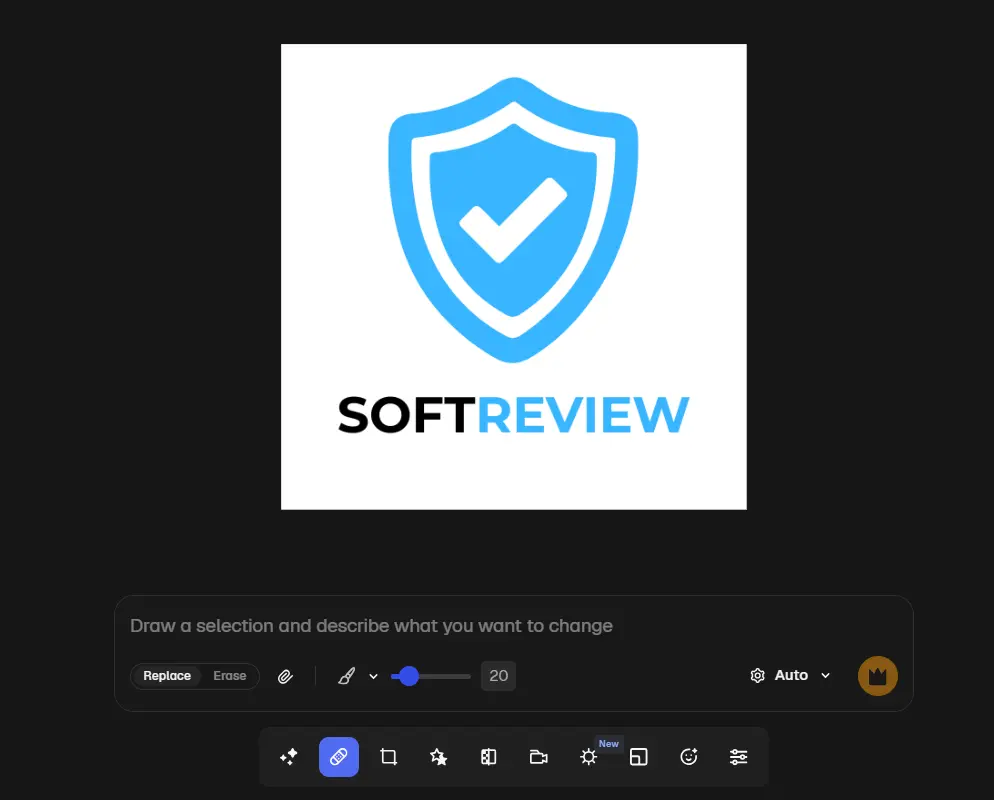
This makes Magnific more useful if you want several AI-powered editing capabilities in the same platform instead of using a separate tool for every task.
Relight
Relight is another example of how Magnific has expanded beyond simple upscaling.
The idea is to change the lighting of an image using AI rather than manually rebuilding the lighting in traditional editing software.
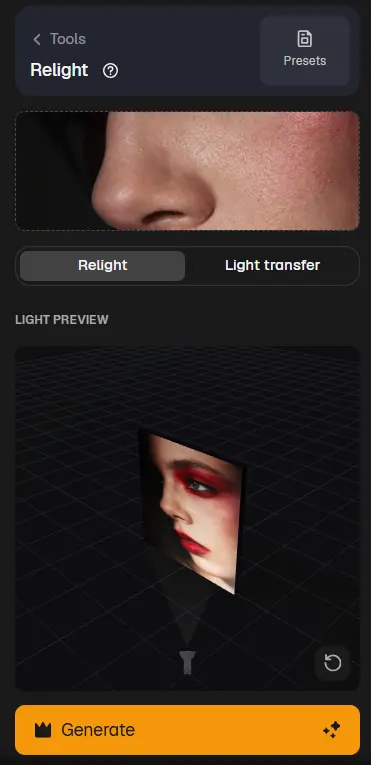
This can be useful for creative work where the original lighting does not match the final look you want.
Video, Audio, 3D and Other Creative Tools
The current Magnific platform also includes tools outside image enhancement.
Its official documentation lists image and video generation, audio tools, 3D capabilities, workflows and other creative tools.
I would not choose Magnific purely because of this broader feature set, though.
If your main goal is image upscaling, the quality and control of the upscaling workflow should matter much more than how many additional AI tools are listed on the platform.
API
Magnific also provides API access for developers who want to integrate its capabilities into their own applications or workflows.
This is useful if you are building an automated image-processing workflow rather than manually uploading individual images.
For most casual users, though, the API is not going to be the reason to choose Magnific.
Magnific Creative vs Precision: What's the Difference?
This is probably the most important comparison to understand before using Magnific.
| Feature | Creative | Precision |
|---|---|---|
| Main purpose | Creative enhancement | More faithful enhancement |
| AI adds/reconstructs detail | Yes | More conservative approach |
| Best suited for | AI art, illustrations and creative images | Photos, products and print-oriented work |
| Source fidelity | Less important than creative improvement | Higher priority |
| Best use case | When you want the image to look more detailed or refined | When you want to preserve the original |
The simple way to think about it is:
Creative = “Improve and reinterpret this image.”
Precision = “Make this image larger while staying closer to what I gave you.”
That difference is more important than any individual slider inside Magnific.
Magnific AI Pricing
Magnific AI's pricing depends on whether you purchase the plan at the regular annual-billing price or go through my exclusive claim offer.
The regular annual-billing prices shown by Magnific are:
| Plan | Regular Price | Credits/Year |
|---|---|---|
| Premium | €12/month | 240K |
| Premium+ | €27/month | 600K |
| Pro | €172.50/month | 4M |
These prices are billed annually. The plans include access to Magnific's image, video and audio models, Spaces, editing tools, stock content, Magnific MCP/plugins and API access with credit-based usage.
Magnific AI Exclusive Discount
If you use my exclusive claim offer, you can get an additional 20% discount on the Premium and Premium+ plans.
Here is how the pricing looks with the exclusive offer:
| Plan | Regular Price | Exclusive Price | Savings | Credits/Year |
|---|---|---|---|---|
| Premium | €12/month | €9.60/month | 20% | 240K |
| Premium+ | €27/month | €21.60/month | 20% | 600K |
| Pro | €172.50/month | €172.50/month | No discount shown | 4M |
So, if you are planning to use Magnific regularly, I would definitely check the exclusive offer before purchasing the subscription.
The Premium plan gives you 240K credits per year and includes Magnific's image and video upscalers. The Premium+ plan increases that to 600K credits per year and also includes Magnific and Topaz upscalers. The Pro plan is aimed at professionals with 4M credits per year and is described as the best credit value on the pricing page.
One thing I particularly like about the current pricing structure is that the displayed plans show the credits as valid for 1 year with no monthly resets. Premium+ and Pro also show an option to top up credits when needed.
The exact features and credit usage can vary depending on the AI tool you use, so I would not choose a plan based only on the number of credits.
My recommendation: If you are an individual creator and don't need a huge credit allocation, Premium at €9.60/month through the exclusive offer looks like the most sensible starting point. If you use AI tools heavily and want access to the additional upscaling options, Premium+ at €21.60/month is the plan I would look at first.
How Do Magnific AI Credits Work?
Magnific uses a shared credit system across its AI tools.
The official documentation says each AI action consumes a certain number of credits depending on the tool, model and complexity of the output. It also states that credits are shared across AI tools rather than being locked to one individual feature.
This means your real cost depends on how you use the platform.
For example, someone who occasionally enhances images has a completely different usage pattern from someone generating and editing visual content every day.
The documentation currently says monthly plan credits reset each billing cycle and unused monthly credits do not roll over. Annual subscribers receive the annual allocation upfront.
So, before choosing a plan, don't just look at the headline price.
Think about how frequently you will actually use the AI tools.
Is Magnific AI Free?
Yes.
The current Magnific documentation lists a Free plan with limited stock downloads and AI usage.
That is important because some older reviews still say Magnific does not have a free plan.
For paid plans, Magnific's documentation does not describe a traditional free trial in the way some SaaS products do. Instead, users can start with the Free plan and move to a paid subscription when they need more access.
Pros and Cons of Magnific AI
PROS
- Creative AI upscaling can reconstruct and add detail.
- Creative mode is useful for AI artwork and illustrations.
- Precision mode gives users a more fidelity-focused option.
- Magnific provides several controls for influencing enhancement.
- The platform now includes image editing and other creative tools.
- It can fit into larger creative workflows.
- API access is available for developers.
CONS
- Creative enhancement can change details from the original.
- It is not the ideal approach for every accuracy-sensitive image.
- AI usage is tied to credits for many tools.
- The broader platform may be more than someone needs if they only want basic upscaling.
Who Should Use Magnific AI?
AI Artists
This is one of the strongest use cases.
If you create AI artwork and want to increase the resolution while allowing AI to add more visual detail, Creative upscaling is a natural fit.
This is especially useful when your original image looks good but lacks the resolution needed for a larger final asset.
Graphic Designers
Magnific can be useful when you want AI-assisted enhancement and editing alongside other creative tools.
The bigger advantage here is having several AI creative capabilities in the same platform.
Photographers
Photographers can use Magnific for image enhancement, but I would pay close attention to the difference between Creative and Precision.
If preserving the original photograph is important, Precision is the safer direction.
E-commerce Creators
This is where I would be more careful.
If you are enhancing a product image, the final image still needs to accurately represent the actual product.
Creative AI can introduce or reinterpret details, so I would not use a creative enhancement workflow on a product image without carefully checking the final output.
Agencies
Agencies producing visual content across multiple projects may benefit more from Magnific's broader platform than someone who only needs an occasional upscale.
Magnific currently also offers Business and Enterprise options for teams and organizations. Its Business documentation says the self-serve Business plan supports teams of 2 to 100 users with shared credits, administration and usage reporting.
Casual Users
If you only upscale an image a few times per year, I would question whether you need a paid creative platform at all.
A simpler or free tool may be enough for occasional use.
Who Should Not Use Magnific AI?
Magnific may not be the best fit if your main requirement is strict source fidelity.
For example, I would be cautious about using Creative mode for:
- Product images
- Logos
- Text-heavy graphics
- Technical images
- Historical images
- Evidence or documentation where the original detail must not be altered
It may also be unnecessary if you only need basic enlargement and don't need the broader AI workflow.
In that situation, paying for a large creative platform may not provide enough additional value.
Magnific AI vs Topaz Gigapixel
The most important alternative to compare with Magnific is Topaz Gigapixel.
But I don't think it makes sense to simply say one is better.
They approach image enhancement differently.
| Magnific AI | Topaz Gigapixel | |
|---|---|---|
| Main strength | Creative AI enhancement | Image upscaling/enhancement |
| Creative detail reconstruction | Strong focus | More preservation-oriented options |
| AI artwork | Strong fit | Also supported |
| Photography | Useful, especially with appropriate mode | Strong fit |
| Local processing | Cloud-based workflow | Unlimited local rendering |
| Cloud processing | Available | Available |
| Best for | Users who want creative AI enhancement | Users who prioritize professional image enlargement |
Topaz currently advertises unlimited local rendering and unlimited cloud image rendering with Gigapixel. Its current models include options such as High Fidelity, Low Res, Text & Shapes, Art & CG, Recover and Face Recovery.
That makes the decision fairly simple.
If your priority is creative reconstruction and adding visual detail, Magnific is worth considering.
If your priority is professional enlargement with unlimited local rendering and a broad set of dedicated enhancement models, Topaz Gigapixel is a strong alternative.
Magnific AI vs Envato Elements
If you are comparing Magnific AI vs Envato Elements, both can be useful for creators, but they are built around different needs.
Magnific is more focused on AI-powered creation, editing, enhancement, and image/video upscaling, while Envato Elements combines AI tools with a large library of creative assets such as stock photos, videos, templates, music, graphics, fonts, and 3D assets.
| Feature | Magnific AI | Envato Elements |
|---|---|---|
| Main focus | AI creative tools, enhancement and upscaling | Creative assets + AI tools |
| AI image generation | Yes | Yes |
| AI image editing | Yes | Yes |
| AI image upscaling | Magnific upscalers | Not its main focus |
| AI video | Yes | Yes |
| AI audio | Yes | Yes |
| Stock assets | 250M+ assets | 29M+ creative assets |
| AI credits | Plan-dependent | Plan-dependent |
| Commercial use | Paid plans include commercial AI license | Commercial license included |
| Best for | AI-focused creative work and image enhancement | Stock assets, templates and AI tools together |
Which One Should You Choose?
If your main goal is AI image creation, editing, or upscaling, I would lean toward Magnific.
Magnific has dedicated image and video upscalers, and its Creative and Precision options let you choose between adding more AI-generated detail and keeping the result closer to the original image.
Envato Elements is different.
I would choose Envato Elements when I need creative assets and AI tools in the same subscription. You get unlimited downloads of more than 29 million creative assets, including stock photos, videos, templates, music, sound effects, graphics, fonts and 3D assets. Envato also provides AI tools for image, video, voice, music, graphics and other creative tasks.
Another important difference is the AI credit system. Envato currently provides 20 AI credits per month on Core, 200 on Plus, and 500, 1,000 or 2,000 on Ultimate, depending on the selected Ultimate allocation. Magnific's current individual plans include 240K credits/year on Premium, 600K on Premium+, and 4M on Pro.
So, don't compare the two only by the number of AI credits. Their credit systems are built around different products and usage models.
Magnific AI vs Envato Elements: My Verdict
If you mainly want an AI image upscaler and creative enhancement tool, Magnific AI is the better fit.
If you need stock photos, videos, templates, fonts, music and AI tools under one subscription, Envato Elements can make more sense.
So I would not consider Envato Elements a direct replacement for Magnific's image upscaling features. Instead, choose based on your workflow.
Choose Magnific AI when your workflow is mainly about creating, editing, enhancing, and upscaling images with AI.
Choose Envato Elements when you need a large library of ready-made creative assets along with AI tools for your projects.
Magnific AI Alternatives
Topaz Gigapixel
Best for users who want a dedicated professional image upscaling workflow with local processing and multiple enhancement models.
Adobe Photoshop
Photoshop is worth considering if you already work heavily inside Adobe's ecosystem and want image editing and AI enhancement together.
Adobe's current Generative Upscale workflow supports 2x and 4x scaling.
Upscayl
Upscayl is a good option for users looking for a free, open-source desktop image upscaler.
It is especially interesting if you don't want to pay for a subscription simply to upscale images occasionally.
Let's Enhance
Let's Enhance is another cloud-based image enhancement option and can make sense for users who prefer an online workflow.
Krea
Krea is another relevant alternative for creators who want a broader AI visual workflow rather than a dedicated traditional upscaler.
The right alternative depends heavily on whether your priority is creative generation, image fidelity, local processing, or occasional free upscaling.
Is Magnific AI Worth It?
I think Magnific makes the most sense when you actually need what makes it different.
If you regularly work with AI-generated images, illustrations, creative assets or other visuals where adding detail is useful, the Creative workflow can be very valuable.
But if you are looking at Magnific simply because you have one blurry photo and want to make it larger, I wouldn't automatically recommend paying for it.
The same applies to accuracy-sensitive images.
If you need a product photo to remain an accurate representation of the product, or you need a logo or text to remain exactly as it is, creative reconstruction is not necessarily what you want.
So my recommendation would be:
Magnific is worth considering if you want AI to actively improve and reconstruct your images.
It is less compelling if you only want predictable, basic enlargement or strict preservation of the original.
Final Verdict
After using Magnific from its Freepik days to its current AI-focused platform, I think the biggest change is how much more useful it has become for my overall content workflow.
Earlier, I mainly used it for vectors, photos, illustrations, mockups, sound effects, and other stock assets.
Now, I use it for image generation, voice generation, audio isolation, and sometimes video generation and video upscaling.
For me, the AI image generator stands out because of the number of models available and the ability to use reference images.
The Voice Generator is also useful for creating natural-sounding voiceovers, although the character limit can become a problem when you need to generate a long script.
And for YouTube, I find Audio Isolation particularly useful because it makes background-noise removal very simple.
I also like having Creative and Precision options for image upscaling because not every image needs the same type of enhancement.
So, is Magnific AI worth it?
For my workflow, yes.
But I wouldn't recommend it simply because it has a long list of AI tools.
If you regularly create content and need AI image generation, image enhancement, voice, audio, video, and stock assets, Magnific can provide a lot of value from one platform.
If you only need basic image enlargement, a dedicated upscaler may be a better choice.
And if you are planning to subscribe, I would check my exclusive claim offer first because Premium and Premium+ currently have the discounted prices mentioned above.
Frequently Asked Questions
Q1. What is Magnific AI?
Magnific is an AI creative platform that includes image generation, editing, enhancement, upscaling, video, audio, 3D and other creative tools.
Q2. Is Magnific AI free?
Yes. Magnific currently offers a Free plan with limited AI usage and stock access.
Q3. How much does Magnific AI cost?
Magnific currently offers Free, Premium, Premium+, Pro, Business and Enterprise plans. The exact paid price depends on the current plan and billing option, so check the official pricing page before subscribing.
Q4. What is Magnific Creative?
Creative is Magnific's more generative image-upscaling approach. It can reconstruct and add visual detail instead of simply enlarging the original image.
Q5. What is Magnific Precision?
Precision is designed for a more faithful enhancement workflow and is positioned by Magnific for use cases such as photos, products and print.
Q6. Is Magnific AI good for AI-generated images?
Yes, AI-generated artwork is one of the use cases where Magnific's Creative approach can make sense because adding or reconstructing visual detail is often desirable.
Q7. Can Magnific AI upscale photos?
Yes. Magnific provides image upscaling tools, including a Precision workflow intended for photos and other images where preserving the source is important.
