


In this Revid AI review, I’ll look at what the platform can do, how much it costs, and how far its credits go. Revid AI is an AI-powered video creation platform that helps you turn ideas, scripts, blog posts, and other content into short-form videos. It also includes AI voiceovers, captions, video editing, and social media publishing tools.
If you create content for YouTube Shorts, Instagram Reels, or TikTok, Revid AI gives you several tools to manage video production from one dashboard. You can create videos from text, repurpose existing articles, generate AI visuals, and automate recurring content.
The platform goes beyond basic text-to-video generation. It also offers a viral video library, different AI video models, AI avatars, and integrations for developers.
But is Revid AI actually worth paying for? How much does it cost, and how many videos can you create with its monthly credits?
In this Revid AI review, I'll explain its features, pricing, credit system, customer feedback, advantages, and limitations. I'll also compare it with other AI video generators so you can decide whether it fits your content requirements.
What Is Revid AI?
Revid AI is an AI-powered short-form video creation platform operated by Revid SAS, a company registered in France and based in Paris.

Revid AI
- Turn scripts and article URLs into short-form videos
- Add AI visuals, voiceovers and captions
- Edit scenes in a timeline before exporting
- Schedule to TikTok, Instagram, YouTube and X
- Run recurring workflows with Auto-Mode
- Provides API, MCP, and CLI access
Growth includes 2,000 monthly AI credits at the displayed $39/month promotional price.
The product originally launched as Typeframes in 2023 before being renamed Revid in April 2024.
Its main purpose is to help creators and businesses produce videos without having to manage every production task manually.
You can start with a written prompt, script, article URL, or other supported input. Revid then provides tools to generate visuals, narration, captions, and finished videos.
It also includes a video editor and publishing integrations for supported social platforms.
Here are some things you can do with Revid AI:
- Turn text prompts and scripts into videos.
- Convert blog posts and website links into short-form content.
- Generate AI images and video clips.
- Add AI-generated voiceovers and captions.
- Create talking avatar videos and face swaps.
- Repurpose existing video content.
- Find popular videos for content inspiration.
- Schedule and publish videos to connected social accounts.
- Automate recurring video creation.
- Connect video workflows through its API, MCP server, and CLI.
What makes Revid interesting is that it combines different stages of video production instead of focusing on just one generation feature. You can research ideas, prepare content, generate scenes, edit the result, and publish through supported integrations.
Revid AI Promo Code
Get 20% Off Your First Month of Revid AI
Enter SOFTREVIEW at checkout and confirm the discount before paying.
Your exclusive deal is ready!
Copy the code below and use it at checkout to save.
If you're planning to purchase Revid AI, you can use our partner discount code for a reduction on your first month.
Exclusive SoftReview partner code: SOFTREVIEW
New customers can get 20% off their first month.
Enter the code during the applicable checkout process and make sure the discount appears before completing your payment.
What Is Revid AI Used For?
Revid AI is mainly designed for short-form video production.
For example, a blogger can turn an existing article into a narrated video, while a YouTuber can use scripts to create Shorts. Marketing agencies can also use its automation features to manage recurring video projects.
Some common use cases include:
| User type | How Revid AI can help |
|---|---|
| YouTubers | Create short videos from scripts and ideas |
| Bloggers | Convert articles into video content |
| Affiliate marketers | Repurpose product-related articles |
| Social media agencies | Produce videos for different accounts |
| Podcast creators | Turn longer content into shorter clips |
| E-commerce businesses | Create promotional videos |
| Musicians | Create music and lyric videos |
| Developers | Connect video generation to other applications |
The platform is particularly relevant if you already have content ideas or written material that you want to distribute through video.
Who Should Use Revid AI?
Revid AI is aimed at individual creators, businesses, agencies, and developers.
However, the value you get from it depends on your production requirements.
If you publish videos regularly, its automation and publishing tools may save time. If you only make a few videos occasionally, a monthly subscription may be harder to justify.
The pricing and credit system are important here, so I'll explain those in detail later.
Revid AI Features: What Can You Do With It?
Revid advertises more than 100 AI video tools. These cover different content creation workflows, including video generation, editing, voiceovers, avatars, and publishing.
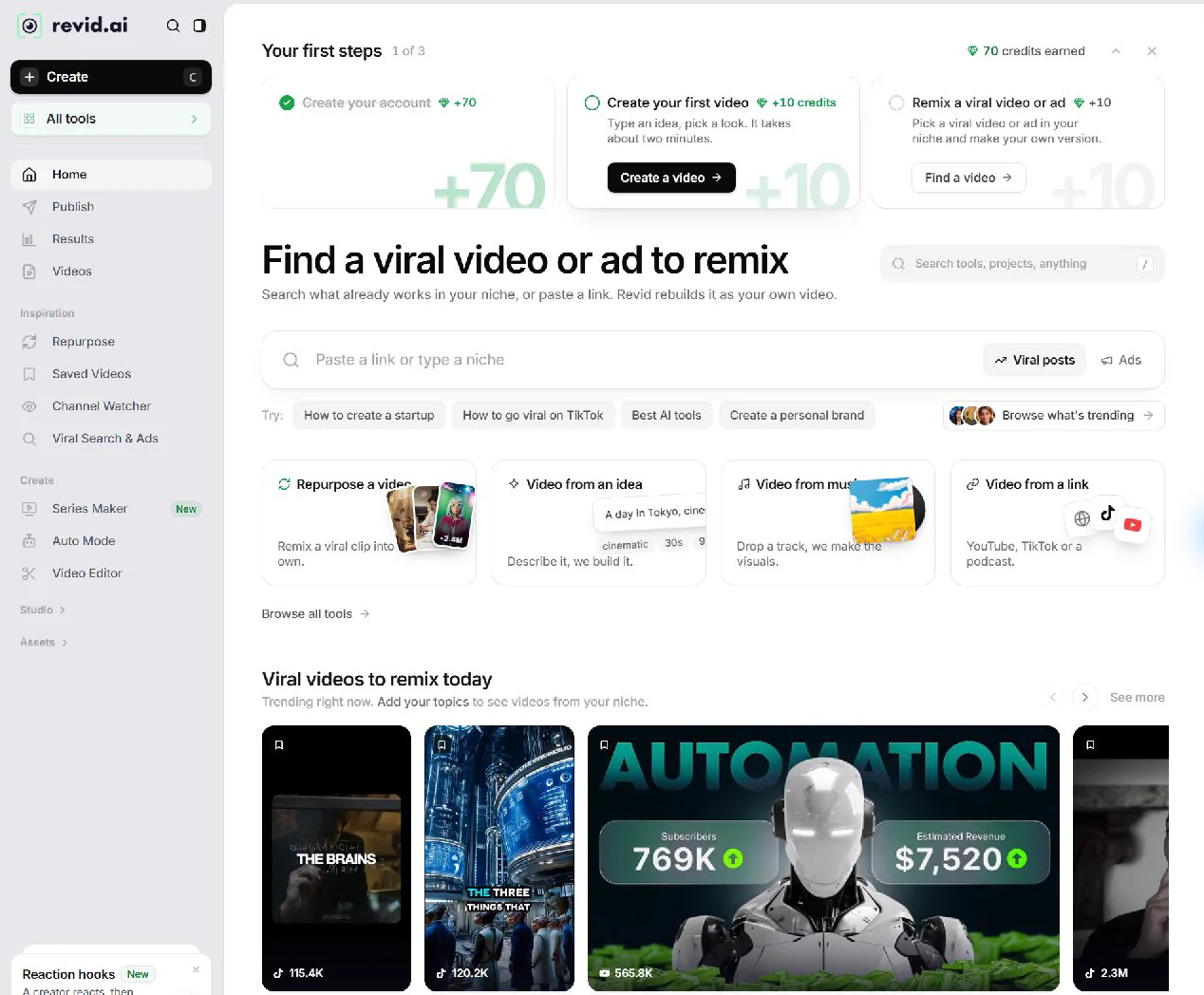
Here are the main features worth understanding before purchasing.
1. AI Text-to-Video Generator
The text-to-video generator lets you turn a written idea or script into a video.
You provide the topic and instructions, then configure the available generation options. Revid can help prepare the script, visuals, narration, and captions.
For example, you could start with an idea about the benefits of using a VPN. Revid can help turn that topic into a short informational video with narration and visuals.
This is useful for creators who don't want to record themselves for every video.
However, generated scenes still need reviewing. A visual may not always represent the narration accurately, especially when the script includes technical information or specific product details.
2. Article-to-Video Generator
This is one of the more relevant features for bloggers and affiliate marketers.
Instead of preparing a new script from scratch, you can use an existing article or website link as the starting point for video creation.
For example, if you've published an article comparing project management software, you can use that content to prepare a short video covering its main points.
Revid can help transform the written material into a video with narration and visuals.
This gives you another way to distribute content you've already created. You should still review the generated script to make sure it doesn't leave out important information or change the original meaning.
3. AI Video Generation Models
Revid provides access to several AI video-generation models through its platform.
Its documentation lists models and generation options from providers including:
- ByteDance Seedance.
- MiniMax Hailuo.
- Google Veo.
- Wan.
- Other available generation options.
You can select models according to the video workflow and scene you're creating. If you also need to refine still images for your scenes, see our Magnific AI review.
The main thing to consider here is credit consumption. Different models have different generation costs, and higher-quality options can use considerably more credits.
Revid lists Seedance 2.5 at 250 credits per five seconds for 1080p and a separate Seedance 4K option at 500 credits per five seconds.
This is a significant difference compared with lower-cost visual-generation workflows.
4. AI Voiceovers and Voice Cloning
You don't need to record your own narration for every video.
Revid provides more than 1,000 AI voices across over 70 languages, with voice options powered by providers including ElevenLabs and Google.
You can select a voice and use it to narrate your content.
Voice cloning and voice design are also available starting with the Elite plan.
This can help creators maintain a consistent voice across multiple videos. For example, you can create a voice based on your own recording and use it for future narration.
However, only upload voice recordings that belong to you or that you have permission to use.
5. Automatic Captions and Subtitles
Revid can generate captions automatically and supports more than 100 languages for captioning.
It also provides different caption styles and customization options.
This is useful when creating videos for social media, where many viewers watch without sound.
You can adjust the appearance of captions to match your content style. Still, check the generated text before publishing. Product names, technical terms, and unusual words can be transcribed incorrectly.
6. AI Avatars and Face Swaps
Revid includes talking avatar and face-swap tools.
With the avatar workflow, you can create presenter-style videos using an uploaded or selected avatar and a script.
Face-swap and motion-transfer features offer another way to change the appearance of existing video content.
These tools can be useful for product explainers, educational videos, and promotional content.
There is an important limitation: you must have permission to use another person's face, images, or voice. Don't use these features to impersonate someone or create misleading videos.
7. AI Video Editor
Generated videos often need a few changes before they're ready to publish.
Revid includes a timeline editor where you can work on scenes and adjust the video.
You can review the visuals, narration, captions, and other elements before exporting.
For anyone producing informational or affiliate videos, I would recommend checking every scene against the original script. An attractive video is of little use if the visuals don't match what you're explaining.
8. Viral Video Library
Revid has a searchable library containing millions of short-form videos and their publicly available engagement information.
You can use it to research content ideas and find video formats that are getting attention on social platforms.
The platform also provides remixing workflows that use reference videos to help create new content.
This can be useful when researching a niche or planning your next batch of Shorts.
One thing to remember is that a popular reference video doesn't guarantee similar results for your own content. Its topic, audience, timing, and execution all matter.
9. Auto-Mode and Video Automation
If you create videos regularly, Auto-Mode is another feature to examine.
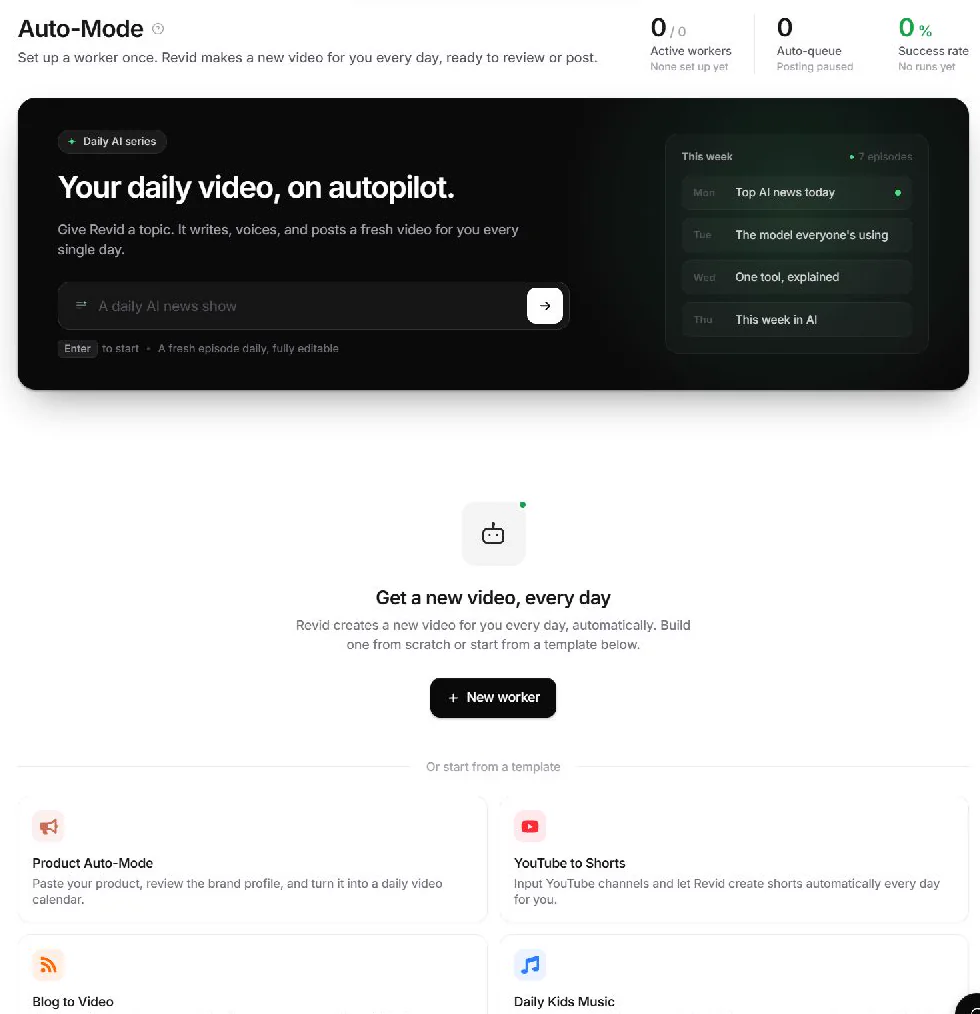
It allows you to configure recurring video-generation workflows using a prompt or content source.
Once configured, an automation worker can generate new videos on a recurring schedule. You can also configure publishing as part of the workflow.
The number of workers depends on your subscription:
| Plan | Auto-Mode workers |
|---|---|
| Hobby | 0 |
| Growth | 3 |
| Elite | 5 |
| Ultra | 10 |
Remember that automated video generation still consumes credits. If you configure several recurring workflows, keep an eye on your monthly balance.
10. Social Media Publishing
Revid lets you connect supported social accounts and publish or schedule videos from its platform.
The documented integrations include:
- TikTok
- YouTube
- X
You can also access available post statistics for connected accounts.
This is useful for creators who manage several channels and prefer to handle publishing from one place.
11. API, MCP Server, and CLI
Revid also provides tools for developers who want to connect video generation to other applications.
Its REST API, MCP server, and CLI provide programmatic access to supported video workflows.
For example, a developer can connect Revid to an application that prepares scripts and sends them for video generation.
The MCP server is particularly relevant for people who work with compatible AI assistants.
These features require an active subscription and are subject to the platform's usage limits.
How Does Revid AI Work?
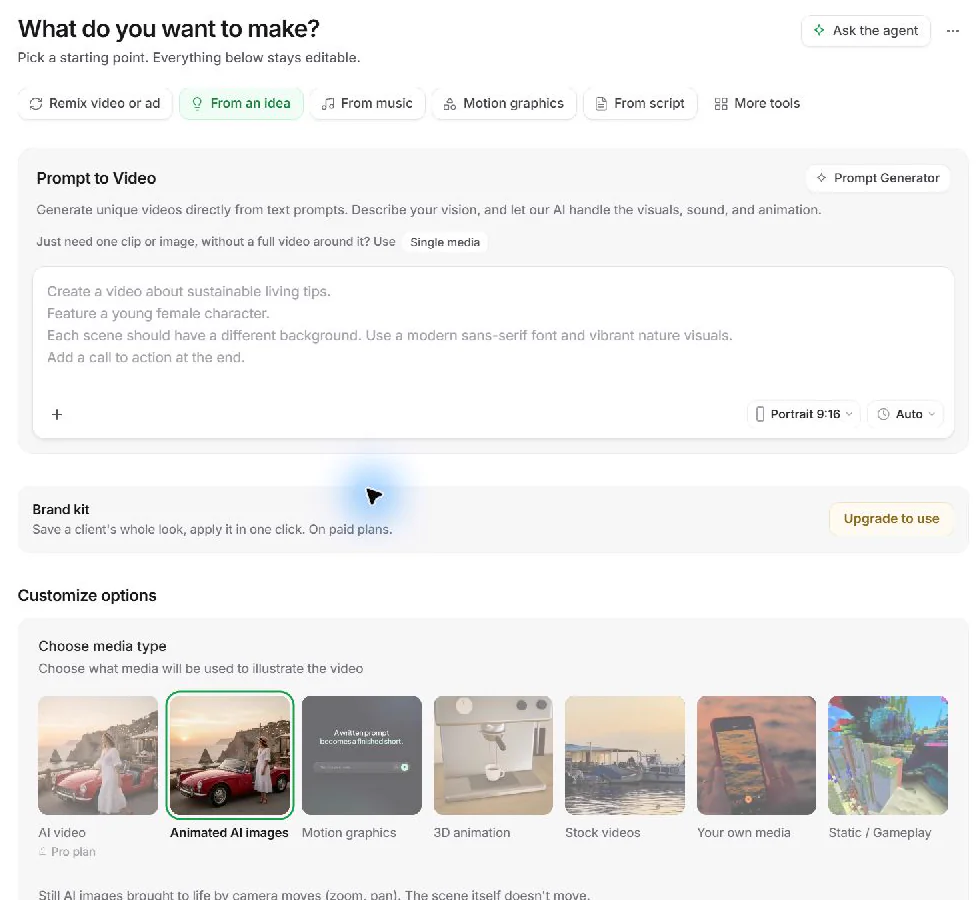
The general process starts with an idea or existing content. You then select a video workflow, configure the available options, generate the video, and make any necessary edits.
Here is how the process works.
Step 1: Choose a Video Creation Tool
Visit the official Revid AI website and create an account.
Once you're inside the platform, choose the tool that matches your requirements.
You can start with text, a script, an article URL, an image, or another supported input.
Step 2: Enter Your Prompt, Script, or URL
Provide the content you want to turn into a video.
If you're creating an educational video, enter the topic and explain what the video should cover.
If you already have a blog post, use its URL as the starting point for article-to-video creation.
Step 3: Select the Video Settings
Configure the available options, such as the video format, visual style, generation model, voiceover, captions, and music.
The exact settings depend on the tool you're using.
Check the estimated credit cost before starting generation. This is especially important when selecting premium AI video models.
Step 4: Generate and Edit the Video
Start the generation process and wait for the video to render.
Once it's ready, review the scenes, narration, and captions. Make changes where necessary.
You may need to regenerate individual elements if they don't match your original instructions.
Step 5: Export or Publish
After editing, export the video or use one of the supported social media integrations.
Revid documents export options in 720p, 1080p, and 4K. However, 4K export is currently marked as beta and has an additional credit cost.
Check the available export settings in your account before starting a project.
Revid AI Pricing: How Much Does It Cost?
Revid AI has different subscription options depending on how you plan to create videos. However, there is one important difference between Hobby and Growth that you should understand before purchasing.
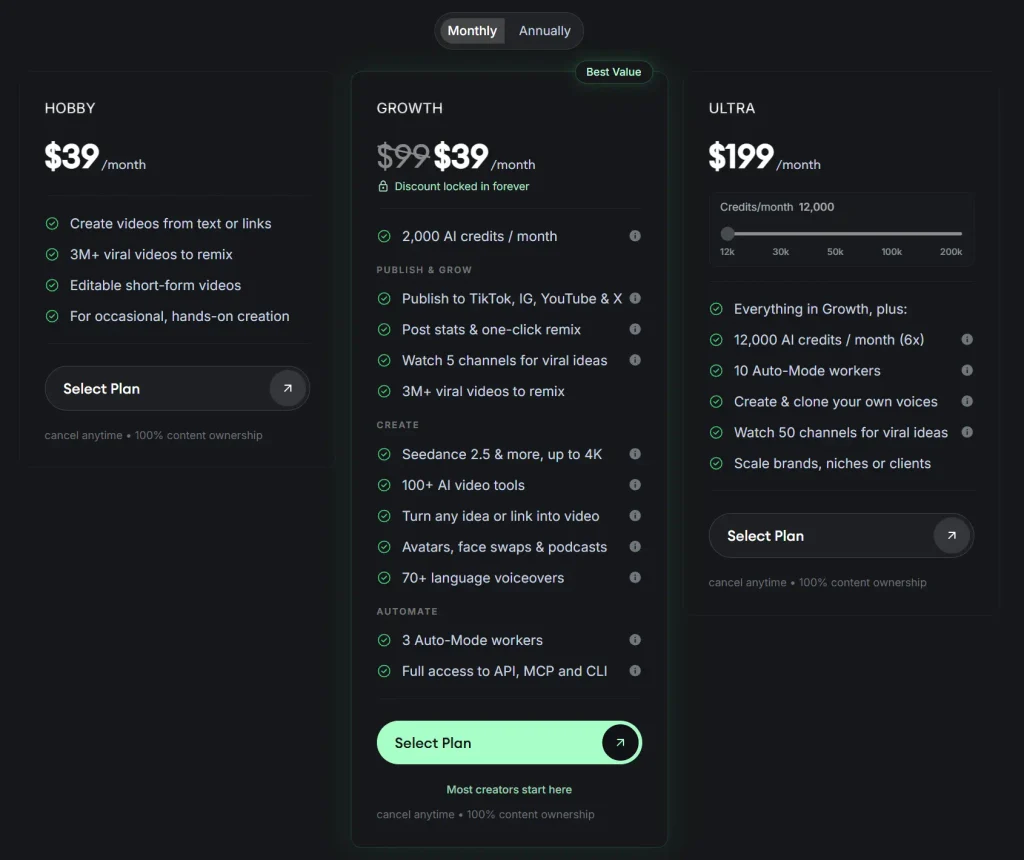
The Hobby plan costs $39/month but does not include monthly AI credits or Auto-Mode workers. It is intended for hands-on editing and exporting.
Growth also currently costs $39/month, but includes 2,000 AI credits and three Auto-Mode workers. The pricing page displays a crossed-out $99 price alongside the $39 promotional price.
Here are the main subscription options:
| Plan | Monthly price | Billed yearly (per month) | Monthly AI credits | Auto-Mode workers |
|---|---|---|---|---|
| Hobby | $39 | Not listed | 0 | 0 |
| Growth | $39 promotional ($99 displayed) | $32 | 2,000 | 3 |
| Elite | $89 | $74 | 5,000 | 5 |
| Ultra | $199 | $166 | 12,000 | 10 |
Prices are in USD. Elite is presented as an upgrade for existing subscribers rather than a standard plan card. The Growth promotional price is subject to the current offer and checkout conditions.
Hobby Plan
The Hobby plan costs $39/month and is designed for occasional, hands-on video editing.
It provides access to the editor and video export workflow, but does not include monthly AI generation credits or Auto-Mode workers.
This is an important distinction because you cannot compare Hobby with Growth simply by looking at their monthly prices.
If you want to generate AI videos regularly, Growth offers considerably more value at the currently displayed $39 promotional price.
Growth Plan
The Growth plan costs $39/month at the current promotional price, reduced from the displayed regular price of $99.
With this subscription, you receive:
- 2,000 monthly AI credits.
- Three Auto-Mode workers.
- Five watched channels for viral video research.
- Access to more than 100 AI video tools.
- Voiceovers in more than 70 languages.
- Social media publishing.
- API, MCP, and CLI access.
Annual billing reduces the monthly equivalent to $32.
For most creators who want to generate videos regularly, this is the plan I would compare first.
Elite Plan
The Elite plan costs $89/month or $74/month with annual billing. Revid presents it as an upgrade option for existing subscribers.
It includes 5,000 monthly credits and five Auto-Mode workers.
The main additional benefit is voice cloning and voice design, which start at this subscription level. You can create an AI version of your own voice for video narration.
This plan makes more sense if you need additional credits or want to use your cloned voice in your videos.
Ultra Plan
The Ultra plan costs $199/month or $166/month with annual billing.
It includes 12,000 monthly credits and ten Auto-Mode workers.
You also get higher-volume channel monitoring and the ability to create and clone your own voices.
This option is intended for agencies and businesses managing larger video production requirements.
How Does the Revid AI Credit System Work?
Before purchasing a subscription, I recommend understanding how Revid calculates credits.
The platform uses credits for different generation operations. The cost depends on the selected visual type, AI model, quality settings, and video length.
A 30-second video made with animated AI images can consume far fewer credits than one created using full AI video generation.
Here is an overview of the published credit costs.
| Operation | Credit consumption |
|---|---|
| AI image generation | 1–16 credits per image |
| AI video generation | 15–500 credits per 5 seconds, depending on model |
| Voice generation | 10 credits per 500 characters |
| Avatar generation | 80–200 credits per 500 characters |
| Music generation | 20 credits |
| 4K export | 10 credits |
The exact cost depends on the generation settings. Revid displays an estimated credit cost before rendering, so check that amount before spending your credits.
How Many Videos Can You Make With 2,000 Credits?
Revid's pricing FAQ estimates that a typical 30-second video with Pro moving images and a voiceover costs around 40–80 credits.
Based on that estimate, 2,000 credits can cover approximately 25–50 videos.
However, this estimate applies to that particular workflow. Full AI video generation consumes considerably more credits.
Here is a more useful comparison:
| 30-second video workflow | Approximate credits | Videos from 2,000 credits |
|---|---|---|
| Pro moving images with voiceover | 40–80 | 25–50 |
| Low AI video with voiceover | Around 100 | Around 20 |
| Pro AI video with voiceover | Around 310 | Around 6 |
These are estimates based on Revid's published credit information. Actual consumption depends on the selected settings and generation workflow.
As you can see, the number of videos you can produce changes significantly depending on the visuals you choose.
If you plan to use premium AI video models for every scene, don't assume that 2,000 credits will give you 25–50 finished videos.
Do Unused Revid AI Credits Roll Over?
No. Monthly subscription credits do not accumulate.
Your monthly allowance resets to the plan's allocated amount at renewal. For annual subscriptions, credits also refresh to the plan's monthly allowance on the first day of each month.
However, separately purchased Credit Boost credits do not expire under the current terms.
Revid offers additional credit packs:
| Credit Boost | Price |
|---|---|
| 1,000 credits | $49 |
| 4,000 credits | $99 |
| 10,000 credits | $199 |
| 100,000 credits | $1,900 |
These are one-time purchases. Credit Boost balances are used after your regular subscription credits.
Does Revid AI Offer a Free Plan or Free Trial?
You can sign up for Revid AI without paying upfront or providing a credit card.
New accounts receive promotional credits to try video generation. Free accounts can also search the viral video library.
However, regular video production uses the monthly credits included with a paid subscription.
The free credits are promotional, so their availability and amount can change. Check the signup page for the current offer.
Can You Get a Refund From Revid AI?
Revid subscriptions are generally non-refundable.
However, its Terms of Service allow the company to grant refunds at its discretion when both of these conditions are met:
- You have used less than 10% of your subscription credits.
- Your payment was made within the last 30 days.
Meeting these conditions does not guarantee a refund. Contact Revid support if you experience generation problems or believe your purchase qualifies.
Can You Cancel Revid AI Anytime?
Yes. You can cancel your subscription through your account settings.
Your paid plan remains active until the end of the billing period you've already paid for. After that, you won't be charged again.
You can continue accessing your account and projects after cancellation, and you retain ownership of the videos you created.
However, there is one limitation: exporting new videos requires an active subscription.
Also, remember that unused monthly subscription credits are not refunded when you cancel.
Is Revid AI Worth Its Subscription Price?
The answer depends on how often you create videos and which generation models you use.
If you're producing short-form videos regularly, having scripting, visuals, voiceovers, captions, editing, and publishing tools together can reduce the number of separate tools you need.
However, creators who rely heavily on premium AI video models should calculate their credit usage before subscribing.
For occasional video creation, Hobby offers an editor and export workflow but no monthly AI credits. At the current promotional price, Growth is a much stronger option if you need AI generation.
Revid AI Pros and Cons
After reviewing the product features, pricing, and subscription conditions, here are the main advantages and disadvantages to consider.
PROS
- Offers multiple AI video creation tools in one platform
- Converts text, scripts, and articles into videos
- Supports AI voiceovers in 70+ languages
- Includes automatic captions and subtitles
- Provides AI avatars and voice cloning
- Includes a viral video library for content research
- Supports publishing to TikTok, Instagram, YouTube, and X
- Offers Auto-Mode for recurring video creation
- Provides API, MCP, and CLI access
CONS
- <br>AI video generation can consume credits quickly
- Generated visuals may require manual editing
- Video generation results may not always be consistent
- Voice cloning is available only on higher-tier plans
- <br>Refunds are generally restricted
Revid AI Trustpilot Rating
The research snapshot collected on November 25, 2026, recorded a Trustpilot rating of 3.9 out of 5 from 307 reviews.
Read Revid AI reviews on Trustpilot
The review count is relatively small compared with the company's reported number of account sign-ups. It should therefore be treated as a snapshot of submitted customer experiences, not a survey of all users.
What Do Users Like About Revid AI?
Positive feedback includes comments about the convenience of the video creation process, generated visuals, and the range of tools available.
Some users appreciate having scripting, voiceovers, captions, and editing in one platform.
Others mention the time saved when creating short-form content.
These experiences suggest that the platform can suit people who want to reduce manual production work. However, results depend on the workflow and generation settings.
What Are the Common Complaints About Revid AI?
Negative customer feedback raises several concerns.
Credit consumption is one recurring issue. Users who need multiple generations or use premium models may find that their balance runs down faster than expected.
Some customers also report unsuccessful generations, editing problems, and dissatisfaction with customer support.
Refund experiences are another area to check. Revid's written policy is generally restrictive, so read the conditions before subscribing.
Customer reviews represent individual experiences. A complaint does not mean every account will encounter the same problem, but repeated complaints are useful when evaluating a subscription.
Is Revid AI Customer Feedback Positive or Negative?
Overall, the feedback is mixed.
There are users who appreciate the platform's convenience and video creation capabilities, while others raise concerns about credits, reliability, and support.
I wouldn't recommend making a purchase decision based on the overall rating alone.
Instead, compare the customer feedback with your intended use case and the platform's current subscription terms.
Is Revid AI Legit and Safe to Use?
Revid AI is operated by Revid SAS, a company registered in France and based in Paris.
The company publishes its Terms of Service and Privacy Policy, which explain subscription conditions, user content, data processing, and account management.
However, there are a few details I would check before uploading business or personal content.
Does Revid AI Offer Commercial Usage Rights?
Yes. According to its Terms of Service, users own their inputs and, to the extent permitted by law, the outputs generated through the platform.
The terms also allow commercial use of generated videos, including after a subscription ends.
However, this doesn't automatically give you rights to every asset used in a video.
You remain responsible for having permission to use third-party images, music, footage, logos, voices, and likenesses.
AI-generated content may also receive different copyright protection depending on the applicable law.
If you're producing client videos or commercial advertisements, check the licensing conditions of the individual assets you use.
How Does Revid AI Handle User Data?
Revid's Privacy Policy explains that it collects account details, prompts, scripts, uploaded files, generated content, and information about connected social accounts.
It also sends the content needed for generation to external AI providers.
These providers may process prompts, reference images, voice samples, scripts, and other inputs to generate the requested media.
Revid states that it doesn't use customer content to train general-purpose AI models and doesn't sell personal data.
Another detail is project visibility. Project pages are public by default unless you change them to unlisted or private.
So, if you're working with confidential business material, check your sharing settings before uploading or publishing anything.
Revid also states that media and rendered videos from inactive free accounts without an active subscription may be deleted after 90 days of inactivity. The company says it emails users before deletion.
I wouldn't use a free account as a permanent storage solution for important video projects.
Does Revid AI Have Copyright Restrictions?
Yes. Although Revid permits commercial use of generated outputs, you must still have the necessary rights to third-party materials.
You should also obtain clear permission before using another person's face, likeness, or voice for AI-generated content.
Revid's terms prohibit deceptive deepfakes and misleading impersonation.
Best Revid AI Alternatives
Revid AI covers several video production tasks, but other platforms focus on specific workflows.
Here are seven alternatives worth comparing.
| Tool | Best use case |
|---|---|
| InVideo AI | Prompt-based video creation |
| Pictory | Article and script-to-video |
| HeyGen | AI avatar videos |
| OpusClip | Repurposing long-form videos |
| CapCut | Manual video editing |
| Runway | AI-generated visual content |
| Higgsfield | Cinematic AI video and camera control |
1. InVideo AI
InVideo AI is a relevant alternative if you want to create videos from written prompts.
Its workflow focuses on turning ideas and scripts into videos using AI-assisted production tools.
If your main requirement is prompt-based video creation, compare its available models, editing options, and subscription limits with Revid AI.
2. Pictory
Pictory is particularly relevant for bloggers and marketers who want to convert existing written content into videos.
It supports script and article-based video creation workflows.
If your main requirement is repurposing blog posts, Pictory is one of the first alternatives I'd compare with Revid.
3. HeyGen
HeyGen focuses on AI avatars and presenter-style videos.
It is a better comparison if you want digital presenters for product explanations, training content, or business communication.
Revid offers avatar functionality too, but compare the specific avatar features and subscription limits before choosing.
4. OpusClip
OpusClip is designed for turning longer videos into shorter clips.
It is useful for podcast creators, YouTubers, and businesses that already have long-form footage.
Revid offers a broader video creation workflow, while OpusClip focuses more directly on repurposing existing recordings.
5. CapCut
CapCut is an alternative for people who prefer more direct control over video editing.
It includes editing tools and AI-assisted features, making it relevant for creators who want to adjust their videos manually.
If you don't need automated video creation and prefer editing your own footage, compare CapCut with Revid.
6. Runway
Runway focuses on AI-generated video and visual content.
It is relevant for creators who want to experiment with AI-generated scenes and creative video workflows.
Revid combines generation with scripting, voiceovers, captions, editing, and publishing. Runway is a different option if visual generation is your main requirement.
7. Higgsfield
Higgsfield is an AI video tool for creators who want more control over how a shot looks and moves. Its Cinema Studio lets you choose camera movements, lenses and aperture before generating a clip.
Compare it with Revid if your priority is directing individual shots for product videos or cinematic clips. Revid’s workflow also covers scripts, captions and publishing for recurring short-form content.
Who Should Buy Revid AI and Who Should Avoid It?
Revid has enough different tools to serve several types of users. However, the subscription makes more sense for some workflows than others.
Revid AI Is Suitable For
Regular short-form video creators
If you publish Shorts, Reels, or TikTok videos frequently, Revid's creation and publishing tools can help manage the production process.
Bloggers and affiliate marketers
You can use existing articles as the starting point for video content instead of preparing every script from scratch.
Social media agencies
Agencies managing recurring content for multiple clients may benefit from Auto-Mode and connected publishing accounts.
Businesses
Businesses producing regular promotional or educational videos can use the platform's different creation workflows.
Developers
The API, MCP server, and CLI make Revid relevant to developers building automated video workflows.
Revid AI May Not Be Suitable For
Occasional creators who don't need AI generation
If you only need an editing and export tool, Hobby may be an option. However, if you want AI generation, its lack of monthly credits is an important limitation.
Creators with limited budgets
Premium video models can consume credits quickly. Calculate your expected monthly usage before purchasing.
Editors who prefer manual control
If you want to adjust every frame, transition, and visual yourself, a traditional editing application may suit you better.
People expecting perfect AI-generated videos
AI generation still requires review. You may need to correct scenes, adjust narration, or regenerate visuals before publishing.
Final Verdict: Is Revid AI Worth It?
Revid AI brings several video production tasks into one platform. You can start with a script or article, generate visuals, add voiceovers and captions, edit the result, and publish through supported social integrations.
Its Auto-Mode and developer tools also make it relevant for people who manage recurring video production.
The biggest thing I'd consider before subscribing is the credit system.
The Growth plan includes 2,000 monthly credits, but the number of videos you can produce depends on the generation models and settings you select. Premium video generation can consume a large part of that balance.
There is also an important difference between Hobby and Growth. Both are currently displayed at $39/month, but Hobby has no monthly AI credits, while Growth includes 2,000 credits and three Auto-Mode workers. If you want to generate videos, Growth is the stronger option at the displayed promotional price.
Customer feedback is mixed. Some users appreciate the platform's convenience, while others report problems with credits, generation reliability, and support.
My recommendation: Consider Revid if you publish short-form content regularly and want several creation tools in one place. If you only need occasional videos or prefer manual editing, compare it with Pictory, CapCut, or OpusClip first.
Before purchasing, try the free account, check the estimated credit cost of your preferred workflow, and read the current subscription and refund terms.
Frequently Asked Questions About Revid AI
Is Revid AI free?
You can sign up without paying upfront or providing a credit card. New accounts receive promotional credits for trying video generation, and free accounts can search the viral video library. Regular video production uses paid subscription credits.
How much does Revid AI cost?
The Hobby plan costs $39/month and includes no monthly AI credits. Growth is currently displayed at a promotional price of $39/month, with 2,000 credits. Elite costs $89/month and Ultra costs $199/month. Annual billing offers lower monthly equivalents. Check the official pricing page for current conditions.
How does the Revid AI credit system work?
Revid uses credits for image generation, video generation, voiceovers, avatars, and other operations. The amount depends on the selected tool and AI model. The editor shows an estimated cost before rendering.
Is Revid AI worth it?
It can be useful for creators who regularly produce short-form videos and want automated creation, editing, and publishing tools. However, its value depends on your monthly video requirements and credit consumption.
Can Revid AI create YouTube Shorts?
Yes. Revid supports short-form video creation in formats suitable for YouTube Shorts. It also provides a YouTube publishing integration for connected accounts.
Can Revid AI turn blog posts into videos?
Yes. You can use article content and website URLs as inputs for its article-to-video workflow.
Can I use Revid AI videos commercially?
Yes. Its Terms of Service permit commercial use of generated outputs, subject to applicable laws and third-party rights. You are responsible for having permission to use uploaded images, music, footage, and other materials.
Can I cancel my Revid AI subscription?
Yes. You can cancel through your account settings. Your subscription remains active until the end of the period you've paid for. After cancellation, exporting new videos requires an active subscription.
Does Revid AI offer refunds?
Subscriptions are generally non-refundable. However, Revid may grant refunds at its discretion if less than 10% of subscription credits have been used and the payment was made within the previous 30 days.
