


Before you pay for AdGuard, check how much you can save on the plan you need. My exclusive offers include 30% off Ad Blocker licenses, 80% off the two-year VPN subscription, and 20% off eligible DNS purchases.
I recommend checking the final price rather than choosing by the discount alone. During the purchase checks for this guide, the VPN offer improved the two-year discount, while the DNS coupon replaced a cheaper automatic deal. Using a code doesn’t always mean paying less.
To help you compare, I’ve put the codes in one table and explained the redemption steps separately for each product. You’ll also find the license options, billing details, and restrictions to check before buying.
AdGuard promo codes and discounts
Save 30% on Ad Blocker
Use Our Code for 30% off an AdGuard Ad Blocker license.
Save 30% on AdGuard Ad Blocker
Copy SOFTREVIEW30 or use the offer link. Check your selected license and final price before paying.
Save 80% on a 2-year VPN plan
Use our code for 80% off a two-year AdGuard VPN subscription.
Save 80% on a two-year AdGuard VPN subscription
Copy SOFTREVIEW80 or use the offer link. Select the two-year subscription and check the full payment before buying.
Save 20% on 1-year DNS Personal
Use our exclusive code for 20% off a one-year AdGuard DNS Personal subscription.
Save 20% on one-year AdGuard DNS Personal
Copy SOFTREVIEW20 or use the offer link. Compare the resulting total with the automatic offer and keep the cheaper eligible option.
These are my exclusive partner codes. I checked AdGuard’s English-language purchase pages and selected USD for the price examples and screenshots below. No payment was completed. All dollar amounts are in US dollars, before applicable tax; local pricing and offers may vary.
For Ad Blocker, the annual and lifetime plan cards displayed the discount, and the Personal lifetime order screen retained it. The VPN two-year and DNS annual Personal order screens also showed their respective savings.
How to apply the AdGuard Ad Blocker promo code
Ad Blocker has two choices to make: how many devices you want to cover and whether you prefer annual or lifetime access.
I suggest applying the discount before selecting a license. That way, you can compare the updated prices on the plan cards.
- Open the official AdGuard Ad Blocker purchase page.
- Scroll below the FAQs and select “Have a promo code?”
- Enter SOFTREVIEW30 and click Apply.
- Return to the plans and select “1 year” or “Lifetime.”
- Choose Personal or Family, then click Choose beneath that license.
- Review the selected license, discount, tax, and total on the order screen.
- Enter your email and continue with payment once the details match your purchase.
During the check, the code-entry option appeared below the FAQs, near the currency selector. Its position may change if AdGuard updates the page.
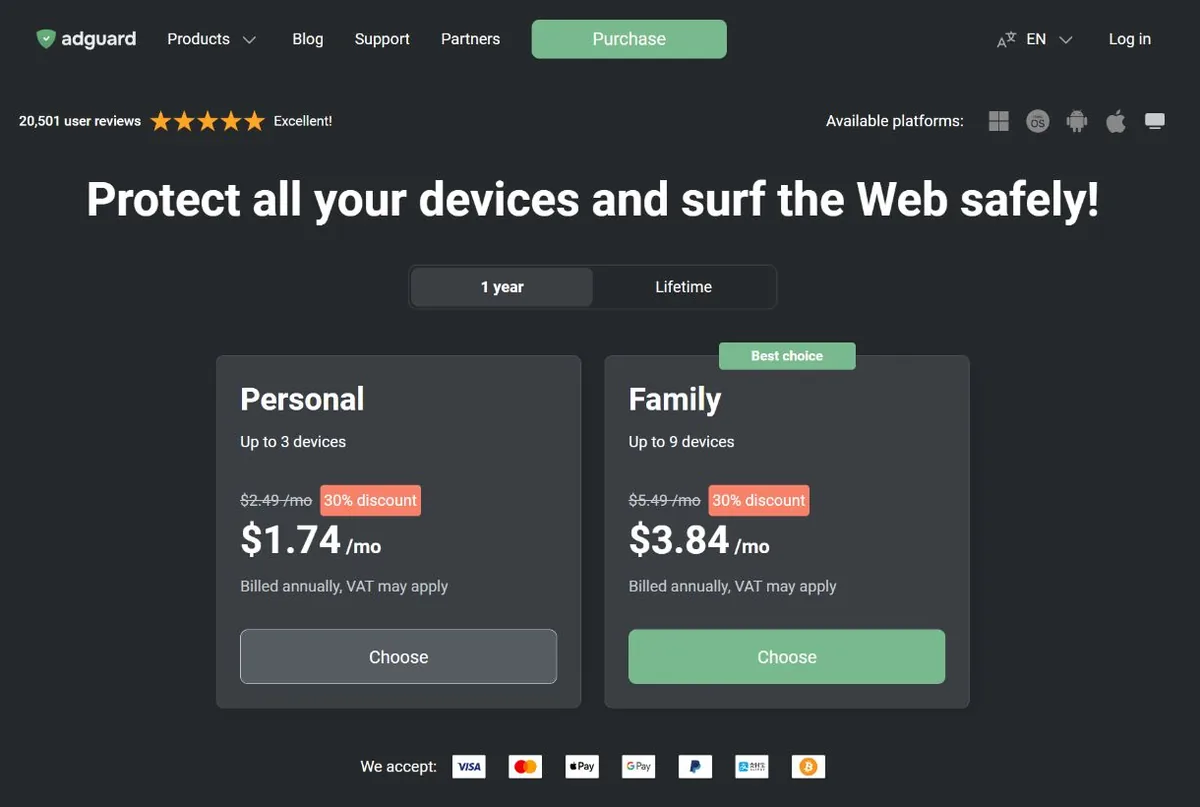
The discount appeared on both Personal and Family under the annual and lifetime tabs. The Personal lifetime order screen also kept the 30% reduction.
Which Ad Blocker license would I choose?
I would start by counting devices. Personal covers up to three, while Family covers up to nine. Both have annual and lifetime options, and AdGuard describes lifetime licenses as perpetual.
A laptop, phone, and tablet would use three slots, even if they all belong to you. If you need more coverage, compare Family with the cost of additional Personal licenses.
For the license term, I would compare the upfront lifetime price with the annual cost. Annual access gives you a shorter commitment. Lifetime may suit you if you expect to keep using the app, but the price difference should guide that decision.
How to apply the AdGuard VPN promo code
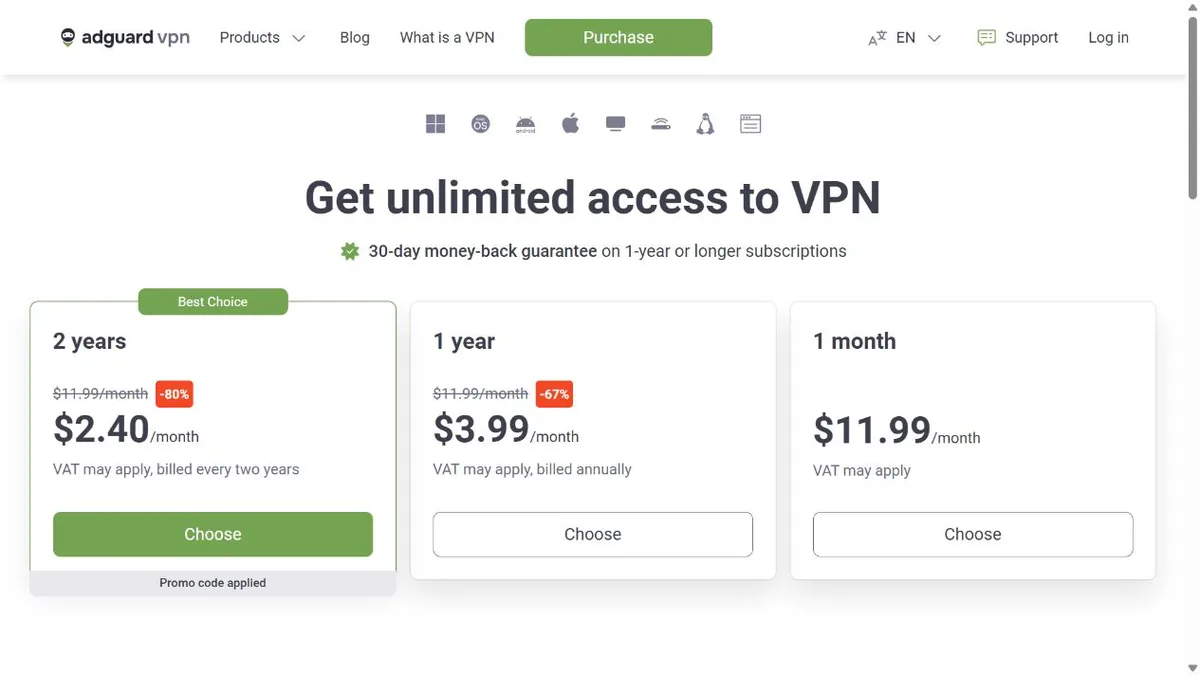
My VPN offer applies to the two-year subscription. The purchase page also lists monthly and annual options, so make sure you select the correct term.
- Visit the official AdGuard VPN purchase page.
- Scroll below the FAQs and select “Have a promo code?”
- Enter SOFTREVIEW80 and click Apply.
- Return to the subscription cards and look for the 80% discount on the two-year option.
- Click Choose beneath that plan.
- Review the full subscription payment, including tax.
- Enter your email and continue when you’re ready to buy.
During the check, the two-year plan changed from a displayed 75% discount to 80%. The order screen retained the 80% saving.
I would compare the full payment with my budget before subscribing. The plan card showed a monthly equivalent, but the selected subscription was billed every two years.
Check your included DNS access
Paid AdGuard VPN includes DNS Personal, according to its official purchase page. If you’re considering both services, I recommend checking that entitlement before paying for DNS separately.
Keep each product’s license term separate. Buying lifetime access to Ad Blocker does not give you lifetime VPN access.
How to apply the AdGuard DNS promo code
For DNS, I recommend noting the original price before entering a coupon. This is where the automatic offer cost less during the purchase check.
- Open the official AdGuard DNS purchase page.
- Select Monthly or Yearly and note the price for your intended plan.
- Scroll below the FAQs and click “Have a promo code?”
- Enter SOFTREVIEW20 and click Apply.
- Compare the revised price with the original offer.
- Keep the cheaper eligible option and click Choose beneath your plan.
- Review the billing period, tax, and total before entering your email and continuing.
The code was accepted for annual Personal. The Team price did not visibly decrease, so I cannot confirm the same saving for that plan.
Why I recommend comparing the automatic offer
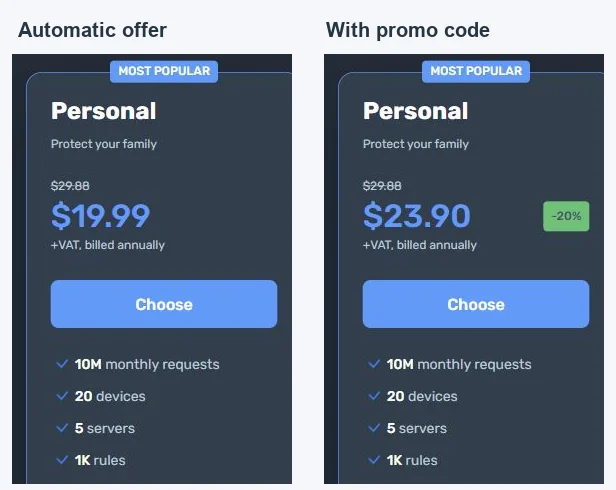
With USD selected, DNS Personal displayed $19.99 per year before tax with the automatic offer. After applying the code, the annual price became $23.90 before tax.
The coupon replaced an automatic 33% discount with 20%, making that purchase more expensive.
If you see a similar result, cancel the code and compare the restored price. These figures describe the checked session; your price may differ by date or country.
Which AdGuard product should you buy?
I wouldn’t choose a product simply because it has the largest discount. Start with what you want it to do.
| Product | Main purpose | What I would compare |
|---|---|---|
| AdGuard Ad Blocker | Ad and tracker filtering through its applications | Device coverage and annual versus lifetime cost |
| AdGuard VPN | A VPN connection | Subscription length and total upfront payment |
| AdGuard DNS | Filtering connections to selected domains through DNS | Plan limits, billing period, and existing VPN entitlement |
AdGuard documents ad and tracker blocking for its Windows application. DNS works at the domain level, so its capabilities differ from those of a full application.
For example, DNS filtering has limitations when advertisements and wanted content share the same domain. I would not buy it expecting every advertisement to disappear.
If you’re still deciding, my AdGuard review covers the features, platform differences, and limitations in more detail. For another VPN option, see my Surfshark VPN review and compare the subscription terms before choosing.
What I recommend checking before payment
Once you choose a plan, read the order summary. I would give the complete amount due more attention than the percentage saving.
| Detail | What to review |
|---|---|
| Product | The correct AdGuard service |
| License or plan | Your intended tier and device coverage |
| Duration | Monthly, annual, two-year, or lifetime |
| Upfront payment | The complete amount due now |
| Tax and currency | Your final payable total |
| Renewal | Whether it renews and the next charge |
A code-applied message confirms acceptance for that purchase. It does not establish that the same discount continues on renewal.
Why is your AdGuard promo code not working?
I would check the product and subscription length first. The VPN offer requires two years, while the other codes belong on their respective purchase pages.
If you selected the correct product, copy the code again and remove spaces at either end. Read the error message and review any stated eligibility or expiration conditions.
An automatic promotion can also affect the result. As the DNS example shows, a coupon may replace the offer already on the page.
If the problem continues, contact the relevant product’s support team with your code, selected plan, and error message. I recommend waiting until the expected reduction appears before paying.
Renewals, upgrades, and refunds
My advice for existing customers
If you already have AdGuard, open your account and compare the renewal or upgrade options before purchasing another license.
AdGuard supports upgrading an Ad Blocker Personal license to Family or moving from annual access to lifetime. Whether a coupon applies to that upgrade needs separate confirmation.
You can also renew Ad Blocker early. AdGuard states that the additional year begins after your current license expires, preserving the remaining subscription time.
Check the refund terms for your purchase
VPN advertises a 30-day money-back guarantee for subscriptions lasting one year or longer. DNS offers a 30-day guarantee for annual subscriptions. Both purchase pages describe monthly subscriptions as non-refundable.
For Ad Blocker, the purchase FAQ and checked order screen state 30 days, while its knowledge base mentions a 60-day threshold. I would confirm the applicable terms before relying on a longer period.
Reseller purchases have different conditions. The examined StackSocial Family lifetime listing requires redemption within 30 days and describes redeemed licenses as final sale. I would compare those conditions alongside the price.
FAQs
Is a promo code the same as an activation key?
No. You enter a promo code to request a discount during purchase. A license or activation key activates the license you bought.
Does AdGuard offer a free trial?
AdGuard lists 14-day trials for Windows and Mac, and a seven-day trial for Android. I recommend checking the application you intend to use because durations differ by platform.
Do I need a paid license for the browser extension?
AdGuard Browser Extension is free and requires no registration. If browser filtering meets your needs, I would consider that option before buying an application license. Official browser-extension page.
Can I combine a coupon with an automatic sale?
I would compare the resulting price rather than assume the discounts combine. In the DNS check, the coupon replaced the automatic offer and increased the cost.
Does the Ad Blocker discount apply to lifetime licenses?
The check showed 30% off Personal and Family lifetime plan cards. The Personal lifetime order screen retained that saving. Eligibility for account upgrades was not confirmed.
Will canceling automatic renewal end access immediately?
AdGuard states that a canceled subscription remains valid until expiration. App Store subscriptions are managed through Apple’s settings.
My recommendation is to choose the product you need, apply its matching code, and compare the final payment. If the automatic offer costs less, use it.
