


I have been testing and recommending web hosting services for years now, and this is my honest Bluehost review based on real research and performance data.
At the start, Bluehost was known as the go-to beginner host cheap, simple, and officially recommended by WordPress.org. But in 2026, the hosting landscape has changed a lot.
They recently migrated over a million customers to Oracle Cloud Infrastructure, upgraded to NVMe storage, and added AI-powered tools to their dashboard. So it is definitely worth a fresh look.
If you are planning to start a website or switch hosts, you might want to read this in-depth Bluehost review first. I will cover all the major features, real performance benchmarks, pricing breakdowns, and help you decide whether Bluehost is actually worth it in 2026.
Quick Verdict: Should You Choose Bluehost?
Short answer: Yes, but only if you match the right profile.
Bluehost is a solid, beginner-friendly host that is officially recommended by WordPress.org. It offers reliable uptime (99.97–99.99%), decent speed, NVMe storage, free Cloudflare CDN, and a straightforward WordPress setup experience.
However, the renewal pricing is steep sometimes up to 3x the introductory rate. And if you are outside the US, the speed performance is noticeably weaker compared to alternatives like Hostinger.
For beginners launching their first WordPress site in the US, Bluehost remains one of the safest and most supported choices. For performance-focused users or international audiences, you might want to explore alternatives.
Who Is Bluehost For?
Bluehost works best for a specific type of user. Ideally, those who want a simple, supported WordPress experience without a steep learning curve.
Bluehost is a good fit for:
- Bloggers and content creators launching their first site
- Small business owners who need a straightforward online presence
- Beginners who prefer 24/7 live chat and phone support
- WordPress users who want an officially recommended host
- eCommerce sellers running a small to medium WooCommerce store
- Freelancers managing websites for multiple small clients
Who Should NOT Use Bluehost?
Bluehost is a capable tool, but it is definitely not for everyone. Here are some cases where you should look elsewhere:
- You need fast load times for a global or non-US audience
- You are on a tight long-term budget (renewal rates can be painful)
- You are running a high-traffic website that needs serious server resources
- You are comfortable managing WordPress yourself and don't need guided onboarding
- You want month-to-month billing without committing to annual contracts
- You are an advanced developer who needs full server control
Bluehost Overview – How Does It Look in 2026?
Bluehost is one of the oldest and most recognized names in web hosting. Founded in 2003, it now hosts over 2 million websites worldwide and is officially recommended by WordPress.org a badge that still carries significant weight.
In late 2025, Bluehost made a major infrastructure upgrade by migrating to Oracle Cloud Infrastructure. This added 9 new global data centers and delivered a reported 4–5x improvement in median response times compared to their old single-location Utah setup.
The platform now includes:
- NVMe SSD storage on all plans for faster read/write speeds
- Free Cloudflare CDN with Argo routing integrated on every plan
- WonderSuite AI tools for building and managing WordPress sites
- Built-in staging environments for testing changes safely
- 99.99% uptime SLA on cloud-level plans
Combining all of this into a single beginner-friendly dashboard, Bluehost is clearly trying to keep up with faster, cheaper competitors like Hostinger. Whether it succeeds depends on your specific needs.
Bluehost Pricing & Plans Breakdown
Understanding Bluehost pricing is honestly a little tricky. The introductory rates look attractive, but you need to read the fine print carefully before committing.
Starter vs. Business vs. eCommerce Essentials
Bluehost's shared hosting currently comes in four tiers:
| Plan | Introductory Price | Renewal Price | Websites | Storage |
|---|---|---|---|---|
| Starter | $3.99/mo | $9.99/mo | 10 | 10 GB NVMe |
| Business | $6.99/mo | $13.99/mo | 50 | 50 GB NVMe |
| eCommerce Essentials | $14.99/mo | $21.99/mo | 100 | 100 GB NVMe |
All plans include a free domain for the first year, free SSL certificate, and free Cloudflare CDN.
My Verdict: The Starter plan is fine for a single personal blog or portfolio site. However, if you need unlimited websites, go straight for Business it is the best value plan in the lineup. The eCommerce Essentials plan makes sense only if you are running an active WooCommerce store.
Month-to-Month vs. Annual Contracts
Bluehost rewards commitment. The longer the term, the lower the price.
If you go month-to-month, the pricing jumps significantly the Standard plan alone can cost around $15.99/month on shorter contracts. That is a massive difference compared to the $3.99/month introductory rate.
For most people, a 12 or 36-month plan is the smarter move financially. Just make sure you are ready to commit before signing up.
The Hidden Costs: Renewal Rates & Checkout Upsells
This is where Bluehost gets a little tricky and where a lot of users get frustrated.
A few things to watch out for:
- Renewal price shock: The Starter plan goes from $3.99/mo to around $9.99–$10.99/mo at renewal a 270%+ increase. Always calculate the full multi-year cost before purchasing.
- Checkout upsells: At checkout, Bluehost will recommend extras like CodeGuard backups, SiteLock security, and Yoast SEO. Most of these are optional and can be skipped, especially if your plan already includes similar features.
- Domain renewal fees: The free domain is only free for year one. After that, it renews at the standard rate, which is higher than registrars like Namecheap or Cloudflare.
- Add-on refund policy: The 30-day money-back guarantee applies to hosting plans only. Any add-ons or extras you purchase separately are non-refundable.
Top 5 Key Features of Bluehost
1. Seamless WordPress Integration
Bluehost is officially recommended by WordPress.org and it shows.
When you sign up, WordPress is pre-installed before you even log in. The custom dashboard integrates plugin management, theme installation, and WordPress site health directly, so you don't have to jump between screens.
You also get expert WordPress support on every plan. All support agents are WordPress-trained, not generic hosting reps. This makes a real difference when you run into a plugin conflict or a broken update.
If you are building your first WordPress site, this level of integration genuinely saves hours of frustration.
2. Upgraded Cloud Infrastructure (NVMe Storage)
The biggest change in 2026 is Bluehost's migration to Oracle Cloud Infrastructure.
All plans now run on NVMe SSD storage, which delivers significantly faster read/write speeds compared to traditional SATA SSDs. For WordPress sites, this translates to quicker database queries and faster page loads, especially for content-heavy or media-rich sites.
The move to 9 global Oracle Cloud data centers also means better performance for non-US visitors compared to the old single-Utah-datacenter setup though US-based sites still benefit the most.
3. Integrated Cloudflare CDN
Every Bluehost plan now includes free Cloudflare CDN with Argo routing built in.
Cloudflare Argo is a premium feature that Cloudflare normally charges extra for. It intelligently routes traffic through the fastest available network paths to reduce latency. Having it included for free is a genuine value add, especially for sites that receive international traffic.
You can enable it with a single click from the dashboard no separate account setup required.
4. Free Domain & SSL Certificate
Every new Bluehost plan comes with a free domain for the first year and a free Let's Encrypt SSL certificate that auto-renews.
These are standard inclusions across most hosting providers today, but worth noting because they eliminate two upfront costs for new site owners. Just remember to factor in the domain renewal cost from year two onward.
5. Built-In Staging Environment & AI Tools
Starting from the Choice Plus plan, Bluehost includes a staging environment. This lets you create a copy of your live site, test changes like new plugins, theme updates, or redesigns and push them live only when you are confident.
For non-developers, this is a huge safety net. Most cheaper hosts make you pay extra for staging.
On top of that, Bluehost's WonderSuite AI tools let you create a personalized WordPress site in minutes by simply describing what you need. It handles layout, content, and design suggestions automatically. Not perfect, but genuinely useful for getting started fast.
Performance, Speed, and Uptime (2026 Benchmarks)
Performance is where Bluehost gets a mixed scorecard in 2026. The uptime is excellent. The speed is decent for US audiences. For global visitors, there is still room for improvement.
Uptime Reliability (99.9% Guarantee)
Bluehost offers a 99.99% uptime guarantee on its cloud-level plans and 99.9% on standard shared hosting. In real-world testing by independent reviewers in 2026, Bluehost consistently delivered 99.97–99.98% uptime among the best recorded across all shared hosting providers tested this year.
If your site goes down below the guaranteed threshold, you can claim a 5% monthly credit within 30 days. Not a major compensation, but the uptime itself is reliable enough that most users will never need it.
Server Response Time & Speed (TTFB)
This is where Bluehost tells two different stories depending on where you are.
For US-based audiences, Bluehost performs very well. Independent tests recorded a TTFB (Time to First Byte) of around 310–394ms on average, and full page load times of under 1 second on a clean WordPress install. In GTMetrix and PageSpeed Insights testing, sites on Bluehost consistently scored 97–98+ in performance.
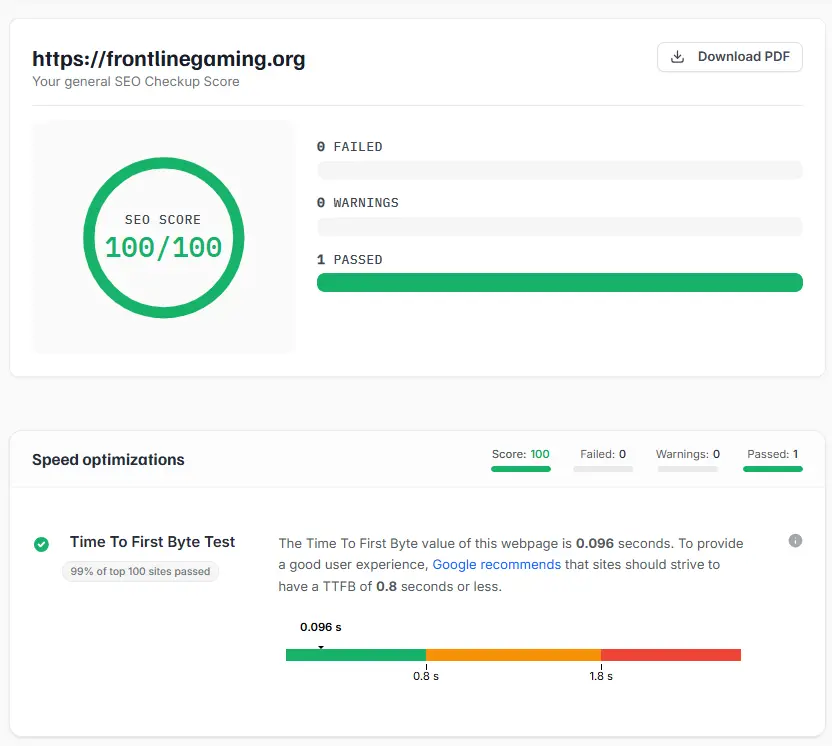
However, for non-US visitors particularly in India or Southeast Asia the performance drops noticeably. Without Cloudflare CDN active, Indian users can experience 2.5–3 second+ load times due to routing through US servers.
The good news: with Cloudflare CDN enabled (which is now free on all plans), the median TTFB drops to 320–550ms globally, which is much more acceptable.
My Verdict: If your audience is primarily in the US, Bluehost's speed is excellent. For international audiences, make sure to enable Cloudflare CDN on day one.
Global Data Centers
Pre-2026, Bluehost ran almost entirely from a single datacenter in Utah. That is now changed.
With the Oracle Cloud migration, Bluehost operates across 9 global data center regions. This does not mean you get to choose your server location on shared hosting plans, but the Cloudflare CDN layer means your content is served from the closest available edge location to your visitors.
For dedicated or VPS plans, server location selection is available.
Bluehost Pros and Cons
Let me break down the key pros and cons I found while researching Bluehost in 2026. I have also included common issues reported by real users.
PROS
- Officially recommended by WordPress.org
- Excellent uptime (99.97–99.99%)
- Beginner-friendly dashboard with guided WordPress setup
- NVMe storage on all plans for faster performance
- Free Cloudflare CDN with Argo routing included
- Free domain and SSL certificate for year one
- Built-in staging environment
- WonderSuite AI tools for quick site building
- 24/7 live chat and phone support
- 30-day money-back guarantee
CONS
- Steep renewal pricing (can be 3x the introductory rate)
- Slower TTFB compared to Hostinger and SiteGround
- Checkout upsells can be confusing for new users
- No India or Southeast Asia data centers on shared plans
- Domain transfer process can be frustrating (users report 60-day lock periods)
- Support quality is inconsistent some users report long wait times and offshore agents
What Customers Say About Bluehost?
Bluehost has a large and polarized user base. Here is how the platform is rated across major review sites:
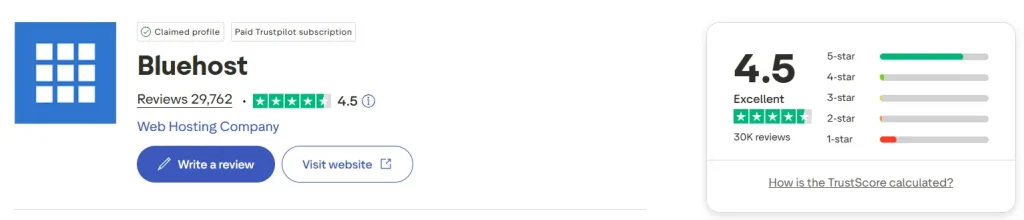
- Trustpilot: 4.5 stars (29,000+ reviews)
- G2: 3.4 stars (150+ reviews)
- Capterra: 3.6 stars (120+ reviews)
The Trustpilot rating is the strongest, with most positive reviews praising ease of WordPress setup, reliable uptime, and responsive phone support. Long-term users frequently mention the quality of support as their main reason for staying.
On the flip side, negative reviews consistently point to three issues: renewal price shock, aggressive upselling at checkout, and inconsistent customer support quality after moving to an offshore support model.
The G2 and Capterra scores are lower because those platforms attract more technically experienced users who tend to compare Bluehost against faster or cheaper alternatives.
Overall, if you go in with realistic expectations particularly around renewal pricing most users have a positive experience.
Bluehost vs. The Competition
Here is a clear side-by-side comparison of Bluehost against the top alternatives in 2026:
| Feature | Bluehost | Hostinger | SiteGround | GoDaddy |
|---|---|---|---|---|
| Starting Price | ~$2.09/mo* | ~$2.99/mo | ~$3.99/mo | ~$ 5.99 /mo |
| Renewal Price | ~$4.68 24/mo | ~$10.99/mo | ~$17.99/mo | ~$8.99/mo |
| Free Domain | ✅ Year 1 | ✅ Year 1 | ❌ | ✅ Year 1 |
| Free SSL | ✅ | ✅ | ✅ | ✅ |
| Storage Type | NVMe SSD | NVMe SSD | SSD Storage | NVMe SSD |
| Uptime | 99.97–99.99% | 99.9% | 99.9% | 99% |
| TTFB (Avg) | 310–394ms | ~180ms | ~145ms | ~450ms |
| Free CDN | ✅ | ✅ | ✅ | ✅ |
| Staging | ✅ | ✅ | ✅ | ✅ |
| WordPress Official Rec. | ✅ | ✅ | ❌ | ❌ |
| Phone Support | ✅ | ❌ | ✅ | ✅ |
| Best For | WP Beginners (US) | Budget/Speed | Performance | Domain Users |
Bluehost vs Hostinger
Hostinger wins on speed (180ms TTFB vs Bluehost's 310ms+), lower long-term pricing, and more features per dollar. If budget and performance are your top priorities, Hostinger is the stronger choice.
However, Bluehost beats Hostinger on phone support (a rare perk in this price range), the official WordPress.org recommendation, and a more polished guided onboarding experience for complete beginners.
Bluehost vs SiteGround
SiteGround is faster (145ms TTFB) and has superior managed WordPress features. But it is more expensive on renewal and lacks phone support.
Bluehost is better for users who need affordable entry-level hosting with phone backup. SiteGround is better for performance-focused WordPress users who don't mind paying more.
Bluehost vs GoDaddy
Bluehost beats GoDaddy on almost every metric better pricing, more storage, free CDN, staging, and the WordPress.org recommendation. GoDaddy's main advantage is its domain registrar ecosystem, which is convenient if you already manage domains there.
For standalone hosting, Bluehost offers significantly better value than GoDaddy.
Final Verdict: Is Bluehost Worth It in 2026?
As we wrap up, one thing is clear: Bluehost has genuinely improved in 2026. The Oracle Cloud migration, NVMe storage, free Cloudflare CDN, and WonderSuite AI tools show that they are investing seriously in keeping up with the competition.
Is it the fastest host? No. Hostinger and SiteGround both beat it on raw speed metrics. Is it the cheapest long-term? Also no the renewal pricing can be a nasty surprise if you are not prepared for it.
But for a beginner launching their first WordPress site in the US who wants a smooth setup experience, 24/7 phone support, and the peace of mind of an officially WordPress-recommended host Bluehost remains one of the best choices available in 2026.
I suggest taking advantage of the 30-day money-back guarantee before committing long-term. Test the dashboard, run a speed test on your test site, and see how the support team responds when you have a real question.
If you are still unsure whether Bluehost is right for you, drop your questions in the comments and I will be happy to help.
Frequently Asked Questions
Q1. Is Bluehost good for beginners?
Yes. Bluehost is one of the most beginner-friendly hosting platforms available. WordPress comes pre-installed, the dashboard is intuitive, and 24/7 phone and chat support is available on all plans.
Q2. Does Bluehost offer a free trial?
Bluehost does not offer a free trial. However, all plans come with a 30-day money-back guarantee, which gives you enough time to test the service.
Q3. What happens to my domain if I cancel Bluehost?
If you registered a free domain through Bluehost and cancel within 30 days, a non-refundable domain fee will be deducted from your refund. After 30 days, no refunds are available.
Q4. Is Bluehost good for WordPress?
Yes. Bluehost is officially recommended by WordPress.org, comes with pre-installed WordPress, automatic updates, staging environments, and WordPress-trained support agents.
Q5. How does Bluehost compare to Hostinger?
Hostinger is faster, cheaper on renewals, and offers more features per dollar. Bluehost wins on phone support, guided onboarding, and the official WordPress endorsement. For pure value, Hostinger wins. For beginner support quality, Bluehost wins.
Q6. What is the best Bluehost plan for a small business?
The Choice Plus plan is the best value for most small businesses. It supports unlimited websites, includes 40 GB NVMe storage, free CDN, SSL, domain, and a staging environment all for a reasonable introductory price.
