


I have been using Cloudways for hosting different types of websites, including blogs and client projects, where speed and stability really matter. In this Cloudways review, I tested its latest 2026 updates, including performance, support quality, and pricing changes, to see whether it still holds its position as one of the best managed cloud hosting platforms.
Cloudways is not like traditional hosting providers. Instead of giving you shared hosting or basic VPS, it provides a managed layer on top of powerful cloud infrastructure like DigitalOcean, AWS, and Google Cloud. This means you get the power of cloud hosting without dealing with server setup, optimization, or maintenance.
But in 2026, things are slightly different. Pricing has changed, support has evolved with AI integration, and new scaling features are being introduced. So the main question is simple is Cloudways still worth your money today? Let’s break it down step by step.
Quick Verdict (For Fast Readers)
If you don’t want to read the full review, here’s the short answer. Cloudways is still one of the best managed cloud hosting platforms in 2026. It offers strong performance, reliable uptime, and an easy-to-use dashboard that removes technical complexity. However, you do pay extra compared to raw cloud providers, and support is good but not always instant for advanced issues.
From my experience, if you want powerful hosting without managing servers yourself, Cloudways is absolutely worth it.

Cloudways Overview
- Managed cloud hosting that removes all server management complexity
- ThunderStack technology for faster website
- One-click scaling to handle traffic growth
- Free Object Cache Pro for better speed
- Cloudflare Enterprise add-on for improved global performance and security
Cloudways is a managed cloud hosting platform that lets you host your website on top providers like DigitalOcean, AWS, and Google Cloud without handling server setup or maintenance.
The Cloudways Philosophy: What Exactly Are You Paying For?
To understand Cloudways, you need to understand its core model. Cloudways works as a Platform as a Service, which means it acts as a layer between you and the actual cloud provider.
Instead of directly using DigitalOcean, AWS, or Google Cloud, you access them through Cloudways. This layer takes care of server setup, security, updates, and performance optimization.
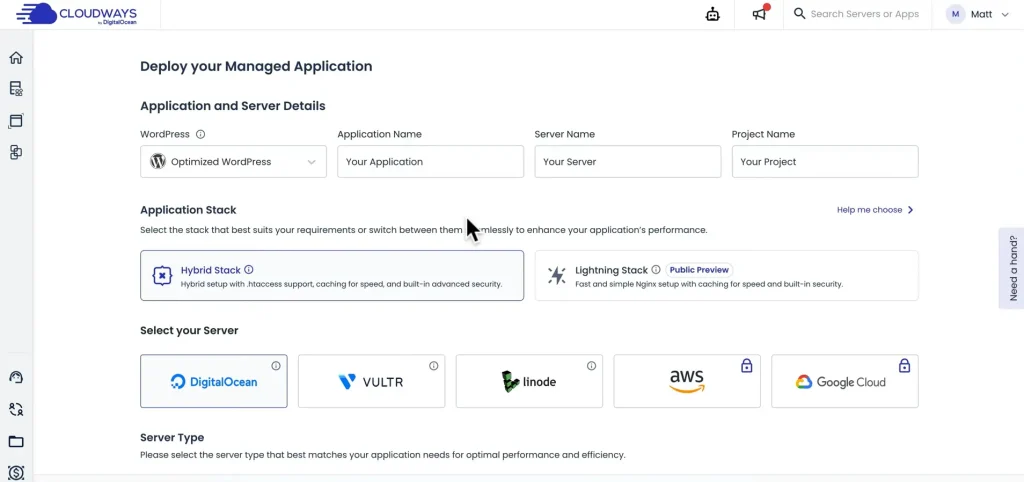
In simple terms, Cloudways removes the technical complexity of cloud hosting.
You are not just paying for a server. You are paying for:
- Managed infrastructure
- Performance optimization
- Security and monitoring
- Easy dashboard and control
This is why Cloudways costs more than raw cloud providers. It adds convenience and saves time, especially for non-technical users.
2026 Performance Benchmarks (The Data)
Performance is the main reason most people switch to Cloudways, so I tested it across different scenarios.
When comparing PHP 8.3 with PHP 8.2, I noticed slightly better performance with PHP 8.3. The improvement is not massive, but on high-traffic sites, even small gains help reduce server load and improve response time.
Looking at global performance, Time to First Byte remained stable across regions. In the US, response time stayed around 200 to 300 milliseconds, while Europe showed similar stability with slightly higher latency. In Asia, performance was good but clearly improved when a CDN was enabled.
Over the last 12 months, uptime has been consistent at around 99.9 percent. I did not experience any major downtime, which makes Cloudways reliable for business-critical websites.
Overall, performance is still one of Cloudways’ strongest points in 2026.
Key Features That Actually Matter (Explained)
Cloudways offers many features, but only a few truly impact performance and usability. Here are the most important ones explained in simple terms:
1. ThunderStack (Performance Engine)
Cloudways uses a powerful stack called ThunderStack, which includes Nginx, Apache, Varnish, and Redis. Instead of relying on a single server setup, it combines multiple technologies to handle traffic efficiently. This results in faster loading speed and better handling of high traffic.
2. Managed Cloud Hosting
With Cloudways, you don’t need to manage servers manually. It handles server setup, updates, security patches, and optimization for you. This is especially useful for beginners or business owners who don’t want technical headaches.
3. Vertical Scaling (Easy Upgrades)
Cloudways allows you to increase your server resources with just a few clicks. If your website gets more traffic, you can upgrade RAM, CPU, and storage without migrating your site.
4. Object Cache Pro (Free Premium Feature)
Object Cache Pro is a premium caching tool that improves database performance, especially for WordPress websites. It usually costs around $95 per month, but Cloudways includes it in selected plans, making it a big value addition.
5. Cloudflare Enterprise Add-on
Cloudways offers Cloudflare Enterprise integration at a low cost per domain. This improves global speed, reduces latency, and adds extra security protection. It is very useful for websites with international traffic.
6. Staging Environment
You can create a staging site to test changes before applying them to your live website. This helps avoid errors and keeps your main site safe.
7. Automated Backups
Cloudways automatically backs up your website at regular intervals. You can also restore your site easily if something goes wrong, which adds an extra layer of safety.
The “DigitalOcean Era”: Changes You Need to Know
Cloudways has evolved over time, especially with deeper alignment with DigitalOcean infrastructure. One of the noticeable changes is pricing. While it is still competitive compared to managed hosting providers, the base cost has slightly increased.
Another major change is in support. Cloudways now uses a mix of AI-based assistance and human support. The AI system helps resolve basic queries quickly, which is useful for common issues.
However, for more complex problems, you still rely on human support, and response times can vary. In my experience, simple issues are resolved quickly, but advanced troubleshooting may take longer.
These changes show that Cloudways is scaling its support system, but it is still not perfect.
Cloudways Pricing Breakdown (No Hidden Fees)
Cloudways pricing depends on the cloud provider you choose, which makes it flexible but sometimes confusing for beginners.
Here is a simple comparison:
| Provider | Starting Price | Use Case |
|---|---|---|
| DigitalOcean | ~$11/month | Blogs & small sites |
| AWS | ~$36/month | Scalable apps |
| Google Cloud | ~$33/month | Enterprise use |
One important concept to understand is the managed markup. For example, a DigitalOcean server that costs around $6 per month directly will cost around $11 per month on Cloudways.
This extra cost is for management, optimization, and support.
There are no hidden fees, but you should clearly understand what you are paying for. Once you do, the pricing feels justified.
Pros & Cons (Brutally Honest)
PROS
- Excellent speed and performance with ThunderStack
- Easy to use compared to raw cloud hosting
- Flexible cloud providers (DigitalOcean, AWS, GCP)
- One-click scaling for growing websites
- Free premium features like Object Cache Pro
- Built-in staging and backup system
CONS
- No email hosting included
- No domain registration service
- Higher cost than unmanaged cloud providers
- Support can be slow for advanced issues
- Custom dashboard (no cPanel, slight learning curve)
Cloudways vs The Competition (2026 Update)
Cloudways sits in a unique position between shared hosting and premium managed hosting. Let’s compare it with the top competitors.
Cloudways vs Kinsta (Price vs Power)
Kinsta is a fully managed WordPress hosting platform that focuses on simplicity. It is very beginner-friendly but comes at a higher price.
Cloudways, on the other hand, gives you more control and flexibility because you can choose your cloud provider. It is also more affordable for similar performance levels.
- If you want simplicity, go with Kinsta.
- If you want flexibility and better pricing, Cloudways is the better option.
Cloudways vs Rocket.net (Edge Performance)
Rocket.net focuses on edge-based hosting, which means your website is delivered from servers closer to the user. This results in very fast global performance.
Cloudways still offers strong speed, but Rocket.net can be faster in global delivery due to its edge network. However, Cloudways gives more control over server configuration.
- Rocket.net is better for pure speed.
- Cloudways is better for control and customization.
Cloudways vs SiteGround (Growth Upgrade)
SiteGround is a popular choice for beginners because it is simple and affordable. However, as your website grows, you may face limitations in performance and scalability.
Cloudways is often the next step for users who outgrow SiteGround. It provides better speed, scalability, and server control.
- SiteGround is good for starting.
- Cloudways is better for scaling and performance.
Cloudways vs Servebolt
Servebolt is another hosting option you may come across when looking for a Cloudways alternative, especially if website performance is your main priority. However, both platforms work differently, so the better option depends on what you actually need from your hosting.
| Feature | Cloudways | Servebolt |
|---|---|---|
| Starting price | From $11/month | From $99/month |
| Hosting approach | Managed cloud hosting | Managed performance hosting |
| Infrastructure | Choose from supported cloud providers | Servebolt-managed infrastructure |
| WordPress | Yes | Yes |
| WooCommerce | Yes | Yes |
| Scaling | Vertical scaling; autoscaling available with Autonomous | Built for high-traffic workloads |
| CDN | Cloudflare Enterprise available as an add-on | Servebolt CDN included |
| Backups | Automated backup and restore | Every 4 hours, 30-day retention |
| Free migration | Yes | Yes |
| Best for | Flexible managed cloud hosting | Performance-focused WordPress and WooCommerce sites |
Cloudways gives you more flexibility because you can choose the underlying cloud provider and manage resources through its platform. Its Flexible plans currently start at $11/month, while the platform also offers features such as vertical scaling, staging, backups, and its Lightning Stack.
Servebolt takes a more performance-focused approach. Its plans start at $99/month and include features such as unmetered data transfer, free Servebolt CDN, automated backups, staging environments, and free migrations. Servebolt also focuses heavily on high-performance WordPress and WooCommerce hosting.
So, which one should you choose? If you want affordable managed cloud hosting with more flexibility, I would go with Cloudways. It gives you more control over your hosting setup without requiring you to manage the underlying cloud infrastructure yourself.
If you are running a high-traffic WordPress or WooCommerce website and performance is more important than the hosting cost, Servebolt is worth considering. But for most website owners, I think Cloudways offers a better balance of performance, flexibility, and price.
My pick: Cloudways for most users, Servebolt for performance-focused sites with a larger hosting budget.
Step-by-Step: How to Migrate to Cloudways for Free
Migrating to Cloudways is easier than most people expect. The platform provides a WordPress Migrator plugin that simplifies the entire process.
You just need to install the plugin, enter your Cloudways server details, and start the migration. The process usually completes without issues, and you can verify everything before making your site live.
This makes Cloudways accessible even for users who are not technically experienced.
Final Verdict: Who Should Use Cloudways?
After testing Cloudways in 2026, it is clear that the platform still delivers strong performance and reliability.
Cloudways is best suited for:
- Agencies managing multiple websites
- High-traffic blogs
- WooCommerce stores
- Developers who need flexibility
However, it may not be ideal for users who want an all-in-one hosting solution with email and domain included. It is also not the best option for those looking for the cheapest hosting.
From my experience, Cloudways is perfect for users who are serious about their website and want performance without technical complexity.
My Final Thoughts
Cloudways continues to deliver where it matters most speed, scalability, and ease of use. While it is not the cheapest option, the value it provides justifies the cost.
If your goal is to grow your website without dealing with server management, Cloudways is still one of the best choices in 2026.
