


I have been researching and testing Amazon seller tools for a long time, and every now and then a tool comes along that genuinely changes the way you work. Data Dive is one of those tools.
When I first came across it, I was skeptical. Every Amazon tool promises to save you hours and help you find winning products. But after going deep into Data Dive's features from the Master Keyword List to Rank Radar I can say this one is different. It is not just another keyword scraper. It is a structured research system built by an 8-figure Amazon seller, and that difference shows in how the tool actually works.
That said, it is not perfect for everyone. So before you pull out your credit card, read this honest Data Dive review. I will walk you through every major feature, explain what it actually does (and what it doesn't), show you the pricing, and help you decide if it is the right fit for your Amazon business in 2026.
Working Data Dive Exclusive Coupon Code

Get 100$ Off on Any Plan Limited Time Offer
Get 10% OFF on any DataDive plan
What is Data Dive?
Data Dive is an Amazon FBA research and optimization platform built by Brandon Young, an 8-figure private label seller and founder of the Seller Systems program. The core idea behind the tool is simple: every product launch decision should be backed by a structured, data-driven research process not gut feeling or basic search volume estimates.
What makes it stand out from tools like Helium 10 or Jungle Scout is that Data Dive is not just a collection of individual tools. It is a connected workflow. You start with niche research, build a keyword list, validate the opportunity with a scorecard, model your margins, build your listing, and then track your rankings all inside one system, all feeding data into each other.
The platform pulls data from multiple sources including Jungle Scout's API, Keepa's historical pricing data, Google Trends, and Amazon Seller Central. This means you are getting a multi-layered view of any niche without jumping between five different tabs.
As of 2026, Data Dive has grown to 8,500+ active users and supports Amazon marketplaces across North America, Europe, and parts of Asia including the UK, Germany, France, Italy, Spain, Japan, and India.
Who Is Data Dive For?
Data Dive is not built for casual Amazon sellers. It is built for people who are serious about building or scaling a private label brand on Amazon.
Data Dive works best for:
- Private label sellers who want to validate niches before investing in inventory
- Established Amazon brands looking to optimize existing listings and lower TACOS
- Amazon agencies managing multiple seller accounts and product lines
- Teams and aggregators managing large ASIN catalogs with complex keyword strategies
- Sellers already using Helium 10 or Jungle Scout who want a deeper layer of keyword intelligence and niche analysis on top
Who Should NOT Use Data Dive?
Data Dive is undoubtedly powerful, but it is not the right fit for everyone. Here is who should probably look elsewhere:
- You are completely new to Amazon with zero understanding of FBA, keywords, or PPC
- You run an arbitrage or dropshipping business (the tool is designed for private label)
- You are on a very tight budget (the entry plan starts at $39/month, which is reasonable, but the workflow depth requires time to learn)
- You are not comfortable with data-heavy dashboards and multi-metric analysis
- You are not selling on Amazon (Data Dive only supports Amazon marketplaces)
Data Dive Overview – How Does It Look In 2026?
Data Dive runs as a Chrome extension that works directly on Amazon pages. When you open a product search page or a listing on Amazon, the extension lets you instantly pull ASINs into a research environment called a “Dive.” From there, the tool generates your Master Keyword List, pulls competitor data, runs profitability models, and routes you through a structured launch workflow.
The main dashboard organizes all your research through a feature called the Niche Pipeline essentially a portfolio view of all your active dives. You can see the scorecard status, competitor count, last research date, and estimated revenue of each niche at a glance. For sellers managing multiple product ideas simultaneously, this feature alone makes the tool feel like professional-grade infrastructure.
The interface has a moderate learning curve. It is not as instantly simple as Jungle Scout, but it is far more structured than trying to build a research workflow yourself across multiple tools. Data Dive provides guided workflows, office hours, a help center, and free masterclasses to help you get up to speed.
Pros and Cons
PROS
- The MKL + Niche Dive system is the deepest niche keyword analysis available for Amazon sellers
- Structured end-to-end workflow from validation to launch to rank tracking
- Ranking Juice scoring makes listing SEO measurable and precise
- Rank Radar's PPC overlay helps directly reduce wasted ad spend
- Multi-source data integration (JS, Keepa, Google Trends, Seller Central) in one dashboard
- AI Product Brief and AI Copywriter save hours on listing creation and product development
- 15-day free trial available
- Strong support ecosystem: office hours, onboarding call, masterclasses, help center
- Pricing is competitive given the depth of features
CONS
- Steep learning curve not beginner-friendly without investing time in tutorials
- Only supports Amazon (no Walmart or TikTok Shop)
- Limited third-party review data compared to Helium 10 or Jungle Scout
- Some advanced features like PPC audit are still in beta
- Starter plan limits (25 Rank Radar keywords, 100 Dive ASINs) are quite restrictive for active sellers
Core Features: Slashing Your Research Time
1. Master Keyword List (MKL) & Niche Dive — Analyze Up to 50 Competitors and Build a Keyword List in 10 Minutes
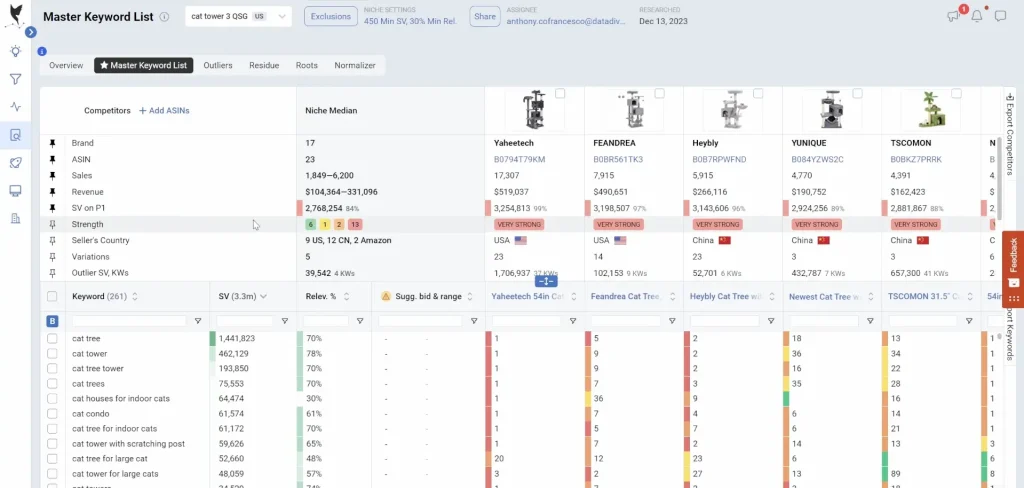
This is the heart of Data Dive, and honestly, the feature that separates it from everything else on the market.
Here is how it works. You open a product search page on Amazon, use the Chrome extension to select your top competitors (up to 50 ASINs), and click “Dive.” In about 60 to 90 seconds, Data Dive generates a Master Keyword List a cleaned, organized keyword database built from the actual indexed terms all those competitors are ranking for.
What makes this different from a standard keyword tool is the structure. The MKL is not a raw list of keywords. Data Dive automatically sorts every keyword into three categories:
- MKL (Core): Keywords with 30%+ relevancy, meaning at least 30% of your competitor set is ranking for them. These are the must-target terms that define the niche.
- Outliers: High-volume keywords (2,000+ monthly searches) where fewer competitors rank on page one. These are your hidden opportunities terms with real demand that are not yet saturated.
- Residue: All remaining competitor rankings that do not fit the MKL or Outlier criteria. Useful for long-tail discovery.
Each keyword comes with search volume, relevancy percentage, competitor organic rank positions, and a color-coded system. Green means low competition and opportunity; red means high competition from strong sellers. You can sort, filter, exclude branded terms, and clean the list in a few clicks.
The Niche Dive feature builds on this by automatically selecting top competitors from a niche for you using AI, so you do not have to manually identify which ASINs to include. It also stores historical niche data in your Pipeline, so you can revisit the same niche weeks later and compare how keyword rankings and sales have shifted.
The Roots tab inside the MKL is another underrated gem. It breaks down the most frequently repeated word families across all your keywords and shows the combined search volume behind each root. This tells you which keyword families to prioritize for both your listing and your PPC structure.
2. Product Scorecard for Accelerated Validation
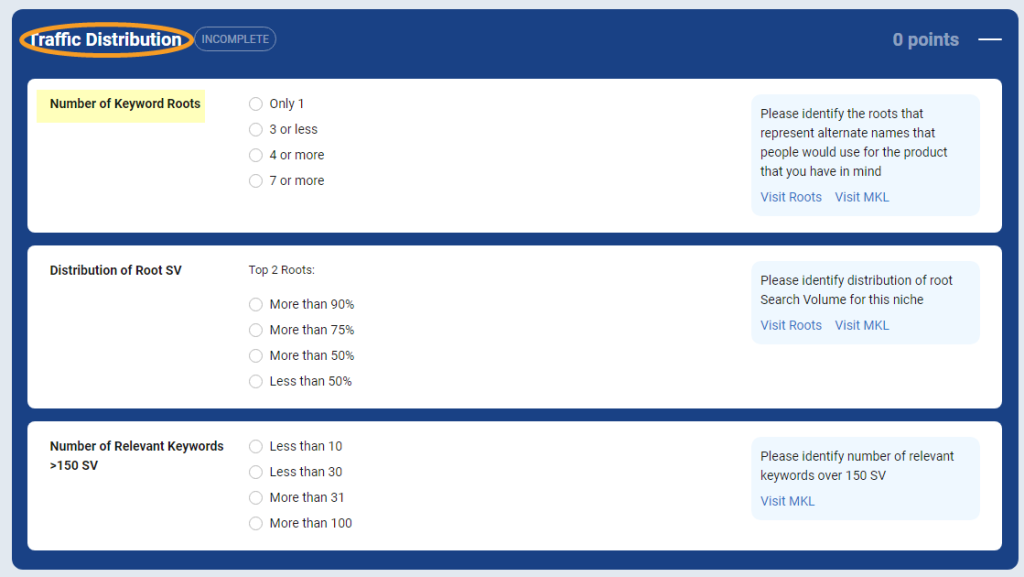
Once you have your MKL cleaned up, Data Dive routes you to the Product Scorecard. This is a structured risk evaluation tool that scores a niche across four categories: traffic distribution, profitability, potential, and competitiveness.
You work through each section by answering guided questions based on your MKL data. For example:
- Traffic Distribution: How concentrated is the search volume across keyword roots? Are one or two keywords dominating 80% of traffic, or is it spread across many terms? Concentrated traffic means higher risk.
- Profitability: What are the average price points, estimated margins, and FBA fees for the niche?
- Potential: Is the niche growing or declining? Are there underserved customer needs visible in competitor reviews?
- Competitiveness: Are the top sellers major brands? How strong are their images, A+ content, and review counts?
At the end, you get a numeric score for each section and an overall niche score. Negative scores flag risky niches; positive scores highlight opportunity.
The Profits tool ties directly into this. It models your landed cost, Amazon fees, FBA storage, PPC spend, and estimated launch budget, then gives you a projected margin and minimum order quantity. You are not guessing you are seeing the full economics of the niche before you commit a single dollar to sourcing.
3. Listing Builder & The “Ranking Juice” Leaderboard
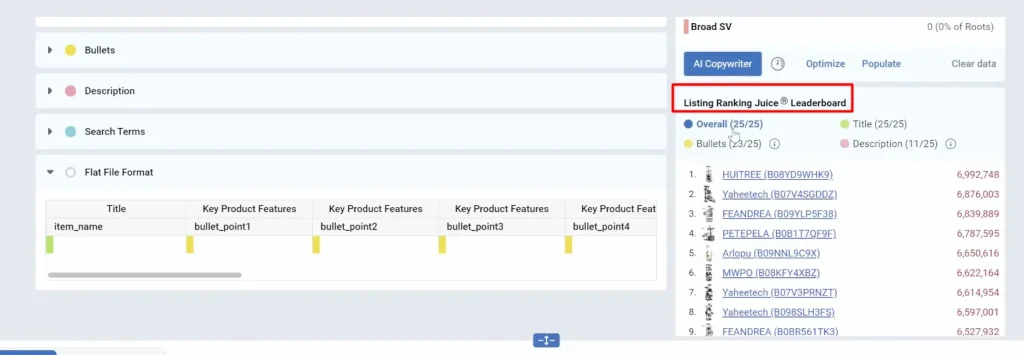
Once you have validated your niche and identified your target keywords, the Listing Builder takes over. Data Dive's Listing Builder is built around a proprietary scoring model called Ranking Juice.
Ranking Juice evaluates your listing's SEO strength based on four factors: keyword coverage, match type (exact match scores higher than phrase or broad), field position (title placement carries more weight than bullets or description), and search volume of the keywords used.
When you add a keyword to your title, Data Dive calculates how much “ranking juice” that placement gives you. The tool then guides you to optimize keyword distribution across your title, bullet points, description, and backend search terms to maximize your overall listing score.
The Battle of the Listings feature lets you compare your listing side-by-side against any competitor in your niche, showing exactly where your keyword coverage is weak and where they have an edge over you.
The AI Copywriter sits on top of this. Feed it your target keywords and niche data, and it generates listing titles, bullet points, and descriptions built specifically around your keyword priorities. The output is not generic AI filler it is grounded in the actual search terms driving traffic in your niche.
The AI Product Brief goes even further. It analyzes thousands of competitor reviews to extract recurring customer pain points, desired features, and product attributes. The output is essentially a product development brief that tells you exactly what customers want and what your competitors are getting wrong.
4. Rank Radar + PPC Overlay
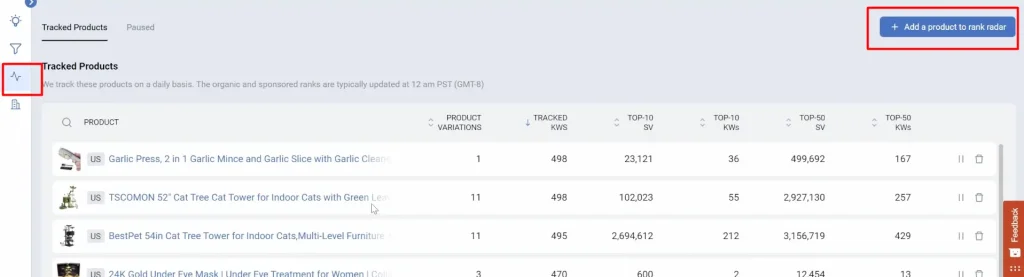
Most keyword rank trackers give you a daily number. Rank Radar gives you a number, a PPC context, and an action signal and that difference is significant for any seller running sponsored ads.
Here is how it works. Once you set up Rank Radar for an ASIN, it tracks your daily organic ranking for every keyword in your MKL. When you connect your Amazon Seller Central account, it overlays your PPC metrics impressions, spend, clicks, conversions directly alongside each keyword's organic position.
The result is a color-coded heatmap that shows you, at a glance, where your paid ads are propping up keywords you have not yet earned organically, and where you are wasting spend on keywords you already rank well for without ads.
The Gainers and Losers view quickly surfaces which keywords are climbing and which are slipping, so you can take action before small ranking drops become big problems. You can also annotate the timeline with notes marking when you changed a bid, updated your listing, or ran a promotion so you can track the impact of every action you take.
The Roots visualization inside Rank Radar shows how ad spend on one keyword can improve rankings on related keyword families. This is especially useful for understanding how a single root keyword connects to dozens of long-tail variations in your PPC structure.
5. Deep Dive Image Gallery & AI Product Briefs
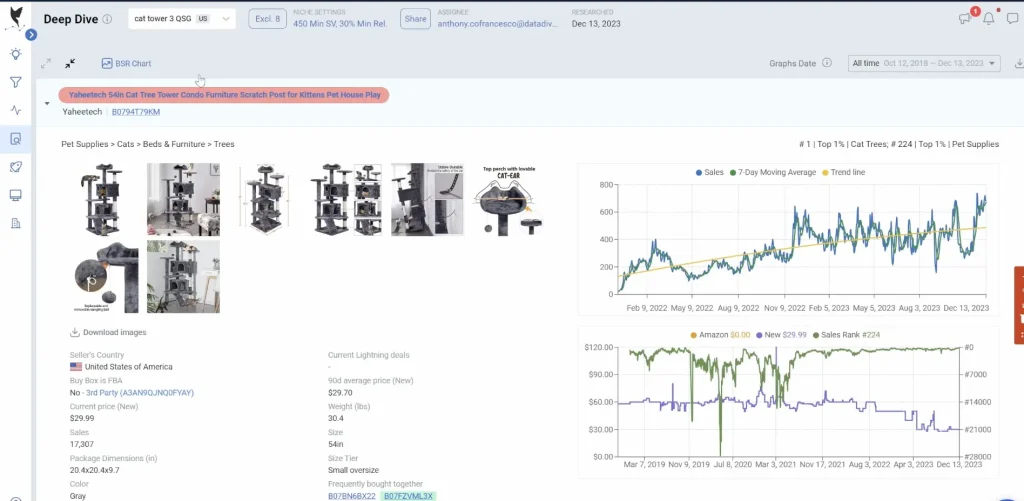
The Deep Dive feature gives you a full SERP-level breakdown of any niche: competitor images, BSR trends, pricing history via Keepa, product dimensions, variation breakdowns, and Google Trends data all in one view.
The Image Gallery within Deep Dive lets you analyze all top competitor image sets side by side. You can toggle between collapsed and expanded views to quickly spot which competitors have high-quality A+ content and which ones have weak creative. Identifying image gaps is one of the fastest ways to find a differentiation opportunity in a crowded niche.
The AI Product Brief analyzes thousands of competitor reviews to surface the attributes customers repeatedly mention both positively and negatively. Rather than reading through hundreds of reviews manually, you get a structured summary of what buyers love, what they complain about, and what they wish the product had. This feeds directly into product development decisions and your listing's messaging strategy.
The Support Ecosystem: You're Not Left in the Dark
One thing I noticed about Data Dive that many reviews skip over is how seriously the team takes seller education. This is not just a tool it comes with a structured learning ecosystem around it.
Here is what is included regardless of your plan:
- Free Masterclasses: Publicly available training sessions covering product research, keyword strategy, and listing optimization
- YouTube Channel: Tutorials, walkthroughs, and feature updates
- Help Center: A well-maintained knowledge base with detailed guides for every feature
On paid plans, you also get:
- Live Office Hours 3x per week: Direct Q&A sessions where you can ask questions about your specific research and get feedback
- 30-Minute Onboarding Call (Standard and Enterprise): A personal setup session to get your account configured and your first dive running correctly
- Seller Systems Bundle: Add the Seller Systems Mastermind for live weekly coaching calls and advanced training from 8-figure sellers available at 33% off for Standard and Enterprise plan users
For sellers who have invested in Data Dive and want to get the most out of it, the Office Hours sessions alone are worth their weight in gold. Having direct access to experienced sellers who can review your actual research and tell you what you are missing is not something you get from most software tools.
Data Dive Pricing (2026)
Data Dive recently doubled tool limits on most plans without raising prices, which makes the value proposition significantly stronger in 2026.
| Plan | Monthly Price | Annual Price | Best For |
|---|---|---|---|
| Starter | $39/month | $32/month | Aspiring FBA sellers, solo traders, VAs |
| Standard | $149/month | $124/month | Active FBA sellers, growing brands |
| Enterprise | $490/month | $408/month | Brands, aggregators, agencies |
Here is what each plan includes at its core:
Starter Plan:
- 100 Dive ASINs
- 25 Rank Radar Keywords
- 10 AI Copywriter Tasks
- 10 AI Product Brief Competitors
- Help Center access
Standard Plan (Most Popular):
- 1,000 Dive ASINs
- 1,000 Rank Radar Keywords
- 50 AI Copywriter Tasks
- 20 AI Product Brief Competitors
- Listing Builder, PPC Campaign Builder
- Up to 10 team seats
- Live support
Enterprise Plan:
- 4,000 Dive ASINs
- 12,000 Rank Radar Keywords
- 250 AI Copywriter Tasks
- 75 AI Product Brief Competitors
- Hierarchical organization structure
- Audit logs
- Priority support + dedicated Customer Success manager
- Free onboarding call
Data Dive + Seller Systems Bundle: Add the Seller Systems Mastermind to your Standard or Enterprise plan and save 33% up to $184/month in savings. This includes live weekly coaching calls and private label mastery training from 8-figure sellers. You can check above coupon code and deals for saving on Datadive Plan.
Annual billing saves roughly 16% across all plans. Plans also include flexible add-on sliders, so you can increase your Dive ASIN limits or Rank Radar keyword caps without jumping to the next full pricing tier.
Free Trial & Refund Policy
Data Dive offers a 15-day free trial on the Starter plan. The trial gives you full access to the core tools including the MKL, Niche Dive, and Rank Radar so you can run real dives on actual niches before deciding whether to subscribe.
The 15-day trial is not always publicly listed on the main pricing page. You may need to use an affiliate or referral link to access it.
On refunds, Data Dive does not publicly advertise a standard money-back guarantee. If you are concerned about commitment, the 15-day trial is your best option to test the tool thoroughly before paying.
Data Dive vs. Competitors
| Tool | Best For | Pricing | Keyword Depth | Ease of Use | Data Sources |
|---|---|---|---|---|---|
| Data Dive | Private label, niche validation, deep SEO | From $39/month | Very Deep (MKL + Outliers + Roots) | Moderate | JS, Keepa, Google Trends, Seller Central |
| Helium 10 | All-in-one Amazon tool suite | From $129/month | Deep | Moderate-Complex | Amazon direct |
| Jungle Scout | Beginners, product discovery | From $49/month | Moderate | Easy | Amazon direct |
| AMZScout | Budget-conscious sellers | From $49.99/month | Basic | Very Easy | Amazon direct |
Data Dive vs Helium 10: Helium 10 is the more complete all-in-one suite it covers Walmart, has more standalone tools, and has been around longer. Data Dive wins on niche keyword depth, the structured MKL workflow, and the Ranking Juice listing system. Many advanced sellers actually use both together Helium 10 for broader operations and Data Dive for deep niche analysis and launch preparation.
Data Dive vs Jungle Scout: Jungle Scout is better for beginners and for general product discovery. Data Dive is better for sellers who have already identified a niche and want to go deep on keywords, competitor analysis, and listing optimization before launching.
What Customers Say About Data Dive?
Data Dive does not currently have a large volume of public reviews on third-party platforms like Trustpilot or G2, which makes independent review data limited. However, the testimonials shared directly on the platform from verified users reflect consistent themes.
Users commonly highlight:
- Significant time savings on competitor keyword research and niche analysis
- The depth of the MKL compared to other tools they had used previously
- The structured workflow reducing costly research mistakes
- Rank Radar's PPC overlay as a standout feature for lowering ad spend waste
A few representative user quotes from the Data Dive platform:
“Data Dive is saving me so many hours of tedious work. This is by far the most extensive data tool for Amazon sellers out there.”
“This is an amazing tool! Everyone needs this to track and optimize listing and PPC.”
“Very useful for the entire product research and listing creation process. It takes the bulk of the workload and wasteful time out of the process.”
The most common criticism from users is the learning curve. Data Dive assumes you understand Amazon fundamentals if you are starting from scratch, you will need to invest time in the tutorials and office hours before the workflow clicks.
Frequently Asked Questions (FAQ)
Q1. Is Data Dive good for beginners?
Data Dive is not the ideal starting point if you are brand new to Amazon with no understanding of FBA or keyword research. The tool assumes familiarity with Amazon selling fundamentals. That said, if you are willing to go through the free masterclasses and office hours, the learning curve is manageable.
Q2. Does Data Dive replace Helium 10 or Jungle Scout?
Not exactly. Data Dive positions itself as a complement to tools like Jungle Scout and Helium 10 rather than a full replacement. It pulls data from Jungle Scout's API directly, and many serious sellers use Data Dive alongside their existing tools for deeper niche analysis and listing optimization.
Q3. How accurate is Data Dive's data?
Data Dive pulls from multiple established data sources including Jungle Scout's API, Keepa, and Amazon Seller Central, which gives it a stronger data foundation than tools that rely on a single source.
Q4. Does Data Dive work for all Amazon marketplaces?
Data Dive supports major Amazon marketplaces including the US, UK, Canada, Germany, France, Italy, Spain, Japan, and India. It does not currently support Walmart or TikTok Shop.
Q5. Is there a Data Dive free trial?
A 15-day free trial on the Starter plan is available, giving you access to the core tools before committing to a subscription.
Final Verdict: Is Data Dive Worth the Investment?
After going deep into every feature, here is my honest take.
Data Dive is not a tool for everyone. If you are brand new to Amazon, start with Jungle Scout. If you need an all-in-one suite that covers Walmart and TikTok alongside Amazon, Helium 10 makes more sense.
But if you are a private label seller who has graduated past the basics and is serious about making data-driven decisions before every product launch Data Dive is genuinely one of the best investments you can make. The MKL workflow alone changes how you think about keyword research. The Ranking Juice listing system makes SEO measurable in a way most tools do not. And the Rank Radar PPC overlay is the kind of feature that pays for itself in wasted ad spend within the first month.
The 15-day free trial makes it easy to test it without commitment. I would strongly recommend running at least two or three full dives on actual niches you are considering before deciding whether to subscribe. The tool's value becomes clear when you see how much faster your research process becomes.
If you do decide to move forward, the Standard plan is where most active sellers land the 1,000 Dive ASINs and 1,000 Rank Radar keywords give you enough room to manage multiple products and research projects simultaneously.
Start with the free trial, run a few real dives, and see how it changes your research workflow. That is the best way to decide if Data Dive is right for you.
