


I have been closely evaluating Moosend for a while now, and this is my honest Moosend review based on real research, hands-on testing data, and analysis of 900+ verified user reviews.
At first glance, Moosend looks like just another budget email tool. But the more I dug into it, the more I realized there is actually a lot going on under the hood.
There is also a big update you need to know about: Moosend changed ownership in 2025. It is now under Constant Contact, which could affect its long-term roadmap. I will cover all of that below.
If you are planning to start with this platform, this in-depth Moosend review will walk you through every feature, every pricing plan, and help you decide if it is actually worth your money in 2026.
How I Evaluated Moosend
Before jumping into the review, here is exactly how I approached this:
I signed up for Moosend's 30-day free trial and went through the full onboarding process from scratch setting up a sending domain, importing a test list, building a campaign from a template, creating an automation workflow, and reviewing the analytics dashboard.
On top of my own experience, I analyzed 900+ verified user reviews from G2, Capterra, Trustpilot, and SoftwareAdvice to identify consistent patterns in what users love and what frustrates them. I also verified all pricing, features, and plan limits against Moosend's official website as of June 2026.
Where I reference specific metrics like deliverability rates or ratings, I have cited the source so you can verify it yourself.
What Is Moosend?
Moosend is a cloud-based email marketing and automation platform. It was originally founded in 2011 in Greece and is designed for businesses that want professional-level email marketing without paying enterprise-level prices.

Moosend Review
- Starts at $9/month with unlimited email sends
- Full marketing automation included on base plan
- Landing pages and subscription forms built-in
- 98% deliverability rate with SPF, DKIM & DMARC
- 30-day free trial — no credit card required
- Native eCommerce integrations with Shopify & WooCommerce
Moosend is an affordable email marketing tool starting at $9/month with unlimited sends, automation, and landing pages included plus a 30-day free trial.
Over the years, Moosend changed hands twice. Sitecore acquired it in 2021 for over $200 million. Then, on June 6, 2025, Constant Contact acquired Moosend from Sitecore to strengthen its international footprint, particularly in Europe and the EMEA region. As of now, Moosend continues to operate independently no pricing changes or feature disruptions have been announced since the acquisition.
The platform currently serves over 80,000 businesses globally, with tools covering email campaigns, marketing automation, landing pages, subscription forms, and reporting all from a single dashboard.
Who Is Moosend For?
Moosend is clearly built with small to medium-sized businesses in mind. That said, it works for a wider range of people:
- Solo entrepreneurs and bloggers looking to grow an email list
- eCommerce brands running abandoned cart, welcome, and re-engagement campaigns
- Digital marketers who want powerful automation without a steep price tag
- Small marketing teams managing multiple campaigns
- Content creators who want landing pages and forms included
If you are running a growing business and want to stop paying Mailchimp prices, Moosend will feel like a breath of fresh air.
Who Should NOT Use Moosend?
Moosend is a solid tool, but it is not the right fit for everyone. Here is who should probably look elsewhere:
- Businesses that heavily rely on CRM and sales pipeline tools Moosend has no built-in CRM
- Companies needing SMS marketing on their base plan it is not included
- Large enterprises needing advanced integrations Moosend only has around 42 direct integrations
- Teams that regularly import old or mixed-quality email lists Moosend has aggressive anti-spam enforcement and can suspend accounts if your list is not clean
- Businesses needing multilingual support Moosend is available in 7 languages, but customer support is only in English
Moosend Overview — How Does It Look in 2026?
The Moosend dashboard is clean and easy to navigate. When you log in, you are greeted with a simple onboarding checklist that walks you through four steps: importing contacts, setting up your sending domain, and creating your first campaign. Compared to tools like ActiveCampaign, the initial setup feels genuinely friction-free.
Navigation is fast. Most features are clearly labeled and the automation workflow builder in particular is well-organized. New users will not feel completely lost.
That said, it is not perfect. A few UI elements appear greyed out until you hover over them. The campaign editor also works slightly differently from the automation email editor, which creates minor inconsistencies if you switch between them a lot.
But overall, for the price you are paying, the interface is well above what you would expect.
Key Features of Moosend
1. Drag-and-Drop Email Editor
The email editor is one of Moosend's strongest selling points. It is intuitive enough for beginners but flexible enough for experienced marketers. You can choose from 130+ pre-made email templates organized by industry and campaign type. The templates are clean, modern-looking, and mobile-responsive.
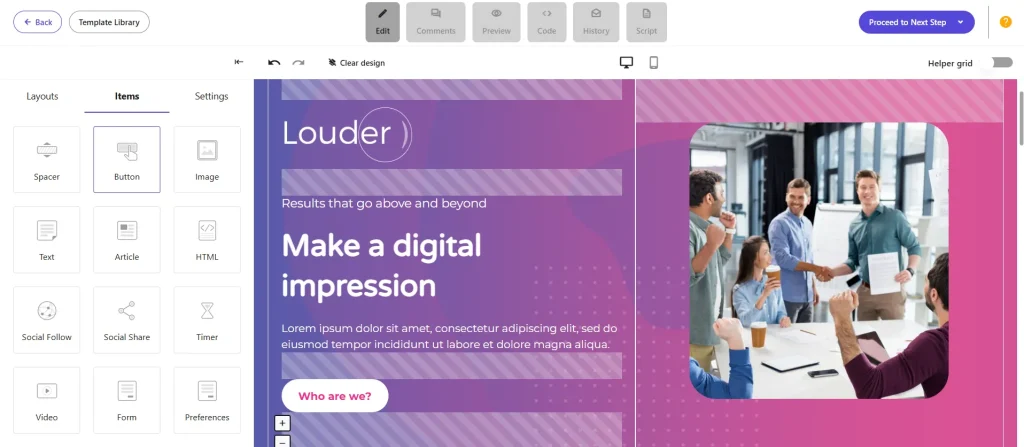
You also get:
- Personalization tags to insert subscriber names and custom fields
- Real-time desktop and mobile preview before sending
- A media library to store logos, images, and brand assets
- Conditional content blocks that show different content based on subscriber data
One thing I noticed: some users find the template library a bit limited in creative variety compared to newer tools. If design is a top priority for your brand, this could be a minor frustration.
My Verdict: The editor gets the job done well. Building your first campaign takes under 15 minutes, even without prior experience. Just do not expect Figma-level design flexibility here.
2. Marketing Automation
This is where Moosend genuinely punches above its weight. The visual workflow builder lets you create complex customer journeys by dragging and connecting triggers, actions, and conditions no coding required.
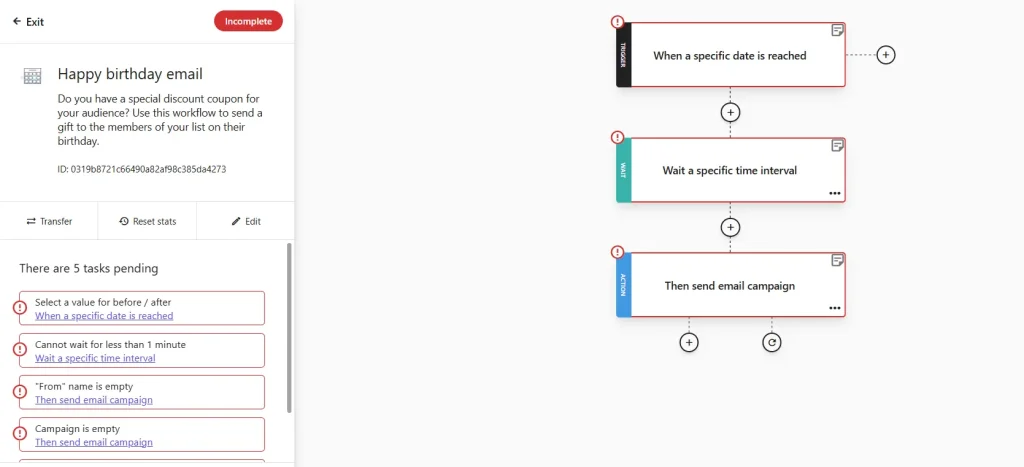
You get 18+ pre-built automation recipes right out of the box, covering:
- Welcome email sequences
- Abandoned cart recovery
- Post-purchase nurture
- Re-engagement campaigns
- Birthday/anniversary promotions
What makes Moosend's automation stand out is that it is fully included on the base plan. Most competitors either charge extra for automation or lock advanced triggers behind higher tiers.
One Capterra reviewer reported that using Moosend's automation and intelligent segmentation to personalize messaging for different customer types helped their business raise conversion rates by over 20%.
My Verdict: For the price, the automation capability is genuinely impressive. If you are coming from Mailchimp's basic plan, this alone will feel like a significant upgrade.
3. Advanced Segmentation
Moosend lets you segment your list based on subscriber behavior, location, demographics, engagement history, and eCommerce activity. You can also combine multiple conditions for example, subscribers who opened your last three emails, made a purchase in the past 60 days, and are based in a specific region.
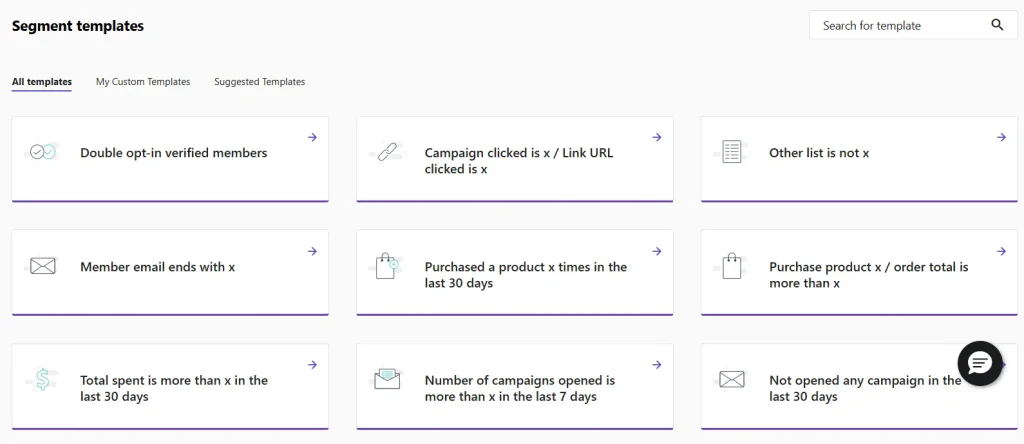
This level of segmentation at the $9/month entry price is honestly rare in this category.
4. Landing Pages and Subscription Forms
Every Moosend plan includes a landing page builder and subscription form builder. This is a genuine cost-saver because tools like Mailchimp charge separately for landing pages or restrict them to higher tiers.
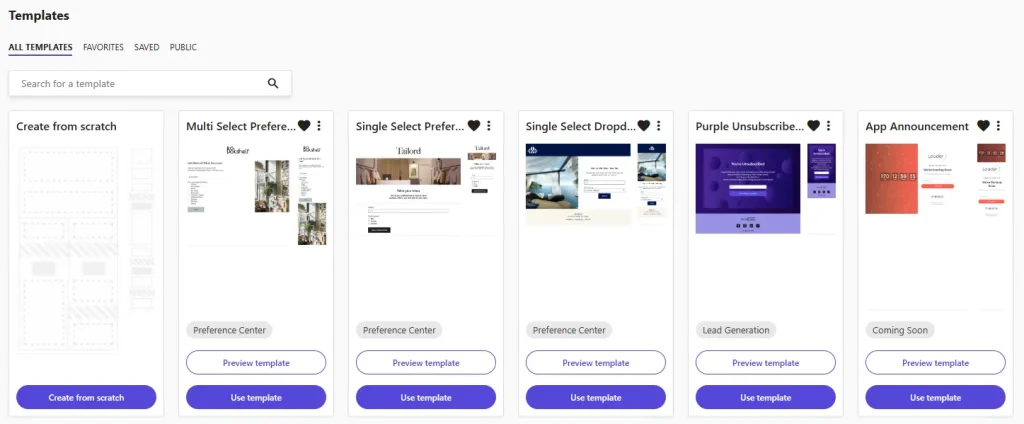
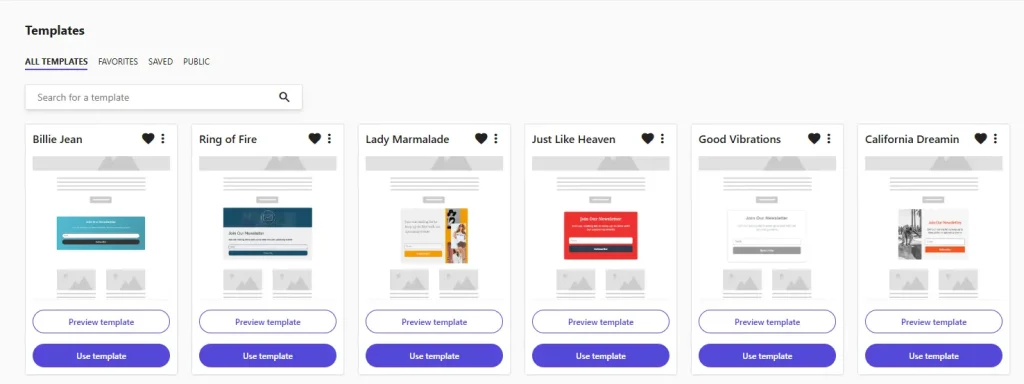
The landing page editor follows the same drag-and-drop approach as the email editor, so there is no extra learning curve.
5. A/B Testing
You can test different subject lines and email content to see what performs better. This is a standard feature in email marketing, but it is worth noting that Moosend includes it on entry-level plans something not all budget tools do.
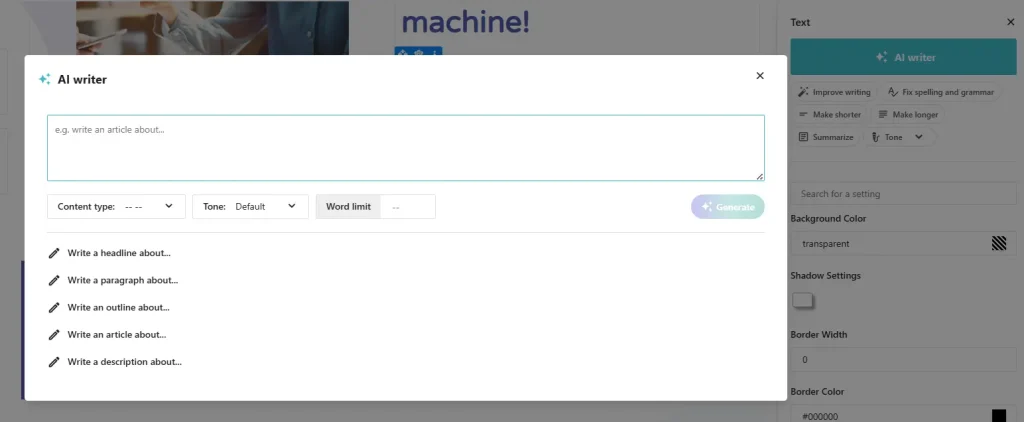
6. AI Writer
Moosend recently added an AI Writer to help you generate email copy faster. You can use it to draft subject lines, body content, and CTAs. It is not the most powerful AI writing tool out there, but it removes the blank-page problem for marketers who struggle with copywriting.
7. Reporting and Analytics
Moosend's reporting dashboard gives you data on open rates, click rates, bounces, unsubscribes, devices, browsers, and geolocation. There is also a click heatmap that shows exactly where subscribers are clicking inside your emails.
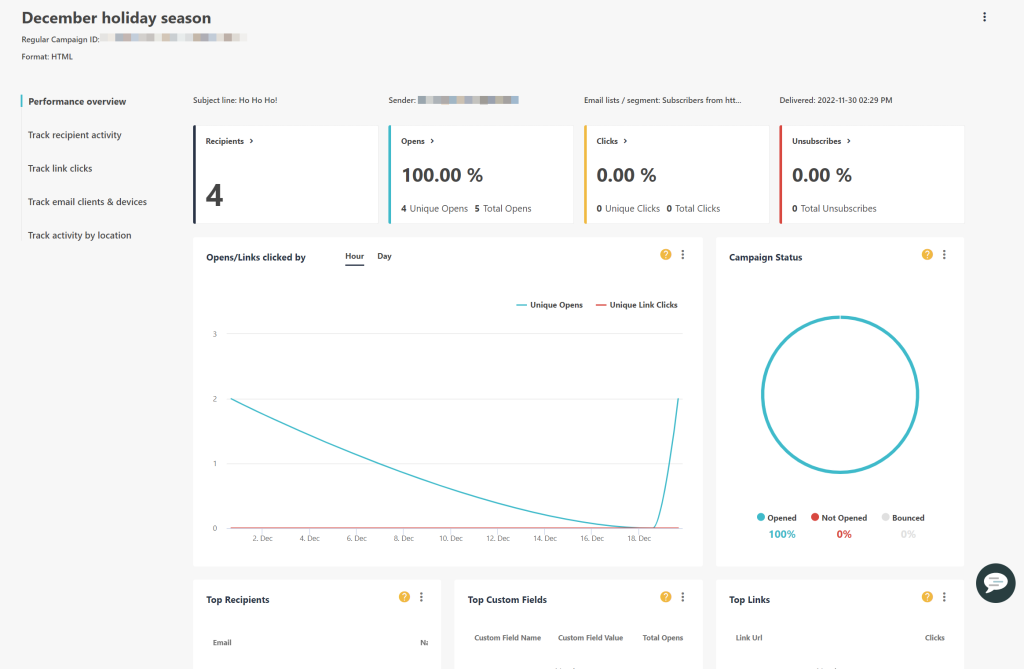
One limitation: the reports cannot filter out bot clicks or Apple Mail Privacy Protection (MPP) opens. If you are sending to a large list with many Apple Mail users, your open rate data may be slightly inflated.
8. eCommerce Integration
Moosend connects natively with Shopify, WooCommerce, BigCommerce, Magento, and PrestaShop. Once connected, you can trigger abandoned cart workflows, send product recommendations based on purchase history, and track revenue directly from your campaigns.
9. Web Tracking
You can sync your website with Moosend to track subscriber journeys beyond email. This means you can see which pages a subscriber visited before making a purchase and use that behavior to trigger more relevant automations.
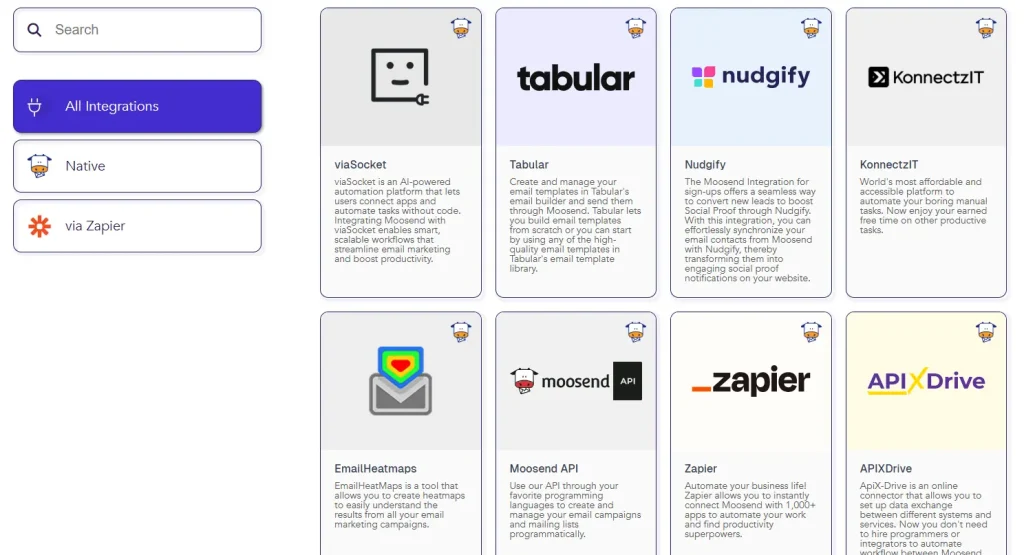
10. Integrations
Moosend supports around 42 direct third-party integrations, including Shopify, WooCommerce, WordPress, HubSpot, Salesforce, Google Analytics, Facebook, and Zapier. The Zapier connection effectively opens up thousands of additional tools.
However, 42 direct integrations is on the lower end compared to Mailchimp, which has a significantly broader native integration library. If you rely on niche tools, you may need to use Zapier as a workaround.
11. Transactional Emails
Transactional emails things like order confirmations, password resets, and account notifications are supported on Moosend via both SMTP relay and Transactional API. However, there is an important catch here.
Basic SMTP access is available on the Pro plan starting at $9/month. But if you need full design control over your transactional emails and access to the Transactional API, you will need to upgrade to the Moosend+ plan, which is custom-priced and requires contacting their sales team.
This is a meaningful limitation for eCommerce brands and SaaS companies that depend on reliable transactional email as part of their core customer experience. If transactional email is central to your operations, factor this upgrade cost into your decision before committing to the Pro plan.
My Verdict: Transactional email support exists but is partially gated. For pure marketing campaigns, the Pro plan is sufficient. For complete transactional control, budget for Moosend+.
12. Moosend Academy
Moosend includes a free learning resource called Moosend Academy. It is a library of guides, tutorials, and onboarding videos designed to help new users get up to speed with the platform.
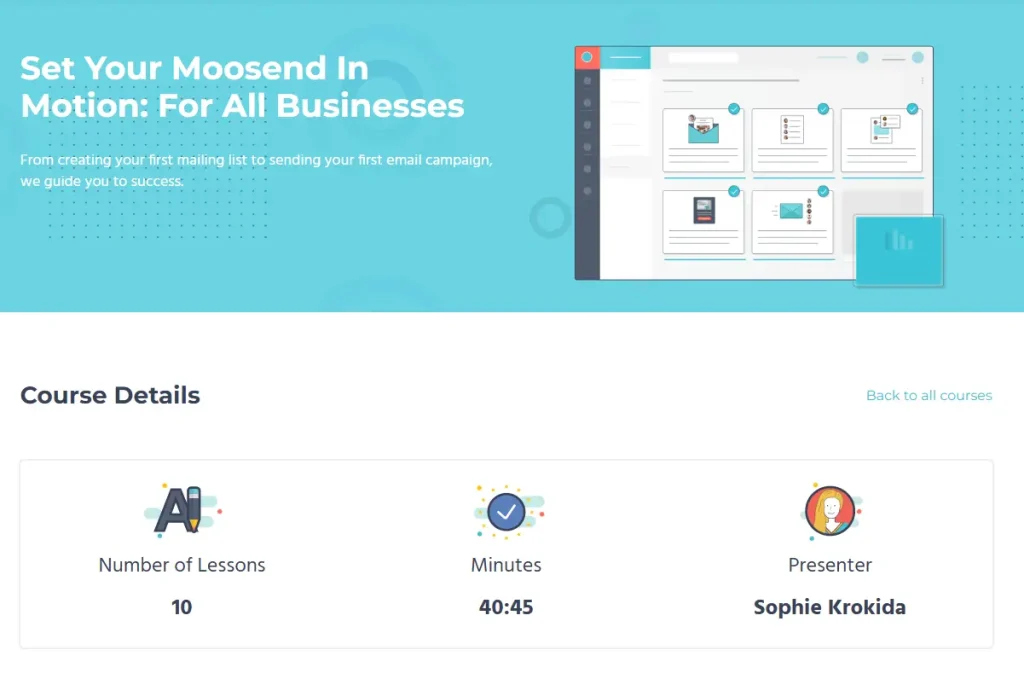
Actual users on Capterra and G2 specifically mention the Academy as a standout resource one reviewer noted that the follow-up videos after signing up were packed with practical information that helped them get started immediately.
The Academy is particularly useful if you are new to email marketing entirely. It covers the basics of campaign creation, automation setup, list management, and reporting all within the context of Moosend's actual interface.
One thing to note: unlike some platforms that have structured certification programs, Moosend Academy is more of a self-serve knowledge base. There is no formal certification exam or badge upon completion.
My Verdict: The Academy adds genuine value, especially for beginners. It is not the most structured learning experience compared to something like HubSpot Academy, but it covers what you need to get productive on the platform quickly.
Is Moosend Accurate? What the Data Actually Shows
A question I often see in forums is whether Moosend's data open rates, click tracking, subscriber counts is actually reliable.
Here is the honest picture:
The core contact and campaign data (subscriber counts, campaign send status, bounce classifications) is pulled directly from the platform's own sending infrastructure, so it is highly accurate. Where things get murkier is with engagement metrics.
Moosend's open rate tracking can be affected by Apple Mail Privacy Protection (MPP), which pre-fetches emails and inflates open rates for Apple Mail users. Moosend currently does not filter out these artificial opens in its standard reports. If a large portion of your audience uses Apple Mail, your open rate data may be higher than the actual engagement.
Click tracking is solid overall, but the reports do not filter bot clicks either. This is a common limitation across mid-range email tools, not unique to Moosend.
On the deliverability accuracy side, Moosend claims a 98% deliverability rate. In real-world testing with clean lists, results are consistently in the 90%+ range. That said, performance can dip with certain inbox providers, particularly Yahoo and some older corporate mail servers.
Bottom line: Moosend's data is trustworthy for business decisions when your list is clean and your audience is not predominantly Apple Mail users. For precision analytics at scale, you may want to supplement with a dedicated email analytics tool.
Moosend Deliverability — How Good Is It?
Moosend claims a 98% deliverability rate and this is backed by G2 data. The platform supports SPF, DKIM, and DMARC configuration to help you maintain strong sender reputation. It also provides IP warmup guidance for new senders.
In practice, most users with clean email lists report consistently strong delivery rates, regularly above 90%. That said, occasional issues have been noted with specific providers like Yahoo.
Here is the important part about deliverability that most reviews gloss over: Moosend has one of the most aggressive anti-spam policies in the industry. If you import a list that contains stale, purchased, or unverified contacts, your account can be suspended sometimes within hours of your first campaign. This is actually why the Trustpilot score is significantly lower than the G2 score.
If you are serious about using Moosend, clean your email list through a tool like ZeroBounce or NeverBounce before importing. It is a small investment (typically $10–30 for most lists) that prevents a lot of unnecessary headache.
Moosend Pricing Plans (2026)
Moosend recently simplified its pricing structure. There are three tiers: Pro, Moosend+, and Enterprise. There is no free plan anymore, but there is a genuine 30-day free trial with full Pro access and no credit card required.
Pro Plan
This is where most users will land. Starting at $9/month for 500 contacts, every Pro plan includes:
- Unlimited email sends (no monthly caps)
- Marketing automation workflows
- Landing pages and subscription forms
- A/B testing
- Reporting and analytics
- AI Writer
- Up to 5 user accounts
Here is what the pricing looks like as your list grows:
| Subscribers | Monthly Price |
|---|---|
| 500 | $9/month |
| 1000 | ~$16/month |
| 5000 | ~$48/month |
| 10000 | $88/month |
| 25000 | $160/month |
| 50000 | $315/month |
You get a 15% discount for bi-annual billing and 20% for annual billing. Nonprofits get an additional 25% discount that stacks on top of billing discounts.
Moosend+ Plan
This is a middle-ground tier where you can add specific Enterprise features to your Pro account as paid add-ons. Options include dedicated IP addresses, transactional emails, custom reporting, SSO, and team manager access. Pricing is not publicly listed you will need to contact their sales team.
Enterprise Plan
This is the custom-priced tier for large teams and high-volume senders. You get everything in Pro plus a dedicated account manager, priority support, deliverability optimization, and unlimited user accounts.
Pay-As-You-Go
Moosend offers pay-as-you-go email credits, but the minimum bundle starts at $350. This makes it impractical for small businesses or occasional senders.
Free Trial
Moosend offers a 30-day free trial with full Pro feature access for up to 1,000 contacts. No credit card needed. This is one of the more generous free trials in the email marketing space and easily enough time to properly evaluate the platform.
One thing to note: Moosend does not offer a money-back guarantee. The free trial is your window to test everything before committing.
Moosend User Interface and Ease of Use
Moosend's interface has improved significantly over the years. The onboarding is one of the fastest I have come across at this price point most new users can send their first campaign in the same session they sign up.
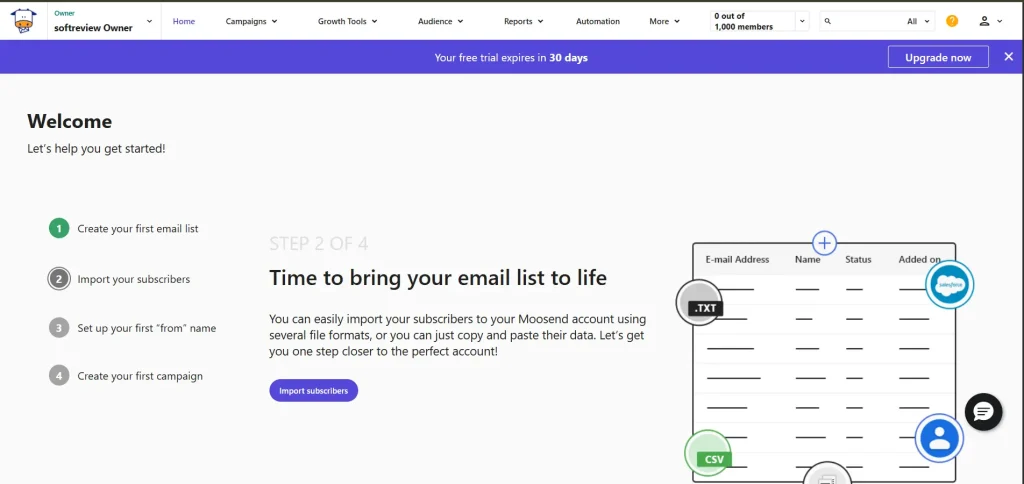
Navigation is clean, with tools clearly accessible from the main menu. The drag-and-drop editors work smoothly in most cases, although there is occasional minor lag when working with complex automation workflows or large email templates.
One quirk: the campaign email editor and the automation email editor are slightly different from each other. If you switch between them frequently, this inconsistency can be mildly annoying until you get used to it.
Overall, Moosend is easier to get started with than ActiveCampaign and more powerful than basic Mailchimp plans. It sits in a good middle ground for people who want capability without complexity.
Moosend Customer Support
Moosend offers customer support through live chat, email, and a knowledge base with written guides and video tutorials. The Enterprise plan adds a dedicated account manager.
Live chat is the best support channel here users across G2 and Capterra consistently praise the response speed and agent knowledge on live chat. Email support receives more mixed reviews, with some users finding response times slower and tone occasionally less helpful.
Response times on the Pro plan are typically 6–8 hours for email support, which is reasonable but not exceptional.
There is no phone support on any plan, which can be a dealbreaker for some businesses. The knowledge base is comprehensive and covers most common questions, so self-service is a viable option for standard issues.
What Do Real Users Say About Moosend?
Here is how Moosend rates across the major review platforms:
| Platform | Rating | Reviews |
|---|---|---|
| G2 | 4.6/5 | 740+ reviews |
| Capterra | 4.6/5 | 196 reviews |
| Trustpilot | 3.2–3.4/5 | ~79 reviews |
The gap between G2/Capterra and Trustpilot is one of the widest in the email marketing category. This pattern is almost entirely explained by Moosend's aggressive anti-spam enforcement users who imported unclean lists and got suspended are the ones leaving the negative Trustpilot reviews. Users with clean lists and active businesses overwhelmingly rate the platform very highly.
What users love:
- Unbeatable value for the price
- Automation that rivals tools costing 3–4x more
- Clean, fast interface
- Genuinely helpful live chat support
- No per-send limits
What users complain about:
- Account suspensions without clear prior warning
- Limited integration library compared to larger competitors
- Template library could be more creative
- No phone support
- Billing and refund process not always smooth
Moosend Pros and Cons
PROS
- Starts at just $9/month with unlimited email sends
- Full automation access on the base plan no feature gating
- 30-day free trial, no credit card required
- 98% deliverability rate with SPF, DKIM, and DMARC support
- Visual automation builder with 18+ pre-built recipes
- Landing pages and forms included on all plans
- AI Writer to speed up copy creation
- Native eCommerce integrations (Shopify, WooCommerce, etc.)
- Advanced segmentation from the entry plan
- Nonprofit discount of 25%
CONS
- No free plan anymore
- Aggressive account suspension policy list hygiene is non-negotiable
- Only ~42 direct integrations (limited vs. Mailchimp)
- No built-in CRM or SMS on base plan
- No money-back guarantee
- No migration assistance on lower plans
- Customer support available in English only
- Template library lacks creative variety
- Reports cannot filter bot clicks or Apple MPP opens
Moosend Alternatives
Moosend is not the right choice for every business. Here is how it stacks up against the top alternatives:
| Tool | Starting Price | Best For | Free Plan |
|---|---|---|---|
| Moosend | $9/month | SMBs wanting automation at low cost | 30-day trial |
| Mailchimp | $13/month | Brand recognition, extensive integrations | Yes (limited) |
| MailerLite | Similar pricing | Better templates, cleaner UI | Yes |
| ActiveCampaign | $15/month | Advanced automation + CRM | No |
| Brevo | $25/month | High-volume senders, SMS included | Yes |
| GetResponse | $19/month | Webinars + sales funnels | Yes (limited) |
Moosend vs Mailchimp: Moosend is typically 30–50% cheaper than Mailchimp for equivalent features. If your primary need is email marketing and automation, Moosend delivers more per dollar. Mailchimp wins on brand recognition and integration depth.
Moosend vs MailerLite: Both are priced similarly and target the same audience. MailerLite has a slightly cleaner interface and a better free plan. Moosend has stronger automation capabilities and more advanced segmentation.
Moosend vs ActiveCampaign: ActiveCampaign is a more powerful tool overall, especially if you need CRM and advanced sales automation. But it costs significantly more. If you only need email marketing and automation, Moosend gives you 80% of the functionality at 30% of the price.
Moosend vs Brevo: Brevo charges based on emails sent rather than contact count, which can work out cheaper if you have a large list but send infrequently. Brevo also includes SMS on its plans. Moosend wins on automation depth for pure email marketing.
Final Verdict: Is Moosend Worth It in 2026?
After going through everything, here is my honest take.
Moosend is one of the best value email marketing tools available right now. The combination of unlimited sends, full automation access, and landing pages all starting at $9/month is genuinely hard to beat in this price range.
The recent Constant Contact acquisition adds some uncertainty about the long-term product roadmap. But as of now, no changes have been made to pricing or features, and both platforms continue to operate independently.
Is it perfect? Not quite. The limited integration library, lack of built-in CRM, and aggressive anti-spam enforcement are real drawbacks you should factor in before signing up. If you regularly work with older email lists or need deep CRM functionality, look at ActiveCampaign or Brevo instead.
But for small business owners, bloggers, eCommerce brands, and growing marketing teams who want professional automation without Mailchimp prices Moosend is a very serious option.
My suggestion: Start with the 30-day free trial before purchasing. It gives you full Pro access with no credit card required and no risk. That is more than enough time to decide if Moosend is right for your business.
Frequently Asked Questions About Moosend
Q1. Is Moosend free?
Moosend removed its free plan in 2022. However, it offers a 30-day free trial with full Pro access for up to 1,000 contacts, no credit card needed.
Q2. What is Moosend used for?
Moosend is used for email marketing, marketing automation, list management, landing page creation, and eCommerce campaign management.
Q3. What is Moosend's deliverability rate?
Moosend claims a 98% deliverability rate, supported by SPF, DKIM, and DMARC authentication. Real-world delivery rates for users with clean lists are consistently above 90%.
Q4. Does Moosend offer a refund?
Moosend does not offer a money-back guarantee. The 30-day free trial is the risk-free window to evaluate the platform before committing to a paid plan.
Q5. How many integrations does Moosend have?
Moosend supports approximately 42 direct integrations. These include Shopify, WooCommerce, WordPress, HubSpot, Salesforce, Google Analytics, Facebook, and Zapier. Via Zapier, you can connect Moosend to thousands of additional tools.
If you are still unsure about Moosend, feel free to drop your questions in the comments and I will be happy to help you decide.
